we are working on a re-furb project at the moment, and i need to design / plan a “communications cupboard” in one corner of a room. i have already had installed an ethernet wired network throughout the ground floor of the house, and all these cables are buried in the walls and emerge into this room at a single point where my cupboard will be.
we will also have the incoming telephone line coming in here (the only broadband we have at present comes over the telephone line via BT as it is a very rural location), but there is potential for fibre broadband to be installed at some point in the future once the providers get their act together. This too could feed into the cupboard when / if it arrives. There is mains power too within easy reach / inside the cupboard.
i am thinking of buying a switch to handle all the ethernet connections, managed or unmanaged? Not sure which is best? and i will probably put a uniti core in the cupboard to handle all my rips and downloads and distribute them throughout the house to any streamers.
is there anything i should be thinking of at this stage? as i am being asked by the builder to design the cupboard, and he will build as per my instructions. i guess it needs to be well ventilated, i need shelving to house internet switch(es) and all associated cabling? approximate dimensions 70cm wide, 40-50cm deep, and it can be up to 150cm from the floor up. probably painted MDF.
any advice appreciated, i am sure that there are those out there who have been through this process already. Cheers!
I’m using the wardrobe in our spare bedroom for the same purpose.
The question of managed or unmanaged switch will really come down to how comfortable you are with those sorts of configs. I have a past life as a network architect, so went full geek (and built a Ubiquiti network - I’m a big fan of their equipment for competent home/small office configurations).
One thing that I would think about is airflow - the wardrobe doesn’t have any, and got rather warm when I ran one of my NAS in there. I’ve also got UPS, because I didn’t want to lose the Internet if there is a short power outage to the house. And if you’re going to have anything with spinning disks in it, think about sound proofing - the new high capacity (10TB+) drives can be rather noisy, and I had to move the NAS as I could hear it through the wall when I was trying to sleep.
If you can, get the cabling put into a small patch panel - it gives you a bit of flexibility as to connections and where they’re going (we’ve got 10 outlets running from the wadrobe to points all over the house).
I’ve got a router, access-point and POE switches by Unifi, a trusted, guest and IOT network.
The Cloud Gateway Fiber is connected to an ADSL via an Openreach modem which would go once FTTP is available.
Re the cabinet I’d look at putting a 19” wall mount 6 - 8 U rack inside the cupboard if it fits, that way you can buy cantilever shelves / accessories to suit and they would be adjustable.
Unless you have a large number of Ethernet cables requiring a large, probably fan cooled switch, I doubt ventilation will be a problem. Just build something big enough to comfortably house the boxes you need.
A basic unmanaged switch is probably all you need and costs very little. It’s a simple matter to change it at a later date for something more sophisticated if required.
Based upon your description, it seems you well understand most of your requirements.
I have had a long career in network design and can suggest a couple points.
The number of network devices in your closet will quickly aggregate the heat buildup which may be undesirable for longevity (of devices) or safety.
I have also have ethernet wired throughout my home, to 15 LAN outlets.
An NBN fiber optic Nokia NTD feeds my primary wiring closet. In this is my primary router, a Netgear RAX120v2 which has WiFi turned off. The four LAN ports of the RAX120v2 has one 16port Netgear switch which has most of the LAN connections. The remaining three LAN sockets have a mixture of Netgear RS600 and RAXE500 access points which deliver WiFi(6/7) to various segments of the three level home.
So in my vented primary wiring closet, is the router and switch both fed by an audio-grade power conditioner, there is also a supplementary fan under the router.
In my study is another 16port gigabit Netgear switch, for a Synology NAS and HP-MicroServer NAS and my Naim Core (SSD). All of these devices hang off multiple audio-grade power conditioners.
All three access points which deliver WiFi and LAN to various parts of the home also have their own audio-grade power conditioners.
My three Naim systems all connect by ethernet to the above described network. For audio, I personally advocate wired network connectivity rather than WiFi (from both professional and domestic knowledge and experience).
Finally I use the Netgear Nighthawk IOS App for rudimentary network management, as well as a couple other vendor’s NW Mgt apps.
As I live in a remote location, I also keep a spare Nighthawk router, and Gigabit switches for testing FW updates/fallback and redundancy. It may seem over-kill but this is a result of seeing some of my clients under-prepared.
thanks to you all for your carefully considered advice. i am by no means an IT specialist, and so will keep things as simple as possible, unmanaged switches sound good to me. my electrician is already asking me about installing wifi boosters through the house, but i will make sure that all audio is plugged into wired internet via ethernet. cabling is cat 6 (i seem to remember). i guess though i should keep my audio network entirely separate from any other wired network? i am thinking of using something like sky Q for 3 TVs dotted around the house, all wired through ethernet on a separate network to my audio, connected to a host sky Q box (hope i have used the right terminology here).
I would suggest a Cisco 2960 switch from eBay would be worth looking at. Cheap, and a Forum favourite for streaming. They can be left as factory default, or play around with all sorts of complex configs.
For a cabinet, I would probably look at Ikea, i.e. a self build, then as you are putting it together you can potentially cut out large section of the back for ventilation but also bearing in mind keeping its stability, so extra cross member may necessary.
I expect you will be using 4 or 6 way sockets extensions, so you will probably want the electrical to put in a couple of double unswitched sockets by the cabinet.
BTW, if you have an electrician coming in, are they putting in a dedicated HiFi mains for your Naim gear, or do you already have this
i am thinking of using something like sky Q for 3 TVs dotted around the house, all wired through ethernet on a separate network to my audio, connected to a host sky Q box (hope i have used the right terminology here).
Can you do vlans on your existing broadband router ?
to be honest i had to google what a VLAN might be. thanks for the suggestion, but it may be way beyond my capabilities! thinking i must try and keep it simple.
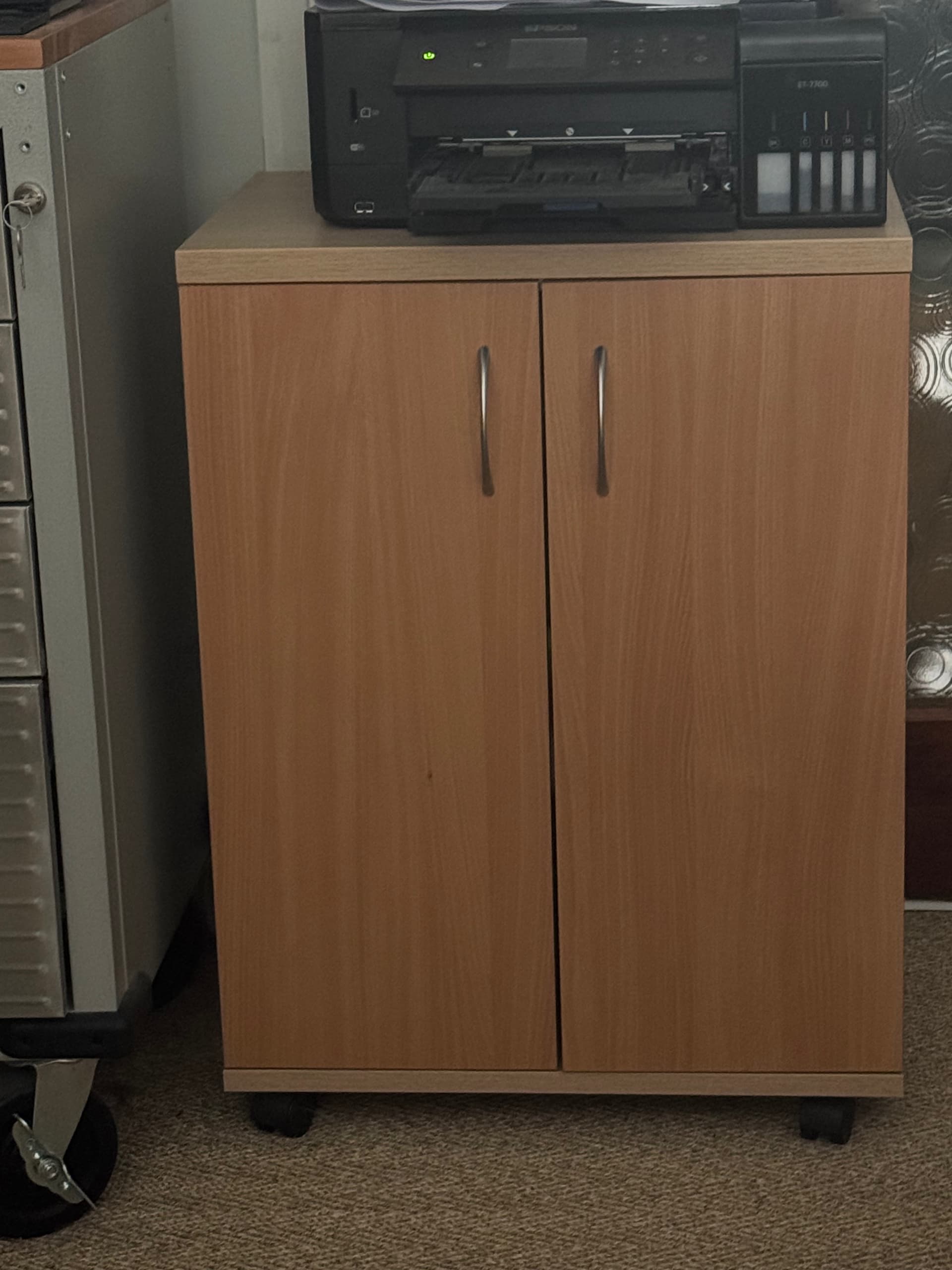
This is what I use in my study from an office furniture supplier.
I drill some large rear cutouts for ventilation and all cables are trunked away out of sight, with sufficient play so I can move the comms cupboard if required