Morning
I have NAIM ND5XS2 and would like to connect an IPAD OR IPhone to thenUSB A port of the streamer .
In such a way I can play Apple
Music classic on lossless mode.
Is there someone that can help me
To connect and configure each one ?
Thank you so much in advance ,
Francesco
Hi, you cannot use the USB input to connect an Apple device. You would need to use Airplay.
An alternative would be to put a copy of the music files onto a USB drive and connect that to the streamer. Then you can play them using the Naim app.
You could use a usb dac between the ipad and the nd5. Eg the original meridian explorer has optical output which could then feed the optical input on the nd5.
There are probably other usb dacs with similar digital pass through / conversion; i know the meridian needs the apple camera connection kit to work with an ipad/iphone so depending on the version you have (usbc or lightning) you might end up with a device or 2 between.
Thank you for the feedback !
Yes I know but AirPlay performs at44khz and Apple Classic has a lot of 96-192 KHz Album.
By a supernait and a NAIM streamer ND5 I was waiting something more than AirPlay ..
Perhaps do I need of an intermediate DAC Pass through or a spdif conversion ?
Anyone has some suggestion ?
Thank you so much
Thank you again
Sinuous have some other suggestion about DAC pass through model ?
Explorer Meridian is out of production I am afraid ..
Thank you
You can connect Apple devices, certainly iPods & earlier iPhones (haven’t tried with my USB-C connected iPhone 16 Pro) to the earlier network streamers (NDS, NDX, ND5XS etc.)
Naim obviously do not look to undertake the Apple certification with the new streamers, and assumed everyone would be looking for an inferior lossy AirPlay connection.
To all I know, that previous USB interface (originally for iPods, before there were iPhones) won’t support anything better than “CD quality”.
If you want HiRes, best get a USB-SPDIF connector - I guess those will be available across price ranges (plus anything intermediate, if you’re still with Lightning).
To all I know, i(Pad)OS automatically switch output resolution, macOS does not (you have to manually set it there).
Just put the music on a USB drive and connect that to the ND5XS2. You’ll get better sound quality than Airplay, high res files will play, and you won’t have to connect your iOS device every time you want to play music.
There’s a company called Cubilux that do a USB C to SPDIF adaptor.
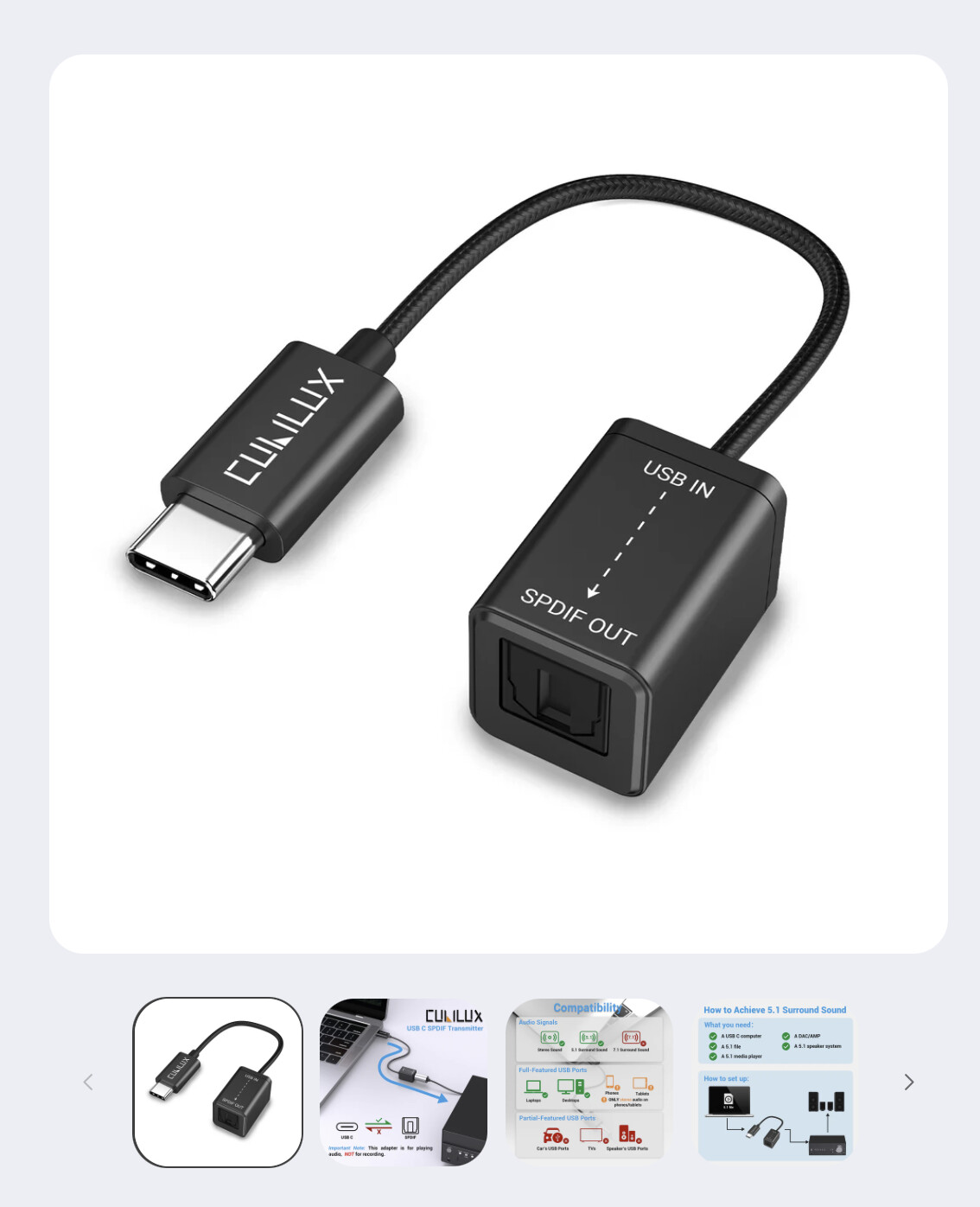
Might be worth a try it’s quite cheap.
1 Like
We used an SMSL PO100 Pro for exactly this, iPad into nDAC via S/PDIF (whilst an iPad can be connected straight into the front USB of an nDAC for playback, that is limited to 48kHz).
But as others are posting there are plenty of alternatives at various cost points.
We now use the SMSL box to put PlayStation 5 into nDAC via toslink.
1 Like
Does the iPad have a USB C or Lightning port? I have one of those adaptors plus a lightning to USB C adaptor, which I still need for some of my iDevices.
I plug into a QB 2, so I haven’t paid all that much attention to what resolution I am getting.
I’ve got one on the way from Amazon.
My iPad has a USB C, I’ll connect it up to my 222 and check what’s being sent.
I don’t have Apple Music I’m a Qobuz user.
Connected it up and was streaming at 96Khz from Qobuz from the iPad, the only problem is I used the Toslink cable from the back of the TV end the blooming flap dropped out when reconnecting the cable  Blu Tack to the rescue.
As I understand, Apple (Music) Classic(al) is another interfacing app with a UI more suited for classical music.
It’s still streaming like Apple Music itself, so there’s no option to download and copy the music to an external drive.
This topic was automatically closed 60 days after the last reply. New replies are no longer allowed.