Hope this is the right ‘room’ to ask the question. 
I have a new Apple TV 4K box (given they refuse to launch the ‘new version’) and I like it, but the sound only comes from the hifi (not a bad thing) but could become a pain to fire the hifi up just to watch the news!
Any Apple TV 4K users here who could give me a steer, i.e. how to get sound through the TV speakers?
Cheers,
Tony
I too have an Apple 4K TV. I use it with a Unity Atom and an LG C2 TV.
To use the TV’s in-built speakers, you use the TV remote control to access the TV’s settings menu, go to the Audio section, then select the ‘Use TV speakers’ option.
But I don’t do this. I run an HDMI Arc cable from the TV to my Atom, and in the aforementioned TV menu select ‘HDMI Arc’. It’s irrelevant whether I use the Apple TV or the TV’s built-in apps - either way sound is routed to the Naim. This works great for me because I have a one-box system which automatically wakes when it detects a signal from the TV. I can control volume with either Apple remote or TV remote.
I can see, however, that this could be a pain if you have a multi-box system and need to manually switch on each one.
Jim.
3 Likes
The Apple TV Box HDMI output needs to go to the TV.
Optical output from TV to your 333.
Ensure TV settings are set for TV internal speakers plus optical output.
Hopefully, that should be all you need.
6 Likes
I have the same set up as @MoonDrifter and do the same, works great (odd drop out which I have never solved but very occasional) otherwise excellent having movies through system. You may need to set TV for PCM output I think for 2 channel stereo.
4 Likes
Exactly this, no issues, no lag, no lip-sync stuff, just works, into our Muso2
Martin
1 Like
Current and recent AppleTVs only support direct AV via HDMI.
Is the HDMI connected to your TV or an AV receiver?
Alternatively if your TV is Airplay compatible it works fine for me (didn’t several years ago) with no lip-sync issues.
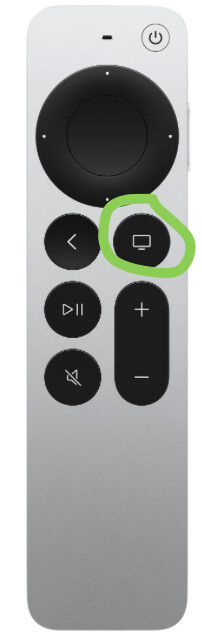
Hold this button to switch between TV and other outputs including Airplay targets.
2 Likes
This is timely! I used the same principles for connecting my Uniti Star to my Panasonic TV and it worked really well. Just changed the TV for a Sony A90 and for some reason the exact same connections (which matches sony’s recommendations) no longer provide sound from the Star - it’s replaced by a puttering sound. Any ideas please?
Simon
@SimontheBike have you tried altering the TV audio output to 2 channel PCM? it could be trying to send surround sound to your Star.
1 Like
Hi nitrous, thanks for the suggestion but that is what it’s already set to.
Have you tried ‘toggling’ it on and off?
Also, try all settings, you never know.
1 Like
@back_in_the_game
Any update on whether the forum advice, you sought, has fixed your problem?
1 Like
That TV is out of action for now, will reinstate in a couple of weeks.