CI Uniti 102 - more than 4-channel EQ?!

Hi,

I bought the CI Uniti over a year ago. It’s overall a wonderful piece of kit for a very good price.

A brief skim of the forums hasn’t revealed to me anyone wishing for more powerful EQ features. My room setup is unbalanced, with a window on the left speaker and an arch gap to the dining room toward the right speaker.

Measurements with REW are accordingly uneven and cannot be truly balanced with combined-speaker EQ.

If this is a product truly geared towards professionals, why would Naim leave the EQ software so lacking? Custom channels & per speaker configuration feels like an essential feature. It is very difficult to get an overall room balance without applying it on an individual app basis - Minimserver has this ability with a lot of tinkering but these settings don’t apply to TV and other streaming playback. Any suggestions?!

Specs:

Naim CI Uniti 102 | ProAc Response 2.5s | UMIK-1 with REW | Minimserver UPNP lossless / Spotify Connect / Tidal etc

Thanks :slight_smile:

Hi and a very warm welcome to the forum!

I was only a temporary user of the CI-102 last year as I wanted to experiment with its features (I had one on loan for two weeks).

However your statement as follows

is confusing for me as I was certainly able to get separate L and R channel filters to provide room resonance correction successfully applied. There are postings on the forum by me on this very topic with the CI-102 if one uses the search box feature of the forum. Maybe try CI-102 or CI 102 to see those threads come up?

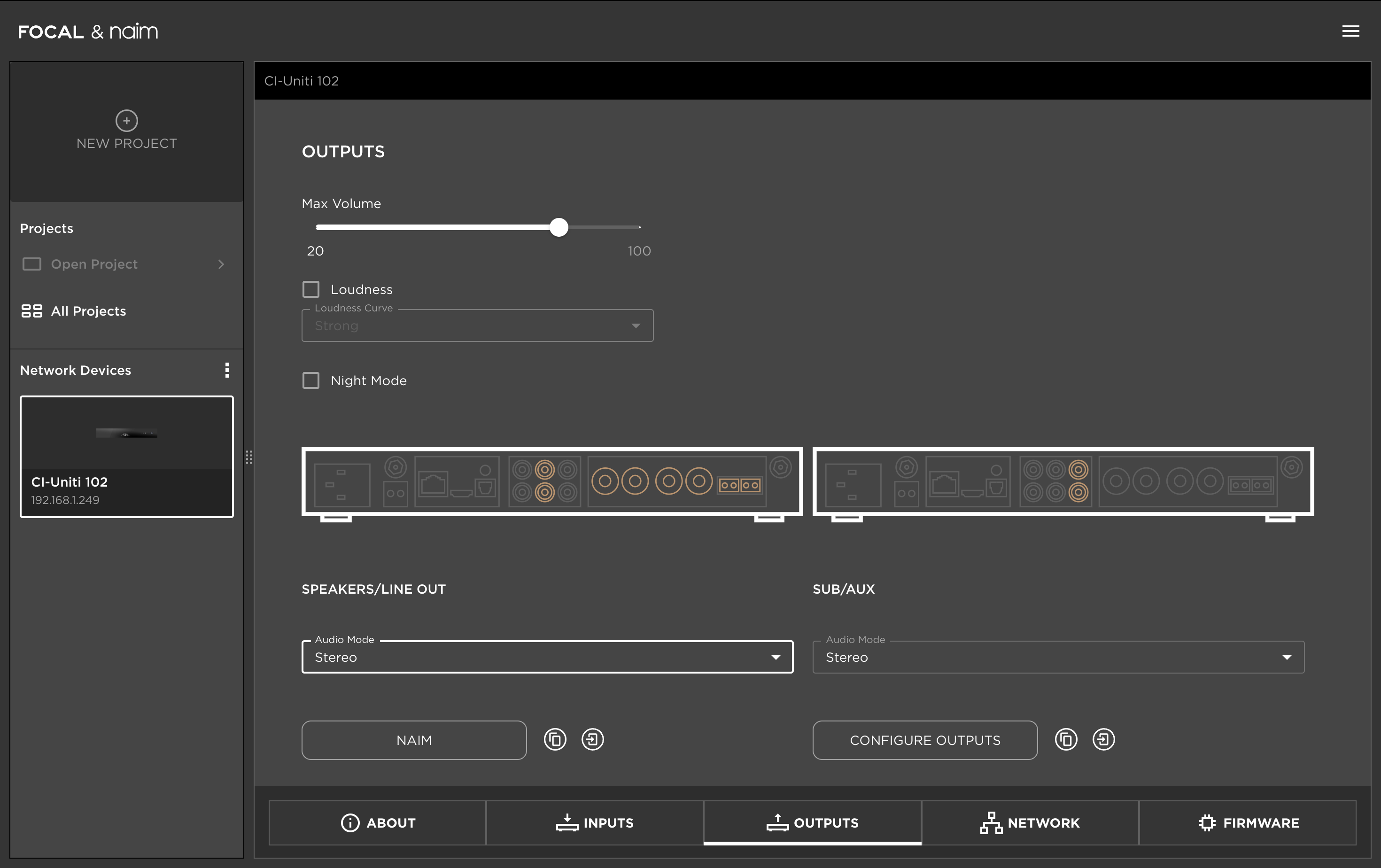
Once again, welcome to the forum and maybe post a screenshot of the Focal Naim manager view of output setup so I or others may direct you to how to achieve what you want.

ATB

E of E

3 Likes

Hi E of E,

Thank you for your most welcoming post :slight_smile: it looks like you have helped multiple Harris-kind with their CI-Uniti 102s recently :smiley:

It’s overall positive you were able to do this re individual speaker config in a way that worked for you. I have not found the option to do so on my MacOS Focal and Naim Manager app - at least not for stereo output. I appreciate the channels can be separated to mono - but I couldn’t lose the dimensionality of these speakers! If you were able to get them working via stereo, I would be very grateful to know how.

As per the F&N Manager Manual, & Claude’s interpretation of the relevant page:

  • Stereo: left→left, right→right (proper stereo), but both outputs are forced to share the same EQ settings. That’s why the built-in EQ was only ever a shared 4-band — the hardware won’t let you EQ the channels differently in stereo.
  • Mono: L and R are summed and sent to both speakers, and then you can give each output its own EQ.

So to directly answer you: yes, switching to Mono lets you configure L and R independently in the app — but it is no longer stereo. Both speakers would play the same summed (mono) signal. You’d lose all imaging and soundstage. For music that’s a non-starter. The Naim simply cannot do per-channel EQ and keep stereo on its own — that’s a hard limitation of the box, and it’s the whole reason we moved the per-channel work to the server.

With which I’m inclined to agree.

… not to put words in your mouth but at this point it looks like this was, at one point, your main critique of this DSP! /t/the-dearth-of-naim/40584/235

I would certainly appreciate the ability to tinker further with customisable 10+ channel EQ without purchasing yet another piece of equipment; I suspect this is not a CI-Uniti 102 processing power issue, but yet another corporate decision.

Thank you again for your message and regardless, this is a bloody good all-in-one in its own right.

1 Like

Hi MpgHarris

Yes, it is a PITA that the CI-102 is not slightly more capable. FYI, I only borrowed the thing for just two weeks last year and I was quickly trying a lot of aspects. In my case I was also building up to a (symmetrically arranged) room that was using loads of acoustic room treatment, so the L/R channel phase imbalance (even at low frequencies) for the main loudspeakers was very small.

Regarding your comment…

I do not believe the implied (audio) professionals (cf ‘home studio types’) to whom you may be referring are the intended market. This is a custom install product for a domestic living space arrangement. The ‘professionals’ in this case are the HiFi retailers using this product to give great sound for customers who want great music experiences in their homes without sitting in environments maxed out with acoustic treatment.

My understanding is that in untreated domestic living spaces there are typically one or two dominant resonances (e.g. sub 50Hz in range 30 Hz to 40 Hz) and their associated low order harmonics as well as a floor to ceiling resonance (e.g. ~72Hz). The ‘stereo’ selection setting for the main outputs would give the capability to appropriately supress the worst offending (‘EQ’ settings applied equally to both L and R) - nevertheless the manual clearly states the overall limitations and the system does not give the ability to apply different EQ for L from R with this ‘stereo’ setting.

FYI, when I was trying to see if I could High Pass roll-on the main loudspeakers (as I had just purchased an active sub bass with two inputs (L and R) and two drivers (which subsequently turned out to be driven always in mono anyway) that’s how it worked for me in my room. I.e. Anything below 100Hz (for example) was delivered in mono and anything above was delivered in stereo.

However, I still think you can do what you wish, but it will need a separate power amplifier or active loudspeakers…

Connect the L amplifier input channel to Speakers/Line output (L).
Connect the R amplifier input channel to Sub/Aux output (R).
Set both Main and Sub preamplifier outputs to Stereo.
Apply NO overall LP or HP separation (i.e. setting ‘OFF’).
Set EQ filters appropriately (parametric or whatever) using the values you have derived for the L channel on Speakers/Line output settings.
Set EQ filters appropriately (parametric or whatever) using the values you have derived for the R channel on Sub/Aux output settings.

Naturally, with the above arrangement you will not be able to use a separate Sub Bass.

Edit PS: Actually one could try to incorporate an active Sub Bass that had two inputs (L and R) that summed to mono internally. The cable would be connected to the ‘unused’ outputs of R on Speaker/Lineout preamplifier output and L on the Sub/Aux preamp output.

The challenge is then to have the SubBass roll off its output seamlessly with the ‘Roll On’ of the Main loudspeakers, based on what they were doing in the room at listening position as a result of their placement in the room.*

The above is quite tricky to do but with REW and a sufficiently controllable Sub Bass should be possible.