I have been trying without success to backup my UnitiCore onto a Seagate Expansion 8TB hard drive. I did this when I first got the Core about 2 years ago. It took a couple of days because the 7.28 TB internal hard drive has only about 454 GB of free space. After several days, it declared the backup complete (backup status is “success” and last operation is “idle”), but that evidently is not the case, because the Seagate still has 1.31 TB of free space. I’d like to restart the backup and finish the job instead of losing the days of copying, but there does not appear to be any option for doing that. If I choose “backup now” it will start from scratch. I have tried this several times and it has not been able to complete the backup. This is the farthest it has gotten.
I could connect the core to my PC and use its software to copy the files, but I don’t know if that will create a backup that will be usable for “restore from backup” should that be necessary. Instructions on how to do that appropriately would solve my problem.
You can’t restore from files copied onto a PC, but you can import such files into the Core. They may all end up in the downloads folder though as the Core software is picky about what to put into Music/MQ/.
It’s possible that the Core has encountered an error when reading the files on your internal hard disc. That happening does exactly what you describe, except that I would expect to see an error message in the backup manager in the Naim app. At least that is what happens with IOS, but I don’t know about Android.
I think you probably will have to start again from scratch. If you wanted to try something else though, then you could look to see what was the last actual file it copied successfully and then try to play that CD from your Core. You may well find it stops replaying part way through the affected track, in which case you probably can assume there is an error on your internal hard disc. At that point you could delete that CD from the Core and try restarting the backup again.
If this works, then you would be well advised to buy a new hard disc for the Core and restore your completed backup immediately. Note that the restore process takes the same length of time as the backup process though, so it’s a bit of a long job either way.
Also: what would be bad about having those files go into the downloads folder? My experience in adding music from a flash drive has been that the music seamlessly goes onto the Core, where it appears among the artists, recent additions, etc. just as if it had been copied from a cd. I ask because, after having backups repeatedly fail after weeks of trying, I’d like to try a different backup method. I am apprehensive about just trying again.
You look at the backup using file explorer on your PC and see which was the last file it copied. The one that failed is the next one, which likely will be obvious, although it might not be in which case you would need to look at the disc you are backing up and see which the next file is by time stamp as the backup works that way.
The only disadvantage I can think of if you have everything in the downloads folder is that you won’t be able to do any metadata editing with the Naim app. Whether that bothers you or not is up to you, but I find it useful to be able to do some metadata editing with the app personally.
You say: “You look at the backup using file explorer on your app and see which was the last file it copied.” I don’t see any such option on the focal/naim app. What file explorer app are you referring to? Thanks for your patience with this. I’m not a sophisticated programmer. By the way, the equipment sounds sensational and I’m very happy to have it, despite these difficulties.
David is referring to whatever file manager programme/app you have on your computer.
The other possibility that occurred to me is that if the problem results from the Core storage being near its limit, then try deleting a few albums to clear some space. Then try the back-up again.
From my experience the Core storage disk shows precisely the same space left or used as the back-up disk so your back-up disk has definitely not completed, despite what the Core tells you.
I see the folders on my PC, but there is no option to delete anything.
When I attempted the backup, I first chose NTFS as the format. It got to 99% and then declared that the format had failed. This happened repeatedly, even after I performed a factory reset on the Seagate external hard drive. So then I went to HFS+, even though that’s less preferable because I have a PC, not a Mac. I just wanted a backup and that appeared to be the only option. Now, however, my PC will not detect the Seagate. I plugged it back into the Core and tried to reformat it in “configure a new backup” and once again it got to 99% and failed. If I could get the PC to detect the Seagate I would back it up that way, since the file explorer does allow me to copy files (I tried it with one 5GB album and it worked).
I am hypothesizing that if I could format the Seagate to NTFS that my PC would be able to detect it.
I generally edit the metadata when I first add the album. After that I’m happy to leave it as it is, so a PC backup would be a good solution for me if I could make it work.
The files in the Music/MQ folders are locked so you have to change that attribute if you want to delete an album in the Core via a PC. But if you find the CD rip that is currently not reading properly, then it’s easy to delete that album in the Core using the Naim app.
I doubt that a single CD is the problem, because I presume that they get backed up in the same order each time, and the backup fails at a different point each time: the incomplete backup has been a different size each time the app has told me that the job is complete.
Forgive me, but I don’t know how to change that attribute. If I could edit the folders, I’d like very much to move some files that have somehow ended up in the wrong folder. For instance, I have an album by Riccardo Chailly, which in the metadata clearly indicates that he’s the artist, but which the core has filed under “Daniel Barenboim.” It has happened a few times and there seems to be no way to fix it. If I could use explorer to move it to the right folder perhaps that would fix it.
Ah well you didn’t say that a backup failed at a different point before. In that case I think your Core internal HD is too full. As a rule of thumb, I would never go above 90% full.
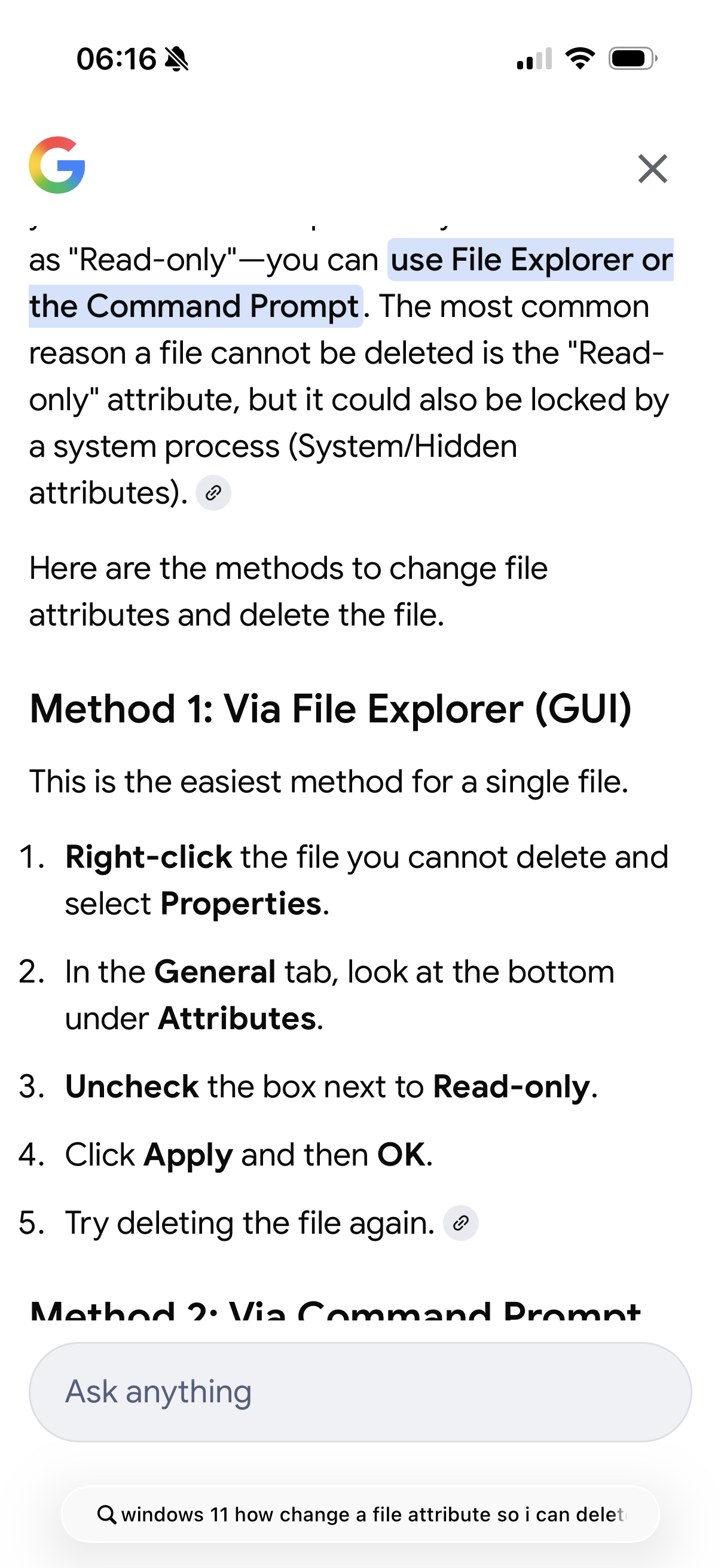
You can easily find out how to do simple computer stuff by asking one of the AIs. This is what the free version of Gemini told me when I asked in Google search how to change a file attribute.
Hello - I bought myself a seagate HDD, 10 TB, same issue: when formatting NTFS via the Naim App, max 99% complete … then: Format Failure message. Same when I try for HFS+.
I reformatted the Seagate on my laptop, all good. Deep sleep and also power off did not help my Uniti Core to format the drive. Did you finally arrive to backup via Network / Router and Desktop? This would be my next idea how to not throw away my 280,- EUR harddisk and to finally backup my Core internal drive… Thanks, BR from Vienna, Sebastian
I would suggest contacting Naim Support and asking what is the maximum drive size supported by the Core - for some reason I seem to remember a figure of 8TB.
Thanks - i already run th Core with an internal drive with 10TB (bought like this from my Naim Dealer)- so for a backup it would be ideal to have the same size
Stumps me. I suppose it’s just, and only just, possible to have two iffy drives. I wouldn’t put too much faith in the PC being able to successfully format the disk, MS has never been that reliable in that area.
Perhaps get one of the low level drive tools off the net (drive manufacturers websites can be helpful here) and run some diagnostics using that, might show up some low level drive faults…..?