I suspect this may be because WiFi coverage isn’t as good as it should be and you need more wireless access points so that their coverage overlaps. Maybe try getting one or two more, preferably wired, but even if some are wireless it should still help.
1 Like
Hi Chris, at one point I went with 5 discs (all wired), and to be honest it was worse. Running speed tests at the location of the lights always give acceptable results (we’re talking in the 300-400 Mbps range).
Hi NogBad, I have a VOIP phone provided by BT in the changeover from the old system, but it’s lying in a cupboard, unused and unconnected.
1 Like
Hi NogBad
Can you say what this means please?
I don’t have a BT or EE app or credentials that I’m aware of.
Unless that means an account number, which is probably written on some kind of Bill from EE and/or BT?
Hi I am not familiar with the older BT wifi discs, sorry. On some wifi solutions you can lock a device to an AP.. and that can work well. I use a Ubiquiti wifi solution with my BT smart hub 2.
1 Like
Thanks Simon
You don’t need any BT PPP credentials with BT broadband.. you can put dummy username and password in. Your physical broadband circuit is your authentication.
PPP is simply a protocol between your broadband router and the internet service node from your ISP.
2 Likes
It all depends on the ISP.
I’m with Zen Internet and I have a specific ID and password tied to my internet connection.
If you have something specific it should be in your router.
When I set up a friend of mine who’s on BT it was a generic ID and password or just blank as @Simon-in-Suffolk mentioned.
“For EE broadband, the default PPPoE username is bthomehub@btbroadband.com and the password is BT (or left blank” according to google.
You mention that your smart bulbs are jumping between the discs… most smart bulbs (I believe) do not communicate via WiFi, but rather form their own Zigbee network back to their hub. I think what you are seeing is maybe your hub jumping between WiFi discs?
Mark
we went from a bt smart hub to the EE hub 7+, copper to fibre install.
the new EE router has better range and alleviated device selection to the old bt router not always picking up devices / apps / services which was a consequence of the old BT router config [long story and too complex for this thread].
in my experience the new EE router, service and stability as well as internal wifi reach [large 4.5 bedroom home in the northern tundra] is good and we lost [another long story] our internal ethernet Network distribution and are now fully-wifi…..
Hi Mark, these bulbs and switches aren’t working through a hub. They’re a combination of Philips and Tapo bulbs and switches, all pure wifi (2.4Ghz), running through the Smart Life app.
So I guess the Wiz bulbs rather than the Hue bulbs… understood 
1 Like
Zigbee devices use ultra low power frequency hopping within the 2.4 GHz ISM radio band . This is a band where you dont need a licence to transmit at low power - and hence why is a radio band used by wireless networks such as Zigbee, Wifi, Bluetooth etc
So yes Zigbee uses ‘2.4GHz’ but you are right to say its totally separate than wifi - and hops around with more agility and speed than wifi - and therefore more effective and reliable than wifi for this sort of application albeit for much lower throughput than wifi.
Philips smart bulbs Hue use predominately Zigbee with a few also supporting Bluetooth… and yes they are accessed via a separate gateway, such as Hue Bridge, that bridges the zigbee networks with your local wifi or ethernet home network.
There are some budget digital bulbs such as WiZ (a value brand of Philips) that can use wifi directly instead of a bridge - best avoided in my opinion for most use cases - but are attractive for some who can’t afford a bridge -such as Hue Bridge (circa £50) - or if you dont use your wifi for anything else could be sensible.
The Zigbee wireless protocol is designed for exactly this sort of thing hence why it works so very well, and self heals and meshes as part of the protocol, without requiring any manager, separate protocols and application control such as in wifi to hop, re authenticate etc etc , or internet cloud service and obviously avoids congesting your home network which is not really suited for managing higher number of IoT devices - especially if using IPv4.
The other key benefit of Zigbee is ultra low power massively less power than wifi.. this can start to add up for wifi say if you had 40 lightbulbs or more. Some Zigbee transmitters can be powered by the kinetic energy created from pressing a click switch !!!
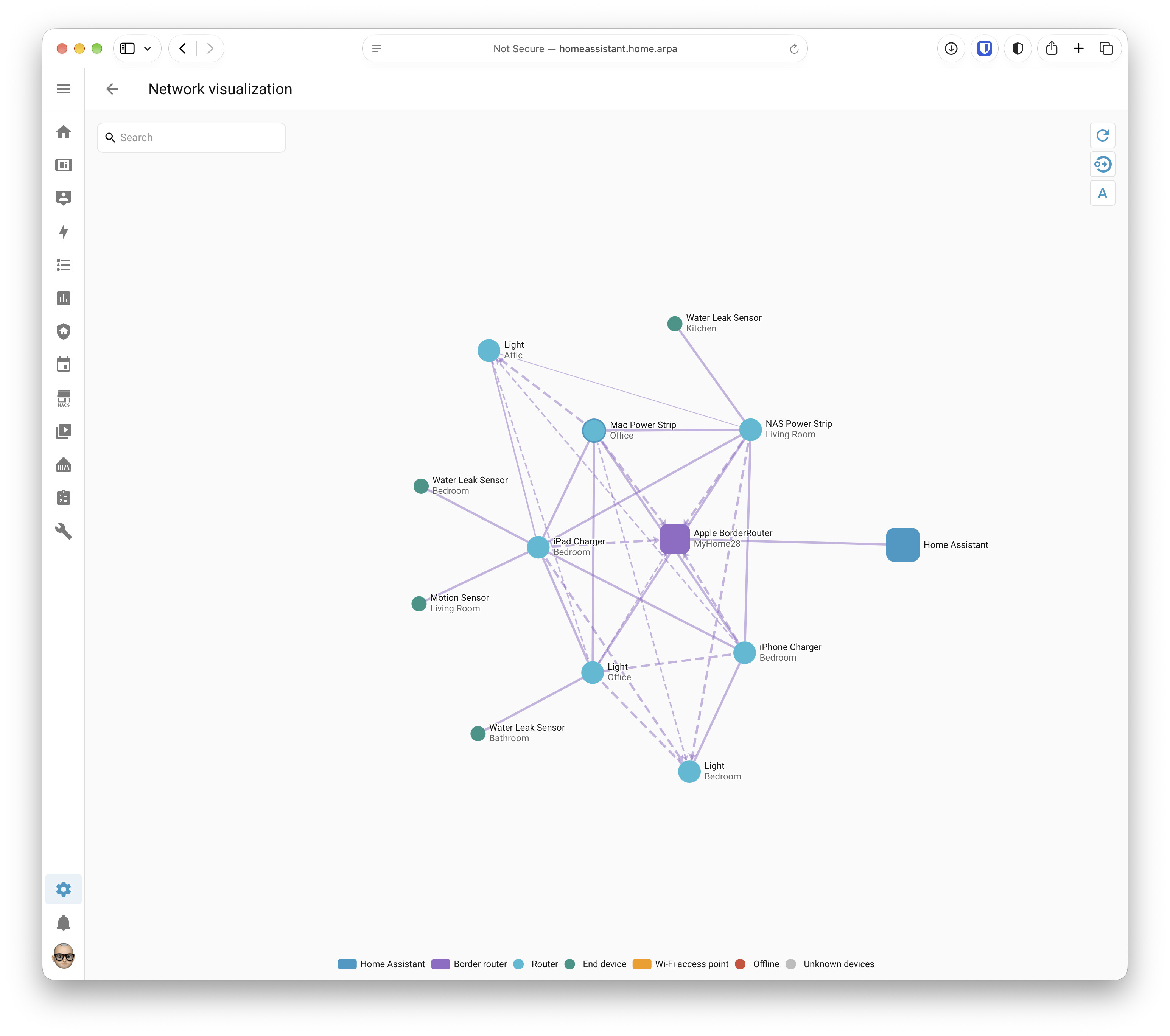
An example of Zigbee meshing as @Simon-in-Suffolk mentioned if you’re interested.

Matter does meshing as well.
1 Like
nice how did you gather that?
1 Like
Home Assistant → Settings → Connectivity
It’s easier to get to with the later versions of Home Assistant.
is this via Philips Hue bridge or similar, or direct from a USB Zigbee transceiver bridge into the HA?
I binned my Hue bridge and Zigbee USB Dongle and purchased a Sonoff Dongle Max and re-paired everything.
The only thing I’ve lost is adaptive lighting.
It’s connected via ethernet, powered by POE, it works a treat.
1 Like