You don’t need UTP in most all domestic environments, but it does no harm to do so, other than you can pick up noise or have other issues if the screen grounding is not done properly
. - but you want this quick & simple.
Maybe best is to go with BlueJeans Cat-6a, this has a floating screen, the screen covers the internal wires but its open (unconnected) at both ends, so no grounding worries.
Plus its a big forum favourite for best SQ.
3 Likes
Did you mean to say STP?
Doh !!! Thanks Chris, I’m due for a brain refurb sometime soon
Yes = you don’t need STP, UTP is all thats needed for most domestic environments
2 Likes
Wouldn’t it be good if we could!
1 Like
Thanks guys, I’m still a little confused I thought I saw the terminology FTP or UTP, have I misread? I understand one is shielded (Foil Twisted Pair) and the other not (Unshielded Twisted Pair) what’s STP? I was assuming shielded would be better to prevent RFI pick up and/or mains noise from nearby mains cables and interference with analogue interconnects.
As far as I could tell Cable Monkey only do Cat 5e in FTP.
If you could offer a complete dullard some further clarity I will appreciate it
Cheers
STP = Shielded Twisted Paur
Thanks IB
So,
Shielded Twisted Pair
Foil Twisted Pair
Unshielded Twisted Pair
Bloody hell! The groove I’m scratching into my head is getting deeper 
What should I be using?

You’ll go mad on this as few adhere to the actual standard
S will normally mean screen (shield) but is non specific
F means foil
B means braid
F/F means each pair has a foil wrap & the whole cable is also foil screened
But the more common S/S can mean the the same as F/F
… perm any 3 from 5
Wish I hadn’t asked, sorry
1 Like
For neophytes like me who find this unnecessarily confusing I found this on tinternet which helps
What makes a good Ethernet cable for audio applications?
What makes a good Ethernet cable for audio applications?
Put simply: It’s all about the spec!
Modern Gigabit Ethernet networks rely on very specific standards for cabling infrastructure in order to ensure that rated network performance can be reliably and consistently achieved. These standards include not only the specifications for the cable construction itself, but also specifications for the termination of cabling and physical connection to devices, creating an end to end highly engineered system. Deviations from these specifications can result in reduced performance and even data loss, so it’s important to use the right cable for the job, and to use good quality cable that meets the necessary specifications.
This rule holds just as true for audio over Ethernet applications, if not more so. Cabling that is out of spec can result in dropped packets and intermittent connections. For something like streaming a YouTube video or transferring a file, it could just mean increased buffer times or increased transfer times. For live real-time audio, it can mean audible dropouts in audio or loss of audio altogether.
Cable Category
Cat5e and Cat6
Most audio over Ethernet applications recommend using Gigabit Ethernet (1000BASE-T, GbE, or 1 GigE), and in high channel-count applications, it’s often even a requirement. Gigabit Ethernet’s 1 Gb/s transmission rate requires certain network infrastructure to support it, including Gigabit-capable switching hardware, and Ethernet cable of sufficient rating or category to support Gigabit speeds.
Copper-wire Ethernet networks generally use twisted-pair cable. Twisted pair cabling is a type of wiring in which two conductors of a single circuit are twisted together for the purposes of canceling out electromagnetic interference (EMI) from external sources, and reducing crosstalk between neighboring pairs.
The two most common Ethernet cable categories that you’re likely to encounter are Category 5e and Category 6, both of which support Gigabit speeds at lengths up to 100 meters, as specified by the TIA/EIA-568 standard. The higher spec of Cat6 is actually designed to support speeds up to 10 Gb/s (10GBASE-T or 10 Gigabit Ethernet), but it is backwards compatible with Cat5e (as well as Cat5, Cat3 standards). The primary differences between Cat5e and Cat6 which account for their different performance ratings are the wire gauge of the conductors and the number of twists per inch in each wire pair, with Cat6 using heavier gauge wire and a higher twists per inch spec, providing for lower crosstalk and a higher signal-to-noise ratio.
Which you choose for your application will depend on a number of factors such as cost, network design, fixed install vs. mobile, and considerations for future use. Cat5e is usually a bit cheaper, can be slightly easier to work with due to differences in construction, and still fully supports Gigabit speeds (as long as it’s truly Cat5e and not the older spec Cat5), but Cat6 is generally a better choice and worth the small premium in price, especially when taking future use into consideration, given the capacity for speeds greater than Gigabit.
The most important consideration is getting cable from a reputable vendor to ensure you get a high quality product that meets the industry and engineering specifications it claims by its Category label. Avoid extremely cheap cable as much as possible, and stay far, far away from anything labeled CCA (Copper Clad Aluminum), as it does not meet the TIA/EIA specifications for Cat5e and Cat6 cabling.
Cable Types
Shielded vs. Unshielded
You may encounter Ethernet cable labeled as shielded or STP (Shielded Twisted Pair) cable. Shielded Ethernet cable is special Ethernet cable constructed with additional electrical shielding along the length of the cable (using braided wire, foil wrap, or a combination of both) as well as specially constructed plugs that electrically connect and properly ground the cable shielding to the device connected at each end (which also must have special shielded jacks as well).
There are some specific use cases which might call for shielded Ethernet cable to prevent electromagnetic interference (EMI) or radio-frequency interference (RFI) from affecting the performance of the cable, but this is generally only called for in severe industrial manufacturing environments around heavy machinery and large electric motors. In fact, if shielded cable is used but not implemented properly, it can actually introduce problems and actually make things worse than using unshielded cable would have been to begin with.
Because shielded cable is more expensive, heavier, more fragile, more difficult to terminate and work with, has additional technical considerations to implement correctly, and is only called for in specific cases, regular unshielded cable or UTP is actually more than sufficient and is even preferable in most situations. That said, you should always check for any specific requirements by the manufacturers of the devices you are connecting, as they may be designed and intended, or even required to use shielded connections.
Coincidentally, most XLR-style locking Ethernet connections you commonly find used for Audio Network connections on Pro Audio equipment are designed to be able to support shielded cable connections if needed, though unshielded cables and plugs will still work just fine with these locking connectors.
When in doubt, it’s safer to stick with UTP cabling, unless your specific application or equipment explicitly calls for using STP cabling.
Solid-core vs. Stranded
Probably the more important consideration for Pro Audio and Live Sound applications would be whether to use solid-core or stranded Ethernet cable.
Most Ethernet cable you find will be solid-core, constructed using solid insulated bare copper conductors for each of the eight wires in the four twisted pairs of the cable. These cables are meant to be used in permanent and semi-permanent installations, and are designed for longer distance horizontal and backbone cable runs. All Cat5e and Cat6 solid UTP cables are designated with minimum bend radius for performance standards. Proper cable installation is essential in order to maximize the performance of the cable.
In the case of a mobile live sound operation, with frequent setup and teardown, solid-core Ethernet cable probably isn’t the best choice, as it’s generally stiffer and not conducive to easy layout and flat deployment runs. Solid-core cables should not be over-flexed, bent, or twisted beyond the cable’s recommended specifications, as you risk damaging the cable causing it to underperform or even fail.
Stranded Ethernet cables have multiple strands (typically 7 strands per conductor) of insulated bare copper conductors. These cables are typically used for patch cords/cables connecting devices to the network, but because these cables are more flexible than solid conductors, they are an excellent choice for portable uses and applications where repeated flexing is common, such as frequent setup and teardown of a live sound PA system.
Another variation worth considering is something usually referred to as “Tactical Ethernet Cable.” This is Ethernet cable that is intended specifically for harsh environments where repeated deployment is the norm. Tactical cable generally uses stranded-wire construction for flexibility and durability, as well as employing a heavy, often rubberized outer jacket in addition to the lightweight PVC jacket of normal cable (sometimes referred to as “up-jacketed”). Tactical Ethernet cable has very similar feel and handling characteristics to XLR microphone cable, and is much more rugged than common solid-core cable used for in-wall building installation, making it ideal for Pro Audio and Live Sound applications.
Plug Termination: Right and Wrong
Making your own Ethernet cables can be a great way to save money, and allows you to create cables to fit your needs and specifications exactly. If you choose to make your own Ethernet cables, it’s important to be aware of some possible pitfalls and follow some important general guidelines.
The right plug for the job
As mentioned, Ethernet cables can be of the solid-core or stranded variety, and just as it’s important to choose the right type of cable for the job, you should also take care to choose the right type of plug for the cable. Most RJ-45 plugs are designed to be used with either solid-core cable or stranded cable, and using a plug designed for one type of cable with a cable of the other type can produce unreliable results. There are RJ-45 plugs available that are designed to be used with both solid and stranded cable, so just pay attention to what the plugs you source are specified for and you should be fine.
The same is true of plugs for Cat5e and Cat6 cable. Most RJ-45 plugs are only meant to be used specifically with one or the other. There are sometimes even several variants of a Cat5e or Cat6 plug just for different wire gauges and overall cable jacket diameters. Again, as long as you make sure that the plugs you choose are appropriate for the cable you’re using, you should be fine.
Also worth considering is that, just like when sourcing cable, it’s important to source quality plugs from a reputable vendor. The plug itself is one of the most crucial pieces in the equation. Even the highest quality cable is only as good as the plugs terminating either end.
T568B or not T568B… that is sort of a question?
There are two wiring pinouts defined by TIA/EIA standards, T568A and T568B. Currently, T568B is used almost universally in the U.S. - a legacy of analog telephone compatibility - while T568A is more common worldwide. Either is perfectly acceptable as long as you are consistent. If you’re doing a new wiring install, it’s best to just choose one or the other (T568B in most cases) and stick with that everywhere. If you’re making up new cabling and not sure about an existing wiring install, don’t worry, it’s even okay to intermingle the two standards for the most part. The most important consideration and the only inviolable rule you absolutely must follow is that for a given cable or run, you must use the same wiring standard on both ends .
Doing the twist
One of the most fundamental characteristics of twisted-pair Ethernet cable that allows it to work are in fact the twists of the wire pairs within the cable. Because of this, it is crucial that the twists are maintained as close as possible to the contact termination within the plug as possible.
You’ll also want to make sure that for wire pairs running to adjacent pins that they’re running parallel inside the plug body all the way to the pin. You don’t want different pairs wrapped around each other or have wires bunched up inside the plug and pressed against each other.
Trimming the wire pairs to the proper length is also crucial, as you want to make sure that the back-crimp of the plug is clamping down on the cable jacket , not the wires themselves.
You might be surprised at how easy it is to create a poor termination and how narrow the window is between a working cable and a failing cable. The crosstalk performance and EMI rejection capabilities of Ethernet cable which ensure it will function up to its rated specification are entirely dependent on maintaining these tiny relationships of the wires within the cable and the plug termination. A little attention to detail goes a long way here.
You’re crimping my style
Another often overlooked element of Ethernet cables are the actual plug terminations themselves. RJ-45 plugs and jacks form a highly engineered connection system, with very exacting specifications and tolerances. If you’re making up your own cables, it’s very important to use quality plugs from a reputable supplier and to use a quality crimping tool that crimps the plug cleanly and to the proper contact depth.
RJ-45 plugs that are over-crimped can result in a number of issues, including intermittent connection due to physical contact lift off. It’s important that you use a quality crimping tool, as poor quality tools may be mis-calibrated and poor quality tool dies generally wear out more quickly.

The plug on the right is an example of an over-crimped plug. Notice how the contact blades are sunken a bit deeper, putting them further away from the bottom face of the plug, and how the prongs of the blade are protruding through the top of the wire into the plug body. This plug may actually have physical connection loss due to contact lift off. The crimping tool that was used on this cable may be worn out, poorly calibrated, or simply of poor quality.
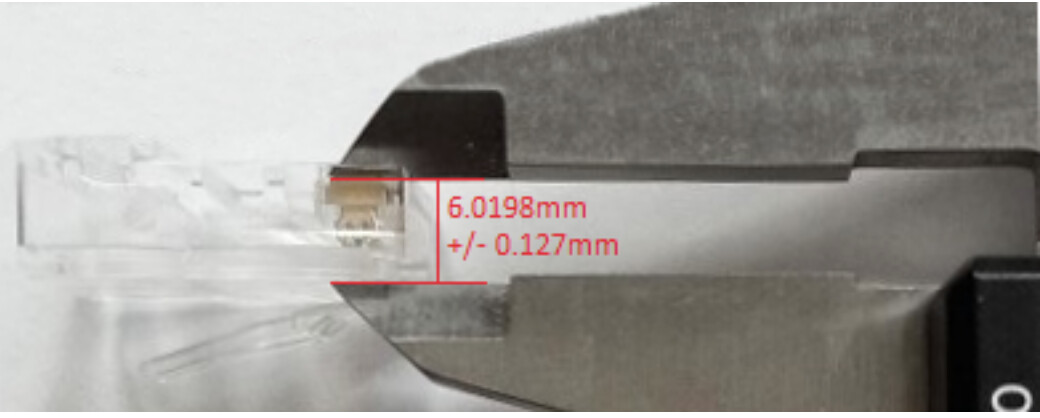
Even with a good quality crimping tool, the best way to ensure you get good results is to spot check your cables with a set of calipers to ensure that your tool is crimping the plug correctly and that the contact blade depth is within spec: approximately 6.14mm to 5.9mm
That’s a Cable Wrap!
Hopefully by now you know a little bit more about Ethernet cables than you did before. Maybe now you know more about Ethernet cables than you ever wanted to! Either way, I hope you’ve come away feeling better informed and better equipped to navigate the world of networked audio with confidence. Having a basic technical understanding of Ethernet cabling standards can go a long way towards both helping you to troubleshoot problems as they arise, as well as increasing your chances of avoiding problems to begin with.
As with just about everything, knowledge is power, so when it comes to something as important as the cable technology that your entire audio network is built on, I say more power to ya!
2 Likes
And when considering the effect, if any, on analogue audio decoded from a digital audio stream arriving from a network, do bear in mind that any effect is likely to depend on the specific DAC involved, some much more susceptible than others, and on the specifics of the rest of the attached network, and probably the electrical environment in which the network sits. And add to that the fact that if something does make a difference, two different people may not agree which sounds better! (E.g. ground plane modulation in at least some DACs apparently can make the resultant audio sound “brighter” - which to one person may be negative, but someone with different ears may be perceive it as better, even if it is the less accurate rendition…)
2 Likes
For home audio use, I wouldn’t agree with everything in that rundown. For example, you don’t need Gigabit Ethernet cables or hardware for even hi-res audio streams, and for Naim and other manufacturers it’s a design choice to avoid it.
It’s also worth bearing in mind that when they say, “Avoid extremely cheap cable as much as possible” their idea of what would constitute an expensive cable evidently varies massively compared with what some audiophiles would regard as expensive - and when I say massively, I mean by a factor of 10, if not 100!
(Incidentally, when quoting verbatim from another manufacturers website, you should probably give them an acknowledgment.)
That’s me out 
My Nova is fed from a basic WD NAS, into the router via a standard ethernet, into a powerline via standard ethernet, through the mains, into another powerline, out to a regular ethernet and into the Nova.
Despite all that and no dedicated hi-fi stand, the Nova sounds amazing.
In relative terms. How much better are ethernet cables going to make my hi-fi sound? Notwithstanding the router, powerlines and mains cable, what sort of gains are to be had?
Powerline adapters necessarily put out high levels of RFI in order to function. While it’s generally a good idea to avoid this, the extent to which it alters the sound from your hifi is hard to predict, and will vary not only with the system you use, but the environment and layout in which it is used.
If you’re curious, get a long Cat5e cable, run it from router to streamer, turn off all your powerline devices (not just the one that connects the hifi) and see if you can hear any changes.
Thanks.
I’m potentially going to change my setup as the NAS serves multiple purposes (security etc) and I’d prefer to have something dedicated.
Using a separate and more direct run sounds like a logical option and will give this a try. However, going a step further, would it be preferable to buy a dedicated HD/SDHC/USB and plug it straight into the back?
A USB drive attached directly to the Nova is certainly worth considering. You’ll obviously still need the network connection for the app, iRadio, Tidal etc. but it’s one less thing to faff about with on your network.
The downside is that the built in UPnP server in the Nova is quite basic, but that may not bother you. Also to add or edit music files you need to remove the drive and attach it to a computer.
It’s easy enough to copy a few albums to a USB drive and try it…or just use that backup drive which I’m sure you have somewhere!
Cheers Chris
It wasnt a manufacturer it was a cut and paste from a tech explained type of site cant remember which I just put in a search and that came up.
Interestingly I read on a HiFi site (Darko Audio, dont know anything about them so dont know if it’s a reliable source)
That basically manufacturers tend to recommend wired connection rather than WiFi because they have been unable to design or implement good enough WiFi applications. The author suggested that is now not so much the case and the argument over WiFi vs Wired is no longer black & white. Bluesound & Auralic IIRC were mentioned as examples of manufacturers who have good WiFi on their products. The article suggested that good WiFi can be better than wired due to the possibility of transmission of various types of unwanted “noise”, electromagnetic, RFI, noise from poor quality power supplies in hubs/routers etc into the audio streamer.
As I said when I first popped into this thread I am a complete neophyte when it comes to streaming (have just recently taken advantage of a £100 reduction deal on a Bluesound Node2i) and just dipping my toes to see if it’s for me longer term. Its sounding pretty good and no problems so far over WiFi so I think I will probably just leave it be and play on.
I have recently moved to Wi-fi with my Nova and it is sounding brilliant. Whether that is due to superiority of Wi-fi or the removal of the detrimental effect of the EoM, I am not sure. I do have mesh Wi-fi btw
Cheers Crispy, sorry what is mesh WiFi?