Not sure where you got that idea from? You can run the latest app on IOS 13.1 or later. No need to update to IOS 16.
1 Like
To be fair, Richard mentioned it several times in this thread because some people aren’t taking any notice of his previous requests.
3 Likes
Re …. “They must be better than this, right?”
Not in my book, you’ve got a connectivity problem, you just need to sort it.
What’s your network setup, ISP, hub (router) brand & number), wired or wireless etc.
My NDX connects OK, & always has, over 74/20 BT Smarthub2 with all ethernet.
The new Naim app iOS 6 has some minor Finding Rooms problems, it sometimes needs a few tries before connecting, but it always connects. But that comes after months/years of no problems & maybe has arrived with something in iPadOS 15.7, so I’m not sure exactly what the actual problem is, but Naim are aware & working on it.
As said… From Naim…
My servers disappear then appear and disappear again very slow response and not responding properly as it was before 
Sorry but you are wrong about that. Look at post 1 in this thread. It’s there:
I’m getting that too. It does however work OK.
Hi Mike,
I’ve got a new (3 weeks old) Netgear Nighthawk router, A new Synology DS220j (1 week old) NAS.
My ISP is TalkTalk but not sure thats relevant (?). All my kit is hardwired…
I updated the firmware on my NDX last week form 4.3 to 4.8.
Guess I’ll have to wait until next week to see whether things get sorted… Thanks for your help!
I didn’t say the App wouldn’t load, it does… It just doesn’t work properly…
Maybe at the time they wrote that they didn’t appreciate that some users would have unforeseen problems.
If you read the italicised comment at the end it eludes to the issue. But at the time of writing they didn’t know that IOS 15.7 was having the same problem. They specifically asked me to clarify this point.
I hope that makes things a little clearer…
Hi Paws,
I feel your pain… I’ve taken out a 1 Month Free Tidal subscription as Tidal seems to work more consistently than my NAS at the moment.
1 Like
I think we are at cross purposes here. But anyway I’ll leave you to it.
1 Like
The new app loads ok on my iPhone 13 & IPad but when it comes play from my NAS there’s no servers on view. I normally get my Synology & Minim server up and ok but not this time.
My iPad was ok initially, but even that’s gone the same as my phone.
Ah well, time to get the wine and vinyl on 
1 Like
The new app updated itself. All is working fine till now. Using Nds and Melco server.
Fingers crossed.
Confirmed.
The backups on a Mac (whether encrypted or not; same for iTunes on Windows) only stores “unique information (only) locally on the device” (encrypted backups (re)store more sensitive information). This excludes any software (OS and apps), anything sync’ed via iCloud, and anything sync’ed locally as media etc.
(And I think apps can label their stored data, as whether it should be backed up or not.)
This makes good sense, since the backup of my iPhone (130 GB usage) is <5GB on the local disk.
Earlier, when apps where downloaded in iTunes and then copied to the phone, one could backup/freeze versions of apps; by that’s years in the last. Maybe (not sure) tools like iMazing might still help here.
(Oohh - maybe “confirmed” would have been enough?)
I’m thinking, shall I reboot my router? I’ve already rebooted my S’Uniti and app itself.
One glass of wine sunk, now where’s the ruddy bottle 
I have Naim nova and IOS app. At first I thought the only difference with new app is cool picture of my device when I turn it on. Today I realized that one useful feature is now lost. When I was using Spotify on Nova via Spotify connect from IPhone there was precise control over volume with side volume presets on IPhone. Now it is lost, volume jumps by few levels so this is useless. Of course there is control from Naim app but presets did not even require opening Naim app.
I suggest turn everything off and restart them again. Your feature should return.
I’m French…
1 Like
On a (slightly) more serious note, the new app includes actual pictures of the products, as opposed to the simpler icons in previous versions. Ever since I upgraded, I found there was something odd with these pictures and I realised they are not all taken at the same angle: the Muso products pictures are taken from a slightly higher view point than the other ones (old and new, as you can see in the picture I am still using an - upgraded - unitiqute first gen). I guess the higher view point for the Musos was to highlight the control wheel feature, but the atom is more consistent with other products…. It is a small detail but it bothers me ever so slightly…
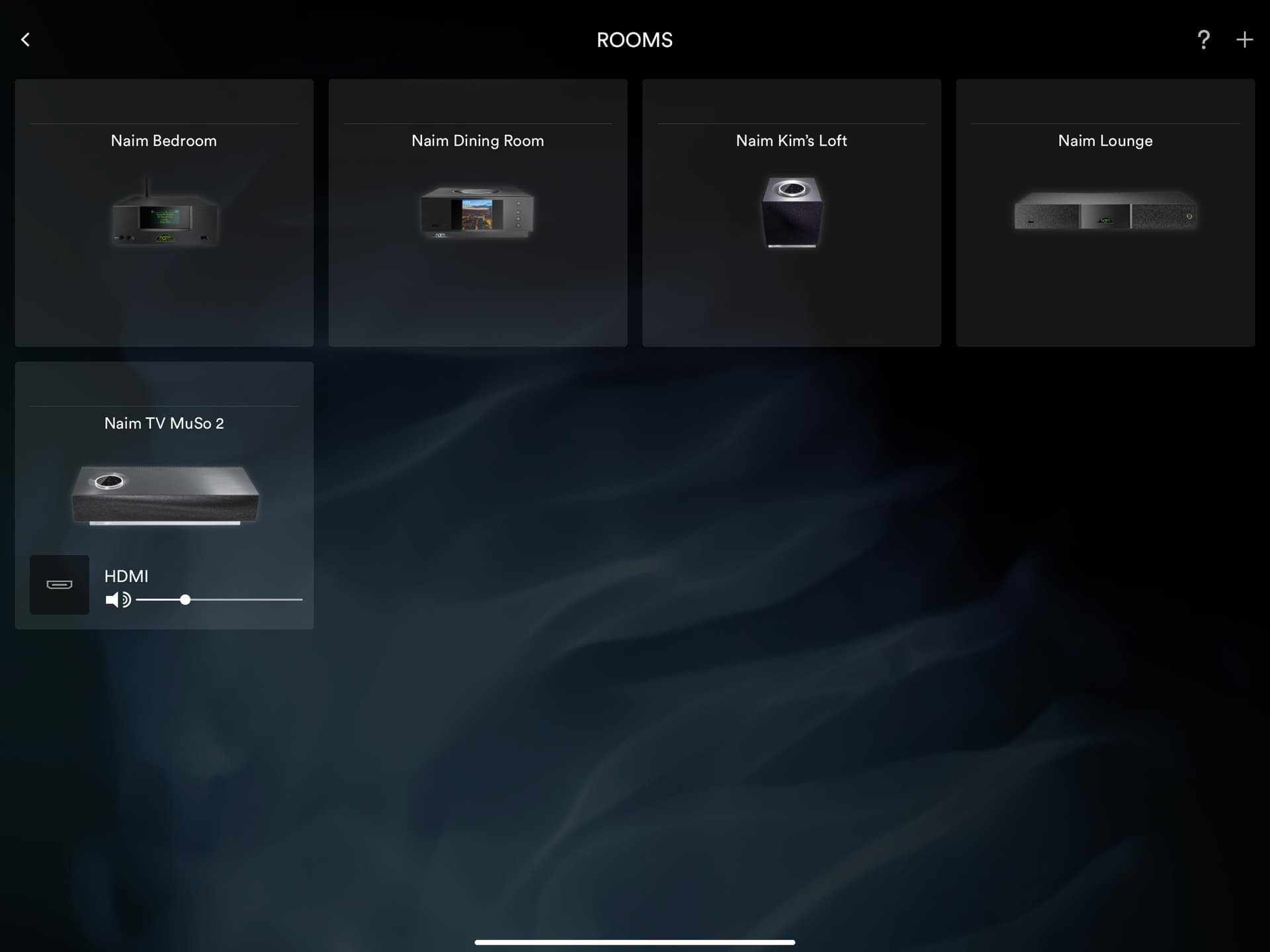
4 Likes
Cheap copy and [Ashe from existing images as far as I can tell. Doesn’t look great.
1 Like