Welcome to the club!
Not happy to be part of this club. They now start responding that they did extensive testing and that others have great results……, and then mention yeah it could be the virus protection which creates this results…., never heard such bs, allow everything in my firewall, for this application……, as if you shouldn’t have a virus protection if you want to use the privilege of Qobuz….
Latest message.

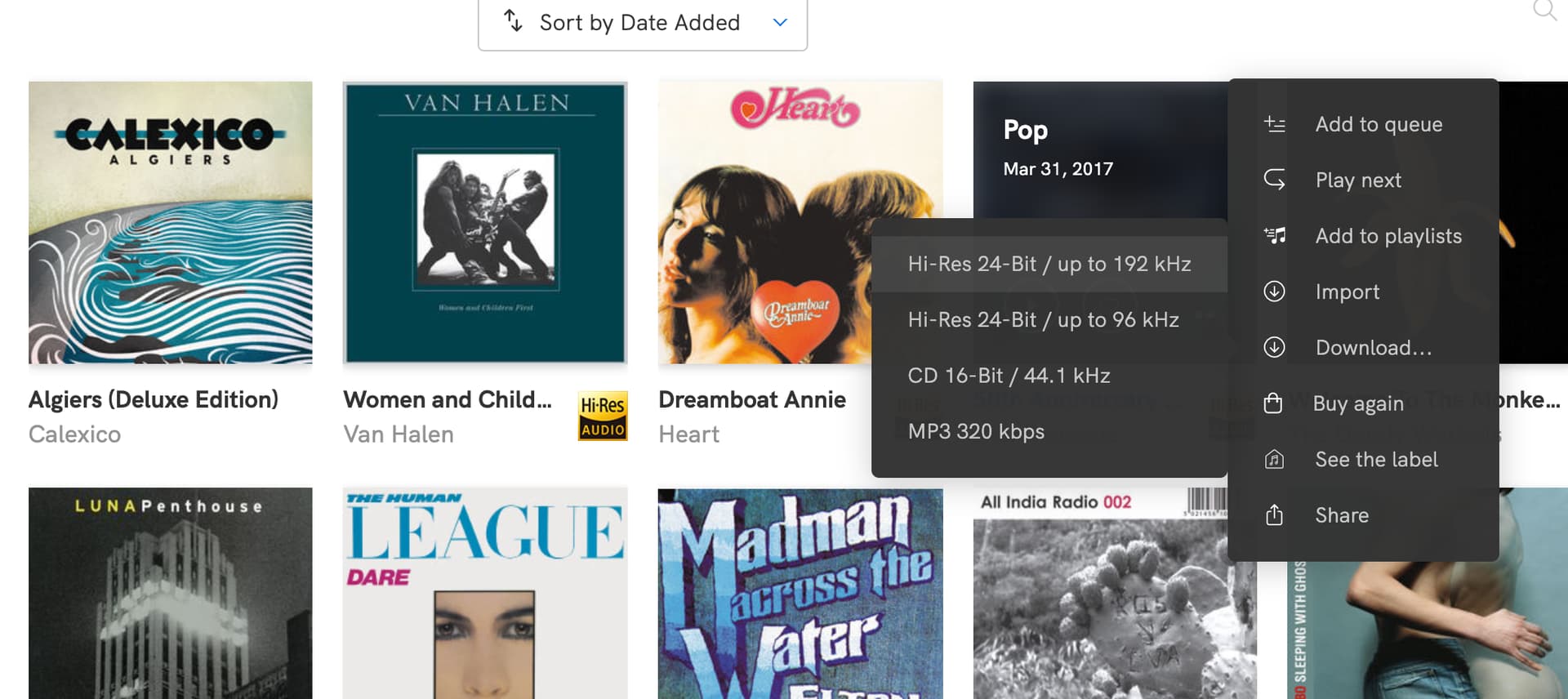
The download app does allow you to choose format and bitrate. Unlike the ‘streaming app’.
You need to scroll down for the “Downloader” skipping over “Application for Mac”
After complaining quite a bit - the latest release is now working pretty well for me.
Sorry - do not understand… Found now way choosing bitrate in any application and loading WAV / 16bit
In the app when I hover over the album image I select the little three dots that appears and it gives me a menu where I can select resolution. I think the app will only download FLAC though.
I haven’t used XLD for years since switching to DBP. On the gen1 streamers I don’t recall hearing a difference b/w AIF, WAV, or FLAC so long as I was transcoding to WAV. I’m on the NC platform now and still have Asset transcoding to WAV and haven’t done any comparisons yet. But FLAC streaming from the cloud sounds divine. I see no reason to use these space consuming formats anymore. FLAC is no different than any other wrt SQ and it uses less space and has meta data.
I have just been asked to provide some feedback via a survey from Qobuz - I made a point of highlighting the Downloader issues plus the noticeable hiking of general download prices…well, they did ask! I am not sure what will happen but at least it is another path for providing feedback on top of reaching out to the support desk.
I had one yesterday, I didn’t hold back.
1 Like
I gave a more clear signal today. I am so fed up in constantly having to add tags etc as their downloader is so incredible buggy. That I need much more time to get the music ready for my system…., I reached the point of cooking today when I had to correct 50% of my downloads today. Will not buy any further music from them, and only download the pre-ordered stuff. As I belief I am one of their top 10 customers, I assume that might set a signal……, and if not, just bad for them.
4 Likes
I transferred my 3 most recent purchases, probably downloaded with Downloader app, to a USB stick I’ve had on the Nova for a while.
The albums do not play in track order when I browse by folder, and some are not there under Artist.
I can’t believe they’ve borked whole album playback with poor metadata, and hope it’s my error.
As you mentioned earlier TAR downloads worked fine for me in the past on the website (apart from a few very large collections including a huge Callas collection, but the desktop app sufficed for that with hi-res art via the web page).
Why on earth they can’t restore the old website functionality/TAR downloads is crazy - I suspect they’ve made big server side changes as the impression I had was that most of the download formats and TAR files were potentially generated server side from some kind of master source in a single format. Maybe their servers have struggled as the business expanded (???) and the downloader shifts the file conversion processing to the Download app instead (eg select ALAC/AAC and FLAC downloads, converts to AAC and the FLACs get deleted).
Sorting out metadata is something I’m never keen on, but I on’t renewed a few weeks ago.
Maybe they’re pushing people to simply stream rather than purchase?
Now I’ve finally worked out how to install the downloader on my iMac, which was nothing to do with Qobuz but simply my ineptitude, I downloaded a couple of albums yesterday. It worked like a dream, with everything spot on. The only weird thing is the 1 folder beneath the album, which means I have to drag the tracks up to album level and then delete the 1. So it’s all good here, and I prefer it to the old TAR system.
If you are downloading as much as me you will easily hit the issues. Had multiple parts in an eleven disc album yesterday without tags. As you miss tags, you also need to find out what the heck the order is and how it fits together, and then you have to regenerate the tags song by song……, I can tell you if you download twenty albums as I did before you get an angry attack…., it was enough for me…, have given them months to get their act together.
They also introduced now a new challenge - they sometimes have a subdirectory called original which hold an earlier version of the album, if you don’t watch you have a problem again in your album.
As suggested earlier, I belief they can’t live from just streaming, so they will have soon correct course or they will get slowly down.
If they would reinstall TAR downloading everything would be ok for me. I could then use the downloader for huge albums and accept every now and then misses in tags…., but not like now more or less every third album.
That’s because of their track numbering convention. The first track is “1” instead of “01” so the order gets reordered in folder view. One of the things I do to prep downloads for my network is to add a “0” to tracks 1-9 for all albums with more than 9 tracks. Very tedious but is only an issue for folder view.
1 Like
[quote="ElMarko, post:245, topic:29664, full:true”]
[quote="Alley_Cat, post:242, topic:29664”]
The albums do not play in track order when I browse by folder, and some are not there under Artist.
[/quote]
That’s because of their track numbering convention. The first track is “1” instead of “01” so the order gets reordered in folder view. One of the things I do to prep downloads for my network is to add a “0” to tracks 1-9 for all albums with more than 9 tracks. Very tedious but is only an issue for folder view.
[/quote]
Thanks, this confusing me possibly shows just how little I play music over USB on the Nova despite having had it for ages!
Honestly I don’t know why I fuss with it since I always use meta data via Asset but I’m a little OCD and it bugs me that if I look at folder view the tracks are out of order. Most of my purchases are in bulk so I’m buying in excess of 20 albums at a time so it can take some time to get the albums ready for the NAS. I’m also adding tags to album name for hi res version.
1 Like
It works fine for me.
I could do without the superfluous folder “1”. Just means I have to spend a few seconds renaming it.
I downloaded a five CD album the other day and got 1 to 5, with the albums neatly arranged in each, which is better than having to split them. So that’s why there’s a 1, but it would be nice if it wasn’t there for single albums. Still, it’s not the end of the world.
I’ve just come across this myself using the new Downloader recently….I’m surprised more isn’t being made of this and it seems completely undocumented by Qobuz….
I was watching a download in real time, and as you say, the ‘Original’ folder is created to which FLAC files start being downloaded to….As I always want WAV files for my Naim and have always selected WAV format, they now start converting from the FLAC ‘original’ into WAV and move over to the ‘1’ folder….I’m presuming this conversion isn’t being handled internally by the Downloader software but is using the local OS audio engine to convert (in my case on a Mac) ? ……I mean, isn’t this a rather large deal and potentially subject to less than optimal file conversions, depending upon the end user’s PC hardware and capabilities etc….Considering we have hundreds of posts arguing the virtues of various audio software such as Db, XLD, etc etc……
If I wanted FLAC, I would have selected or purchased FLAC…! Probably naive, but I’d like to think when I’m selecting a file format at the store, then I am receiving an optimal prepared version of the album in that very format……
I kinda feel they are pulling a sneaky one here and enforcing any required file conversion on the end user – I guess that would also be allowing them to slim down the storage at their server end……
Talking of Undocumented – It would be nice if they also also stated the fact that the New Downloader only works on Macs with 10.15 and above….The particular Mac I usually do much of my downloading and audio prep work on I have deliberately held on 10.14 (Mojave) for various other software reasons….The new Qobuz Downloader forced me to go to 10.15 to be able to use – which I wanted to as it seemed the only current way to select other file formats….which ironically, seems to be a Red Herring as they come in as FLAC and convert at my end anyway….! 

SC
I bought an album yesterday and the downloader worked fine, though I was confused as it shows your previous downloads in the queue as “ready”. I wasn’t sure whether these would download again, so I deleted the queue, but then have to go back and add the album again the to queue.