I had a network that worked seamlessly with a virgin media Hub 3 and last week i switched to a new Hub 5 and since then i have the below issues with steaming internet radio to my ND5XS2, and two seperate MusoQB’s all connected via Ethernet and some small switches along with various other devices like camera’s and Sonus and TV.
The Naim streamers all appear in the app as normal and i can select the radio station select play and it will play for between 30 secs and a few minutes and then stop. its as if they play what is in the buffer than run out of data.
The devices are still connected because they are visible in the App. I have tried connecting wifi and the issues is the same
I can stream from a NAS with no issues and it plays as it should.
Virgin media says its because i have a 250mb connection and i need to upgrade but at the times of the issues i am frequently only streaming to one Muso qb in the house, no one else is home and the camera’s all record locally via the network.
as stated it all worked with the Hub 3 but Virgin are refusing to switch the hub 3 back on as they have decomissioned it remotely.
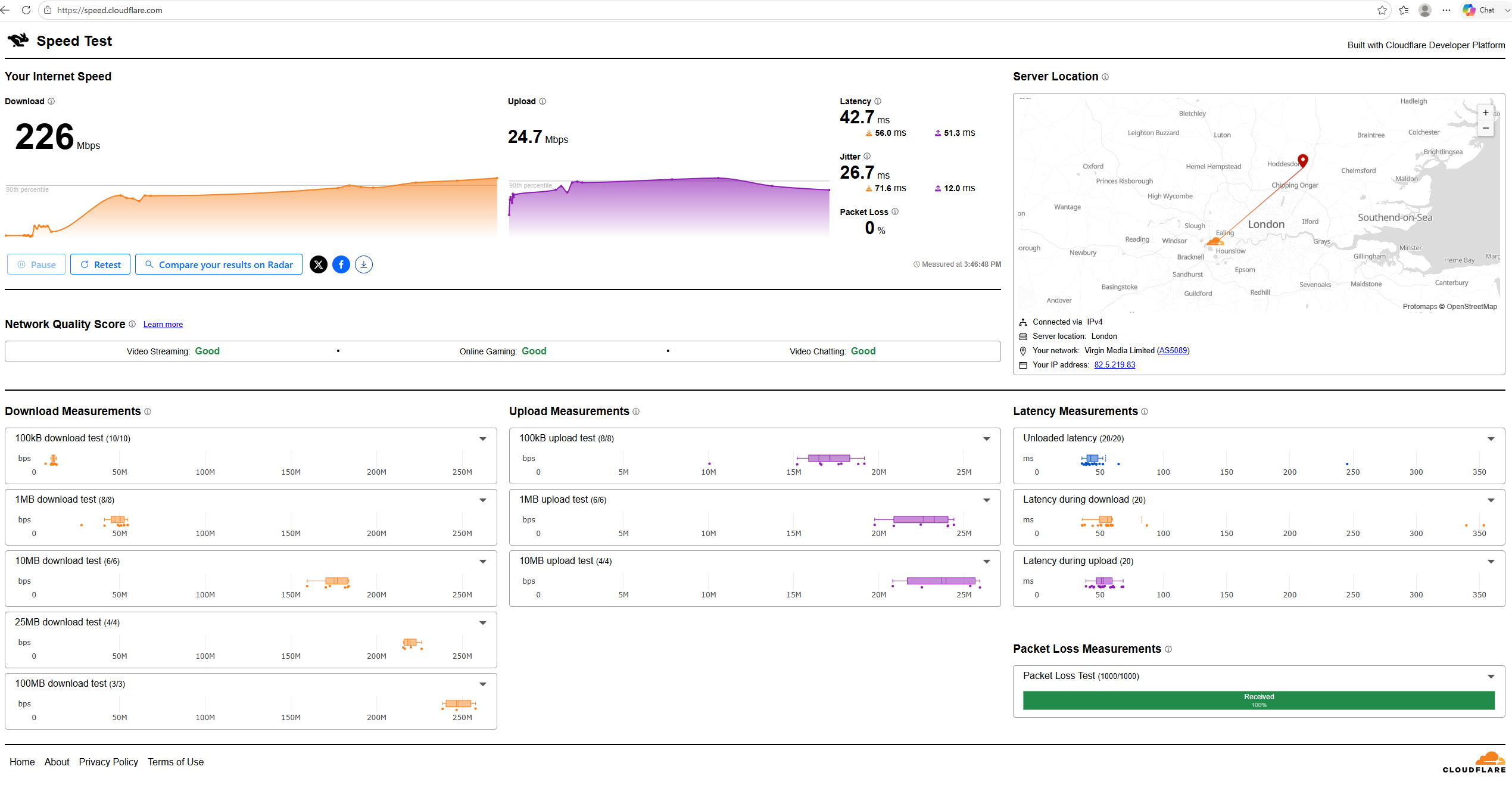
250Mbps is several orders of magnitude greater than needed for internet radio, so if it’s otherwise working ok VM are not being helpful. You might try running the Cloudflare speed check which gives a pretty good idea of how well an internet connection is working.
Are all stations the same? I’ve had issues in the past with BBC stations related to the protocol used. Changing DNS settings in the router (a hub 3 at the time) to Google DNS (8.8.8.8 and 8.8.8.4) worked for me, so in the absence of any other specific advice you might see if that helps.
I have used various tests and all show 220mb’s upwards
the problem is the same across Planet rock radio, LBC and BBC2 all on the Muso QB but stream fine on my phone using the same wifi.
i will log on to the router and look at the DNS settings.
is there any software that i can use to monitor the amount of band width being used when i am streaming the radio in case something else is using all the bandwidth and causing the issue whilst i am streaming although not sure why that would have changed with swapping to the Hub 5
The Cloudflare tests are fairly comprehensive, and should identify any jitter or latency issues that might exist even if headline speed appears ok. Anyway - see what you find in the depths of the Hub 5… but bear in mind that this is just something to try and may be wide of the mark.
I gave up with my flaky Hub 3 and switched it to modem mode with a third party wifi/router; but this shouldn’t be necessary.
Not always that simple - if you’re using VM fibre (as I was) with no practicable alternative, you are sort of stuck with them. Which is not to say that the issue here isn’t a badly set up (by VM) connection.
Does the new VM Hub 5 have any settings for IPTV, IGMP or uPnP that you can see? If it does I’d toggle them (one at a time) and see if that helps. Sonos stopping sounds like multicast issues to me, the ‘new’ Sonos software is much more susceptible to this than before.
The latency and jitter numbers are ~double what I was getting with a VM fttp connection and a Hub 3 last August, but don’t increase much under load - mine went up significantly. If it’s working now - for whatever reason - I think you should leave well enough alone and just keep an eye on the stats…
Was it just a router swap, or did VM move you onto a different connection technology?