Streaming my music library from my NAS to anywhere

Just like to share my experience with listening remotely to my home-based NAS.

13 years ago I started my streaming journey with Naim. I used JRiver Media Center software to rip my modest CD collection to a Synology NAS on my home network, and played music on my Naim NAC-N172XS. Later I upgraded to NAC-N272 and added a Uniti Nova.

My music library has been growing over the years and now consists of 40.000 tracks, most of which I rated by adding 1-5 stars and writing comments to each song. I created more than 100 playlists for all kind of moods. I use Spotify to listen to new music, or select the most beautiful performance of classical music, but once I find music I really appreciate, I want to own it, either buying a second-hand CD for some euros or download from Presto, Qobuz or similar. On your downloaded music you can add artwork, your personal info or comments about the artist, the album, the song.

To play and display music on the Naim app I run the excellent Minimserver on my NAS, which allows me to display albums, playlists, genres and individual songs in any way I like. I recently managed to display the rating (1-5) as part of the song title, so the Naim app shows the rating I entered in JRiver. For instance, I can filter all 5-star songs in the “Jazz” genre, or play all 1-star songs in my entire library, or all 3-star songs from The Beatles or Beethoven, whatever I want.

When driving or travelling without access to my home-based NAS, I enjoyed myself either with Spotify or by bringing a portable HDD on my business trips, playing my music with JRiver on my laptop.

Still this did not make me happy. Couldn’t I stream my personal library stored on my NAS to my iPhone so I had my music available wherever I travelled? After some searching the solution was easy: I installed Audio Station on the Synology NAS, and installed DS Audio on my iPhone. After following some instructions you get all music stored in the NAS “music” directory on your iPhone.

DS Audio is not perfect: you only see only part of the song title, you don’t see the rating you entered in JRiver, you don’t see the JRiver playlists, but still: You can play your personal library by folder, by album or by artist, and use Bluetooth to listen in the car/headset/earplugs. Not too bad!

To the forum guys: did anybody of you find similar solutions?

Music Station and its companion mobile app Qmusic are the Qnap equivalent.

I use foobar2000 on my iPhone which works quite well.

It allows you to connect to any uPnP server on your network and then download the content to your phone.

1 Like

Roon is another method you can use to be able to stream your your NAS audio files from outside your home network.

Just ensure with whatever method you use your suitably secure your home network and connected devices on your home network and understand the added risks.

Technically to stream externally is straightforward, to do safely is a little more involved. I would not automatically rely on single product streaming solutions, not these days, and that includes Roon, which is what I use.

2 Likes

I do have something similar, but my library is over 100k tracks, and with more than 70% in HiRes (24-bit PCM or 1-bit DSD) is around 9TB in disk space. (Yes, I have backups and copies). So move it around is not possible.

My solution is through Roon, this indexes and presents my music library mixing local with albums/tracks sourced from Tidal/Qobuz - though these are only a very small % of my overall library.

This can be consumed in multiple locations on different hardware - Naim NDS in the Living Room, in my office, bedroom and bathrooms and then relevant to the posting, while out/away from ‘home network’ via an application on the iPhone, iPad or Mac called Roon ARC.

Access to the complete library is possible, either in the same format as stored, or down converted to match the connection bandwidth. You can also download to device (it will also auto download based on your current listening preferences) for offline listening, which is great on a plane or where there is no mobile signal.

So I have access when in a hotel room, on a plane, in the car, on a bus/tram, or just out walking/cycling etc. And if I wish, space and bandwidth dependant, all in HiRes.

2 Likes

Thanks Simon,

That’s an impressive library! So far I managed to stay below 2 TB of music, but memory has become very cheap these days.

Roon seems to be the “royal” solution in streaming land :+1:

Lucky to be “in early” to Roon back in ‘15 and my lifetime subscription now looking good value.

1 Like

Simon,

thank for your always wise remarks. Would a simple VPN protection of my network do the job?

No.. not really.. that is not addressing the main issue… it’s more about firewalling and the fact you will almost be certainly allowing ingress traffic and creating a DMZ within your home network.. You need to ensure the devices in your DMZ, which may be just your server or NAS, have all ports locked disabled other than those required for your inbound traffic. Ideally you want to configure that on the NAS or server firewall that will be receiving the inbound traffic requests and creating the egress streams (ie the music stream server or Roon server etc).

Otherwise your input address (public IP address of your VPN provider or ISP ) can be probed and ports scanned by a bot/bots. If you use a VPN that connects to the internet at the other end, this is same and is no mitigation. You will of course need to know your internet facing address (ISP or VPN) to connect to. This can be provided sometimes by dynamic DNS service providers so it tracks address changes here for given domain name.

Keep all software including malware, and firewall software totally up to date on your NAS or server. Ensure all default accounts and passwords are changed to a hard password.

With that you should have a good protection for normal domestic risks, but as soon as you open your home network up for direct ingress traffic you are introducing a risk, so it’s about minimising that risk.

1 Like

You are brave. I would be very hesitant to open up my network for traffic from the internet.

Since you gave a HDD drive solution already, I certainly wouldn’t be opening up holes in my home network.

How do you keep your HDD up to date? Perhaps there are options here we can suggest to simplify the synchronisation process.

Our Synology NAS backs up our music collection to the cloud,

We use a cloud capable music player when away from home (gym/holiday).

No need for any additional software or firewall rules.

Hi Mr Gadget,

I store all music on the NAS located in the fuse box (cabinet) next to the Wifi modem. I run JRiver MC on my Windows PC from which I do all tagging, ripping etc, directly on the NAS. After I made modifications, I run “Alway Sync” manually, which makes a back-up of all changes onto the HDD in my Windows PC. I could also choose automatic back-up, but I don’t bother. “Alway Sync” is quick and fit for purpose, you can define different jobs/tasks such as “Back-up the pictures folder from PC to NAC”, or “Back-up the music folder from PC to portable HDD”. Very easy.

In addition, once in a while I make a back-up to a mobile Transcend HDD, which I also carry on business trips. That 2 TB Transcend is 10-15 years old and never failed. So I have a full double back-up :slightly_smiling_face:.

The issue is not about backing up my music, the issue is about safe access to my local home network from outside, and I got a bit worried about the various warning from our dear Hifi colleagues. I will try to make sense of their cryptic write-ups, since I’m a nitwit on network protection…

Thanks for that. Sounds like you have a good process. Only thing there I might suggest is whether you actually need all your music when away, and a more portable method might be to use a large USB flash drive (due to it being smaller/lighter) along with a Synchro tool that allows you to eliminate folders that you dont need. I have no idea if that works on your current SW but I typically use an exclude-backup file with “rsync” SW whereby I can exclude music that I have that I will probably never want to play these days. This of course may not suit your need, and just an idea

Also, having worked in IT on secure accounts, I would not want to open up my home network for anything. I do use cloud storage for some things, but nothing important or security related.

Oh, and one other thought, I cant recall if it was Apple Music or Amazon music (Apple I think) that would read in all your music, and give you free access to that music through their streaming service provided you were signed up to them. I assume they dont include playlists, but could be wrong.

Simon,

thank you for your always knowledgeable responses - which you have provided over many years!

I know nothing about local network protection, so triggered by your warnings, I looked into Synology’s “QuickConnect” feature, which I’m using to access my home network NAS from outside. Here are some links about “QuickConnect” - hopefully the Naim administrator allows me.

From what I understand from White Paper page 4, it is a secure way to connect to my home network without jeopardising security. Is my understanding correct?

kb.synology. com/en-uk/DSM/tutorial/ What_are_the_differences_between_QuickConnect_and_DDNS

kb.synology. com/en-uk/DSM/tutorial/ Quick_Start_External_Access

kb.synology. com/en-uk/WP/ Synology_QuickConnect_White_Paper/3

kb.synology. com/en-uk/WP/ Synology_QuickConnect_White_Paper/4

From the White Paper:

  1. QuickConnect Security

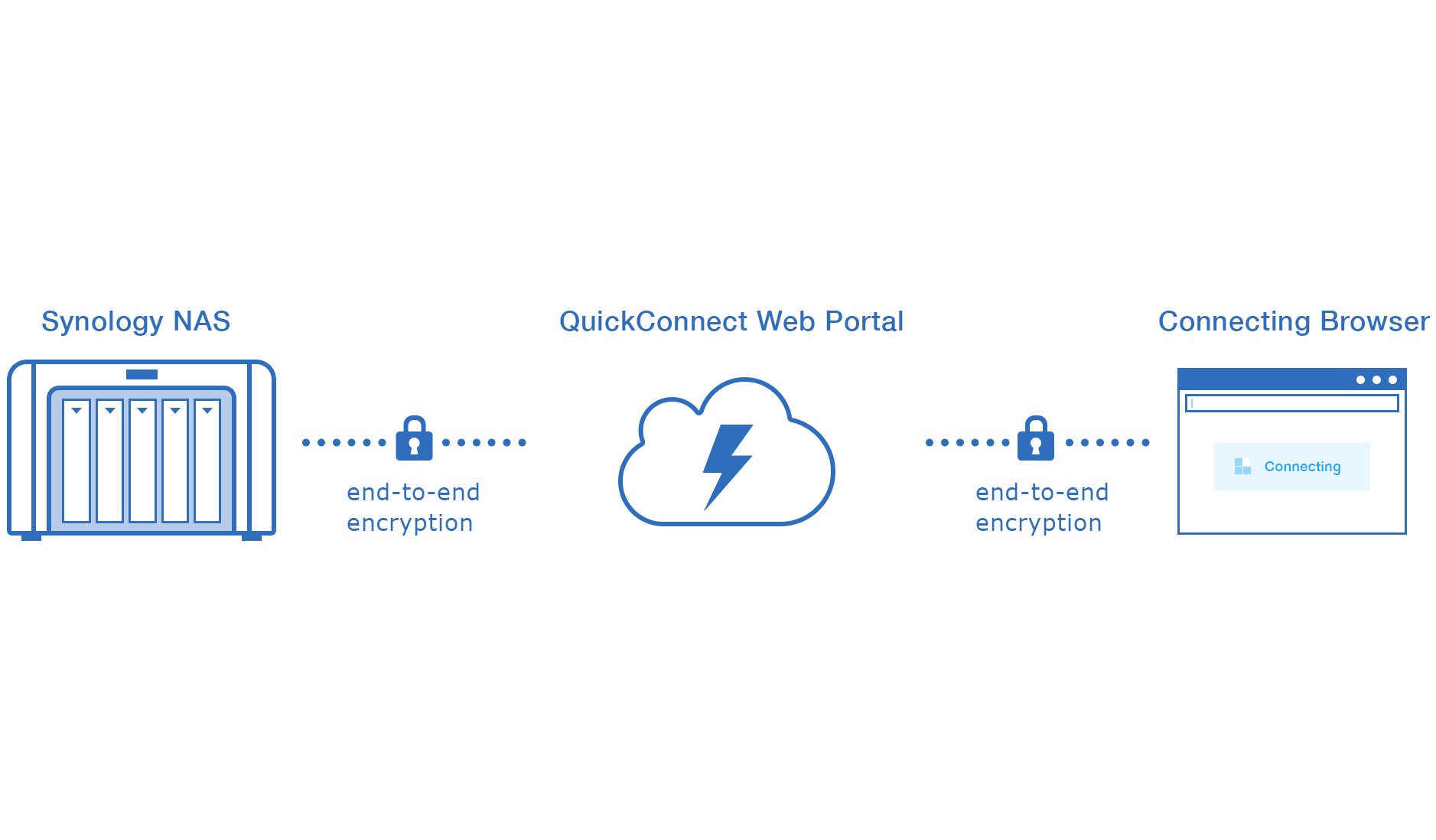
    Even though QuickConnect provides convenient NAS management over the web, businesses can rest assured that all of their private data is protected at all times. In fact, Synology goes to great lengths to ensure that the NAS server data, data transmissions, web portal, and even the data centers for the Synology QuickConnect Servers are impeccably secured. To enable the QuickConnect service2, the Synology NAS must be registered under the QuickConnect Server. This means the Synology NAS reports its status, such as network environments and supported services, to the QuickConnect Server.

    The reported information (i.e. the public IP address, LAN address, NAT type, etc.) is required for the connectivity procedure. Synology safeguards users’ digital privacy. The retrieved information is only used by Synology in order to deliver the QuickConnect service. With SSL enabled, data transmission over the network virtual tunnel is secured with end-to-end encryption. Therefore, QuickConnect guarantees confidentiality and integrity of data transmission between the Synology NAS and client devices.
    QuickConnect Web Portal is secured by end-to-end encryption when the browser is redirected to the Synology NAS using LAN or WAN connection. Otherwise, the request is directed to the Portal Server.

    In such conditions, the Portal Server offers a trusted certificate for the connecting browser to verify the identity of the Portal Server. This helps us combat man-in-the-middle attacks by preventing messages from being intercepted by devices imitating the Portal Server.

    The Portal Server would then decrypt and modify the specific HTTP headers so as to inform the destination NAS of the identity of the connecting client. Having done so, the Portal Server then sends the data to the destination Synology NAS via the network virtual tunnel. Once again, data transmission over the virtual network tunnel is secured with end-to-end encryption if SSL is enabled.

Just to add one more thing on what companies called “secure”. How often (if not always) does a software update include security updates. If it were secure, then the updates should just be feature fixes/enhances.

I rest my suitcase
:microphone:
↓
↓
↓
↓
:microphone:

1 Like

Ok, that’s all very good, and they therefore seem to offer a Dynamic DNS service and they keep secure care of your personal details. However that I would assume with any commercial service, as fines liable otherwise could seriously impact a business.

But it is not addressing the security controls that I described above for your home network and connected appliances. That you would need to do in addition.

1 Like

Thanks Simon, I will try to follow up all your recommendations :+1:

1 Like

I have previously thought it would be interesting to do this if/when one day I get around to doinfg something about mobile listening, whether in my campervan or on holiday. If I were to do it I’d probably look at setting up a separate server not on my network, however there is an alternative I am considering: I only have 1000 or so albums (no idea how many tracks as I only listen to albums), fitting on a 1TB deprive, albeit almost full. That would lend itself to getting a Chord Poly and Mojo, fitting all my albums on a single micro SS card, so having it all with me: not only secure, but not requiring an internet connection to play music, which would be very advantageous.

1 Like

I have JRiver, which I use not only to rip my files but also as my media server. JRiver has the capability to allow remote access, but I have always felt uncomfortable about using it. The closest I came was when I considered giving Amazon access in connection with JRiver’s Alexa skill, allowing me to control JRiver with my voice. That did require opening a port on the server computer. JRiver does offer optional password protection for access. But I wasn’t certain that was sufficient, and in the end I concluded the convenience factor wasn’t worth the risk.

Right now, I am traveling with my iPhone and a dongle with a filled 1TB card, which can be accessed by nPlayer and Flacbox, two third party players, which have different strengths. The downside is I give up the USB-C port to the dongle, but my Bluetooth Bathys produce more than adequate sound. If I want, I can remove the dongle, plug in the Bathys with a USB cable, and listen to Qobuz or the music I have on the phone itself.

I should add that my entire music library is about 2TB, but 1TB is more than enough for travel. I don’t need all of my 12 sets of the Beethoven symphonies.

1 Like