Thanks Chris. So, checked the process as you outlined - on DTC, I select an album, right click and select Encode to WAV/FLAC (didn’t press “Go” yet). What happens then? Does the HDX transcode to FLAC and where the old WAV album was, there is now just a FLAC album? (I haven’t done it yet for fear of screwing something up!)
The WAV file will be converted to FLAC. It’s not like the MP3 library which it creates in addition to the main lossless files.
It will convert each track, one by one, so it takes a bit of time.
I would suggest that you try a few albums to check that you’re happy with the results. If you change your mind you can just convert them back to WAV.
As I wrote above, there is a difference between transcode and convert. Encode to flac will convert the WAV album to flac. If you choose one album it will do that album. If you right click at the top of the tree, it will convert the whole MQ collection.
OK, thanks all. I converted one album from WAV to FLAC. Everything in the folder is the same other than the music tracks are now in FLAC format, everything else is the same.
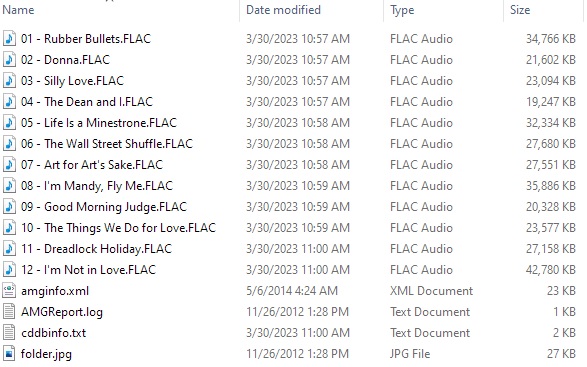
If I convert everything (about 350 albums) from WAV to FLAC and store them on a NAS, will the NDX2 automatically see the metadata or not? How does that work? Does the metadata get sought from the NAS software of the NDX2 software?
Sory if these questions seem dumb but I’m not a streaming expert(!)
The NDX2 will find the music on the HDX over your network and you will be able to browse it and see album artwork. This will be the case regardless of whether the files are WAV or FLAC. It’s when you use a non-Naim server instead of the HDX that the metadata isn’t visible in WAV, so this conversion is future proofing in case you replace it.
2 Likes
Well, the intention would be to trade the HDX in on the NDX2 so I would have to do whatever needs done beforehand.
Convert all files to FLAC, transfer all files to a NAS drive running server software and the NDX2 will see, read and present all the metadata.
It’s exactly what I did.
It worked for me.
I do still have my HDX but rarely use it.
The way it works is that you load upnp software on the NAS, such as Asset.
The Naim app finds Asset, and you tell Asset what to play. Asset then sends the files from the NAS to the NDX2. The NDX2 receives it, unbundles the flac to turn it into PCM, and then processes it.
The server is sending the music - the key is in the name - rather than the streamer asking for it.
Ah, OK. Sounds like no big deal then (at least now, to this old timer)!
As an aside, I used to use Spoon’s software many moons ago (25 , to be precise) when MP3s first came out. Anybody remember the Diamond Rio300 MP3 player???
This topic was automatically closed 60 days after the last reply. New replies are no longer allowed.