Unfortunately removing access points isn’t an option for me given the location of my setup. Yes Naim support desk suggested it; the alternative is trailing ethernet cables around the room!
Sometimes an easy fix is to position a Wireless access point near to the Naim box and then run a short ethernet cable from it to the Naim box (assuming your access points have an RJ45 ethernet socket). I have to do something similar with a Sky Q mini box which doesnt like our mesh wifi much!
As others have said this is normally a very bad idea… it typically creates a relatively large amount of broadband RF energy in your house, and creates a significant amount of RF noise in the mains and near field radiation in the house. (Mains wiring and leads become a near field radiating broadband antenna). In hifi much effort is made to reduce noise and minimise artefacts and interference from the mains… powerlines will simply create a huge amount of RF and typically swamp everything else.
I personally would also avoid because of health reasons in bedrooms, especially with young children…. Long term exposure to low level RF is still not fully understood… short term exposure is generally considered safe.
But also powerline adapters don’t typically provide full duplex ethernet or true ethernet (they are often a kind of half duplex network bridge)… and so Naim streamers will not work optimally with them… when connecting to the streamer ethernet port.
Really surprised you were suggested unless it really is a case of that or absolutely nothing else. These days modern wifi standards and radios have generally made old school powerline adapters redundant. Ensure you wireless access points use MIMO.
I see, hmm ok a little concerning.
My issue is my nearest Ethernet port is far away, so I’d really like to avoid running cables round the room. WiFi just doesn’t seem to play nicely with the Nova for high res; low res is fine.
Would some sort of wireless bridge be an alternative? Just to get the Nova talking to the nearest Ethernet point without creating a whole new network.
That’s been suggested already in this thread; put a wireless access point (in bridge mode or picking up the existing WiFi) near your Naim kit, and connect to that via Ethernet cable.
When you mentioned wireless access points I assumed that’s what you were doing already.
Sorry I wasn’t clear. I’m wondering if I can connect a device to my (far away) Ethernet port in the wall that my Nova can connect to wirelessly?
Alternatively, one suggestion from our AV provider is to create a separate dedicated WiFi channel (2.4ghz band) for the Nova, in case anyone has any thoughts on that?
Appreciate all the help!
2.4 GHz usually has a longer range than the 5GHz band. It has lower bandwidth/speed to start with, but at a certain distance it can have advantages.
In my case, 2.4GHz was much more stable (even at shorter distances), because a newer router of mine „jumped“ though the 5 GHz range every few hours (neighbor and weather radar avoidance), which resulted in dropped streams.
Even though there’s some 20+ 2.4GHz networks visible here (compared to 5 at 5GHz) and there’s much more traffic; but still enough capacity in my case.
WiFi depends on so many parameters of buildings, devices, bands, neighbors, distances, mesh, protocols, … - and the more complex the routers and meshes get, the more confusing it can get.
Maybe explain your router and WiFi setup, which rooms they are in, how far away.
Because a wireless access point near the nova can provide a shorter Ethernet wired connection so you don’t have to trail wires everywhere, and a more stable connection to the existing WiFi.
Or create a 2,4ghz WiFi ssid on your router (assuming that also makes your WiFi?) and join the nova to that.
I thought the problem was of distance and your nova gets intermittent connection over WiFi.
Interesting suggestions, I’ll have to give that a go with my system. At the moment I stream wirelessly via Virgin Media hub with
Naim have suggested the use of ‘Ethernet over mains’ equipment in the past, with the caveat that it can affect sound quality. Wouldn’t do it myself for the reasons Simon mentions above, but it remains an option as long as it doesn’t cause other connectivity problems.
In your case I would consider using an alternative WiFi setup, possibly with a wireless access point close enough ro the Star to allow a short Ethernet cable connection, although with a robust wireless network this really shouldn’t be necessary.
Wifi is only complicated if you try and fiddle it… if you let it do us thing it’s wonderfully straightforward, the modern protocols are designed to make it plug and play. Many commercial offices these days only use WiFi now for staff, guests and appliances… so it’s certainly good enough for domestic use.
Now there may be some limitations or interoperability issues with your wifi product and the Naim product you are using… so perhaps consider
1i an alternate more ‘pro’ grade wifi solution, and disable the current one. Ubiquiti usually woks well with Naim.
2 use a wireless access point with wireless uplinks… sometimes referred to as a mesh access point. Note this is NOT a repeater.
3 indeed use a wifi / ethernet bridge… so wifi link to a switch and ethernet leads to devices… ensure your wifi access point has a good signal to at least two other participating access points.
It is usually beneficial to have a few overlapping access points in your house with Ethernet up links to your router/switch. Many Wifi protocols are designed to move (roam) between APs for best performance and optimum load management. Having just one single AP blasting out and trying to hear everything is not generally optimal, unless everything is physically close to that AP.
BTW there are low profile/flat Ethernet cables designed to go under carpet and edge of rooms discretely. I use some of this in my house where I haven’t routed cables within walls and voids… works well.
Virgin Router → Ubiquiti switch → Ubiquiti wireless access points → Nova
Naim Support believe connecting via access points is causing the issue. I’m surprised by this given my Mu-so works fine, but it’s also nearer to an access point + I’m no expert.
Connecting via Ethernet back to the switch works fine, as does (equivalently) using a power line.
Very frustrating!
My Nova used to have a problem using a mesh access point. I never quite pinned it down but I think it was flicking between 2.4GHx and 5GHz and getting itself in a tizzy.
Running a short ethernet cable from the access point to the Nova sorted it.
I had some WiFi issues some time back. After separating the 2.4ghz and 5ghz bands and selecting one of them, depending on the distance from the ISP modem (used a WiFi analyzer to determine which band was best), it was much better. My ND5XS2 uses the 5ghz band.
Exactly what I have here, and never an issue.. just out of interest you do ensure you have the same SSID on the different bands don’t you?
It points to an issue with the Naim Uniti Star product WiFi implementation possibly perhaps with its implementation of 802.11r and 802.11k. It sounds unfortunately as if you getting som poor support information which is surprising and on face value disappointing. Well an alternative as you say is connect an AP to a switch (ensure you permit that AP for wireless uplink).. and then connect that isolated switch to your Naim. Make sure you don’t connect back to anything else on the router side from that switch or you will create a loop)
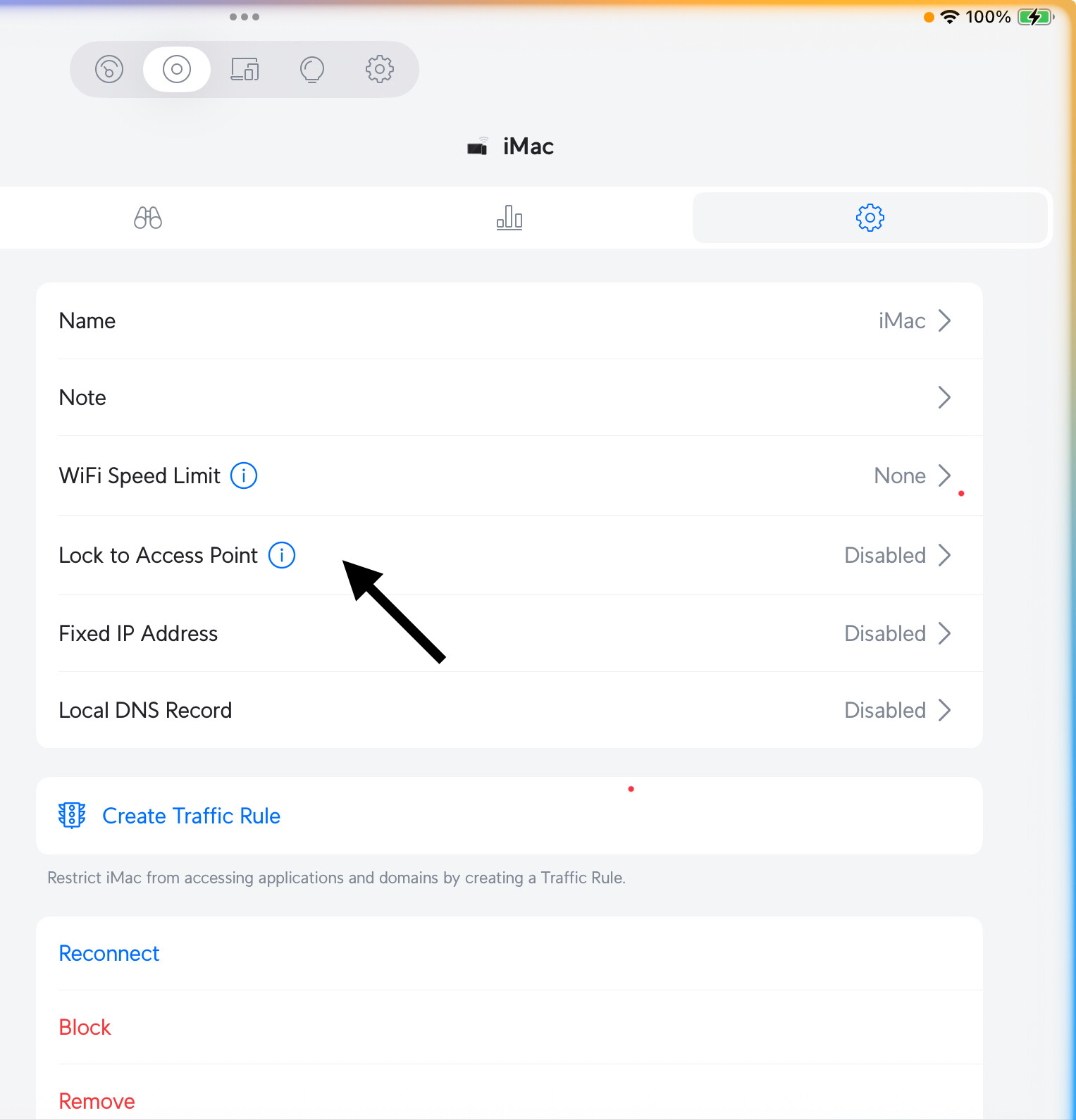
BTW on the latest Ubiquiti software you can bind an access point to a particular client for poorly implemented clients..it might be worth exploring… that way only one AP will talk to that client. It’s not optimal, but may get you going if there is a coding issue in the Uniti Star wlan adapter.
I know ubiquiti as a brand is often recommended, but I think you need to be careful which products you are using. I had a ubiquiti x3 mesh setup - the cheaper level round ones with blue circle leds, they were £85 ish each “uap ac lite” - and they proved to be sub optimal. I can’t remember the exact problem but there was an issue which ubiquiti never solved with the firmware. I sold them on and switched to hp Aruba; essentially the same thing except they are stable.
No problem with AC lite here…super stable and reliable as well as the later access points from Ubiquiti…the software features largely appear the same, as they are controlled by the separate WLC , fantastic devices and all support WMM which can be super effective for home audio… out of the hundreds of connected devices over recent years, temporary and permanent… I have only come across one other device had to have a wifi AP locked to it just on 2.4GHz… it was an old Chinese made wifi interface on a large appliance. It has since been upgraded and ‘fixed’ by the manufacturer.
I find these days try and go for the highest MIMO number you can on the APs… you will get the best performance as you have more and more attached devices, the lite versions tend to have smaller MIMO specs so suitable for smaller number of attached devices.
Some of my Ubiquiti APs are built into the infra of my house now. Fix and forget. I know they are made for smaller office and commercial setups, but I prefer to use properly specified devices to minimize the chances of interoperability issues, and if a client is suboptimal, you often have sufficient controls to work around the client failings… if you have the know-how.
It was the aps themselves that had the issue ; I can’t remember the specific details, it’s long gone from my search history but was in the logs and all over the ubiquiti forums. I had them from 2020 to 2022; there were frequent and repeated connections being dropped. Whatever it was, it was annoying enough that I replaced the whole system.
Thanks for the above advice.
Slight plot-twist this morning: I moved the Nova to the same location as my Mu-so, and it streamed Tidal over WiFi uninterrupted!
The difference appears to be proximity to an AP. The Mu-so room has an AP a few feet away, the original Nova location doesn’t. So despite the Naim app network tool saying the Nova has good connection there, it appears it’s not always the case.
So now I’m thinking I add an access point to that room & it should (fingers crossed) solve the problem. I do find it surprising though as there are 2 close-ish access points: one on other side of a wall, one in the room directly above. But what do I know.
That must have passed me by… mine, or various incarnations have been in for 10 years or so now.
I also use the Unifi Cloudkey mini PoE server to control the configs of Unifi access points and switches… (the size of a large usb memory stick) which might be why I had no issues?