I have not had any discovery issues with my Ciscos in place with ROCK. ROCK did not cope well orginallly with the STP process the Cisco does on first connection as it takes 30secs for the network connection to be fully active and during this time ROCK would timeout connections to Tidal and Qobuz and never reconnect unless you restarted the server software only. They fixed this in the last update to ROCK.
I too have no discovery problems until I connect my SkyQ box to the Cisco switch. Discovery works from my ethernet connected Windows 10 PC when the SkyQ box is connected, but discovery from Roon Remote on both my iPad and Windows 10 laptop fails as soon as I connect the SkyQ box.
When I unplug the ethernet cable between the Cisco switch and my SkyQ box, discovery from all 3 devices (Windows 10 PC and laptop and iPad) is rock solid - very strange and very annoying.
Ok I use the SkyQ Set Top Boxes which provides the video and storage for my SkyQ TV… mine are NOT routers.
I thought you were using the regular Sky Broadband router. Try disabling IGMPsnooping on your ‘SkyQ router’… again this looks to be the suspect device from your description… your SkyQ router would appear to be dropping/not forwarding certain data. If you can’t do this… do you have to use your SkyQ device as a router? See if you can use it as a regular STB, like I do, and a few of my neighbours do and connect it to your normal broadband router, perhaps via your Cisco switch. I’d be surprised if things don’t then work more reliably as indeed it does for me… in fact rock solid.
Failing that you could to try to enable an IGMP querier on your Cisco Catalyst switch to over ride the possibly errant behaviour of your ‘SkyQ Router’, but that is not straightforward if you are unfamiliar with configuring Cisco IOS. Best try to cut the SkyQ box out of any switching or routing functions if you can.
This really shouldn’t be necessary for a consumer device… it does annoy me if this is indeed the case that a consumer devices use these higher level network functions and appear to be blind to what they are doing to the poor consumer with out giving any control, configuration or logging… The consumer then wonders why things ‘mystically’ stop working on their home network in certain conditions.
To add to the confusion, Sky call one of their routers a ‘Sky Q hub’. I have one, despite having no Sky TV, and it’s a regular ADSL router/wireless access point etc.
For what it’s worth, mine works fine with Roon despite having several Catalyst switches. I also have an Airport Extreme which handles WiFi instead of the Sky router, and this is the only device wired to the router, so perhaps that is why I haven’t seen your problem.
 NO-QUARTER,…So was the purpose, you are absolutely right.
So do I,and everyone I know who bought a Cisco.
That is the recommendation for best Soundquality.
But it is well as with much else,.it depends on what you focus on.
But I know what I’m focusing on,…
Best Soundquality.
/Peder🙂
Absolutely not.  … the purpose of a switch is to effectively decouple segments from each other from a data point of view. A quality switch from will also provide good EM decoupling as well . Because of the functionality of a switch like the 2960 certain data that is indiscriminately broadcast on some basic switches is avoided on the 2960. Less indiscriminate broadcast data equals less host processing, equals ultimately better SQ for audio equipment that are also network hosts like streamers.
So I would put a switch like the 2960 either at the hear of a small network, or at the edge connecting your similarly located AV equipment as appropriate.
When I first introduced the 2960 a few years ago to the forum as improving SQ in some systems this is what I advocated… and now it’s still the same… although recent audio hosts such as the new Naim streamer are less susceptible to poorer network equipment… I have also found the same benefits occur with other Catalyst devices as well such as the 3560 (a router-switch/layer3 switch ). Remember the main benefit is in the segment port physical interface and link layer as well as backplane functionality.
Prior to my recommendation many people were needing to faff around with separat switches for audio etc, and some were running into issues of noisy radiating Ethernet leads, noisy powersupplies and even other issues like troublesome discovery. The 2960 took those issues away and introduced a higher quality segment interface, hence better SQ in many cases and also, just as importantly, allowing multiple devices to connect to the same switch with NO SQ impact. (But do remember physical setup can expose other issues that are nothing to do with the network switch that can affect SQ)
For best reliability then use a smaller number of switches as you can… I would suggest a single larger Catalyst switch is the optimum, connected to your broadband router. Best house in cupboard, loft, under the stairs etc, if greater than 8 ports as the larger devices have audible fans. The little 8 port devices are fanless and silent.
For the record I use three Catalyst devices each with various devices connected to them depending on location. I connect the three switches together using dual run EtherChannel. (Cisco’s link aggregation protocol)
That is almost certainly why you have no issue… you have bypassed any possible errant IGMP snooping behaviour undertaken by the Sky device (router/hub/STB etc etc)
IGMP snooping is typically undertaken on Wifi and switch ports.
I have no issue with my two SkyQ STBs but I just treat them as regular hosts aff my home network… and I have no issue at all.
1 Like
I don’t really know what Simon with his high technical explanation above,.is trying to say here.
It is possible that my English understanding is not good enough  .
.
But in practice,…for best Soundquality,use only your Cisco to your music-system.
 Try also what “ports” in your Cisco that sounds best,…it can be a difference.
Perhaps not theoretically,…but practically.
 But before you test different “ports” in your Cisco.
“Plug-unplug” your ehternet-contact 6-8 times in each “port” before testing.
This is to obtain the same prerequisites when testing.
/Peder🙂
I must admit I didn’t find any difference in SQ in my main system when adding other devices to the 2960 (in fact one device that did gain the most from running off the 2960 was a Sonos Connect used as a secondary source). My main system does sound better with the 2960 located away from the main kit and located in another room and this is where it’s staying. Network optimisation has been beneficial for me(cheers Simon). No more fiddling needed 
Don’t forget to assign an IP address that ensures that the fourth octet is an even number when testing even numbered ports.
The LSB of the fourth octet can cause a deleterious effect when set incorrectly.

Now your talking a foreign language…
Since Sky gave me a router ‘upgrade’ to an ac (Sky Q) model, I was thinking of removing the Airport Extreme just to see everything still works. I might give it a go out of curiosity and see if Roon still works. One less device + smps always seems like a good idea.
Chris,
My Sky Broadband router is a ‘Sky Q Hub’ just like yours. It would be very interesting to find out if you have a similar problem to mine if you were to temporarily remove the Airport Extreme.
I have absolutely no complaint about Wi-fi performance from my Sky Q Hub were it not for the problems I am having with the Cisco Router and remote Roon connectivity. General wi-fi performance is hugely better than it used to be. I have a bedroom system (switched off during the day) connecting to Roon over wi-fi using a Google Chromecast which works flawlessly, a Naim Muso Qb which works flawlessly over wi-fi and connectivity between my main Sky Q box and a 2nd Sky Q box in a bedroom also works flawlessly over wi-fi.
Simon,
I also have 2 Sky Q bxes which provide video and storage for my Sky Q TV, and they are not routers. I have a ‘Sky Q Hub’ (which appears to be the same as that used by ChrisSU) which provides my broadband access and wi-fi. Wi-fi performance using this device is excellent with the exception of the Roon Remote connectivity issue whenever I plug my Sky Q Tv Box into any of the Cisco ethernet ports.
I have logged into the Admin screen for my Sky Q Hub with a view to following your suggestion regarding IGMPsnooping, but unfortunately there doesn’t seem to be any reference to IGMPsnooping
in the Admin menus. There is an option in the Sky Q Hub to enable MBL Querier which I tried briefly (without any understanding of what it does) but that too made no difference.
With all due respect to Simon, and his obvious knowledge of networks, and everything associated with them…it is all way above my head what he just posted. I think I will start with just my Core and NDS connected to it, possibly down the road I could try other things connected, to see if it downgrades the sound.The only other thing I could connect, in the same room as the the audio gear would be my smart TV (plasma). I can just run a single cable from it (TV) to the router, with no problem at all.
No Quarter… I think I will be following suit…then maybe the sky box later
1 Like
 James_n,…Two “fiddling” that you can try.
-
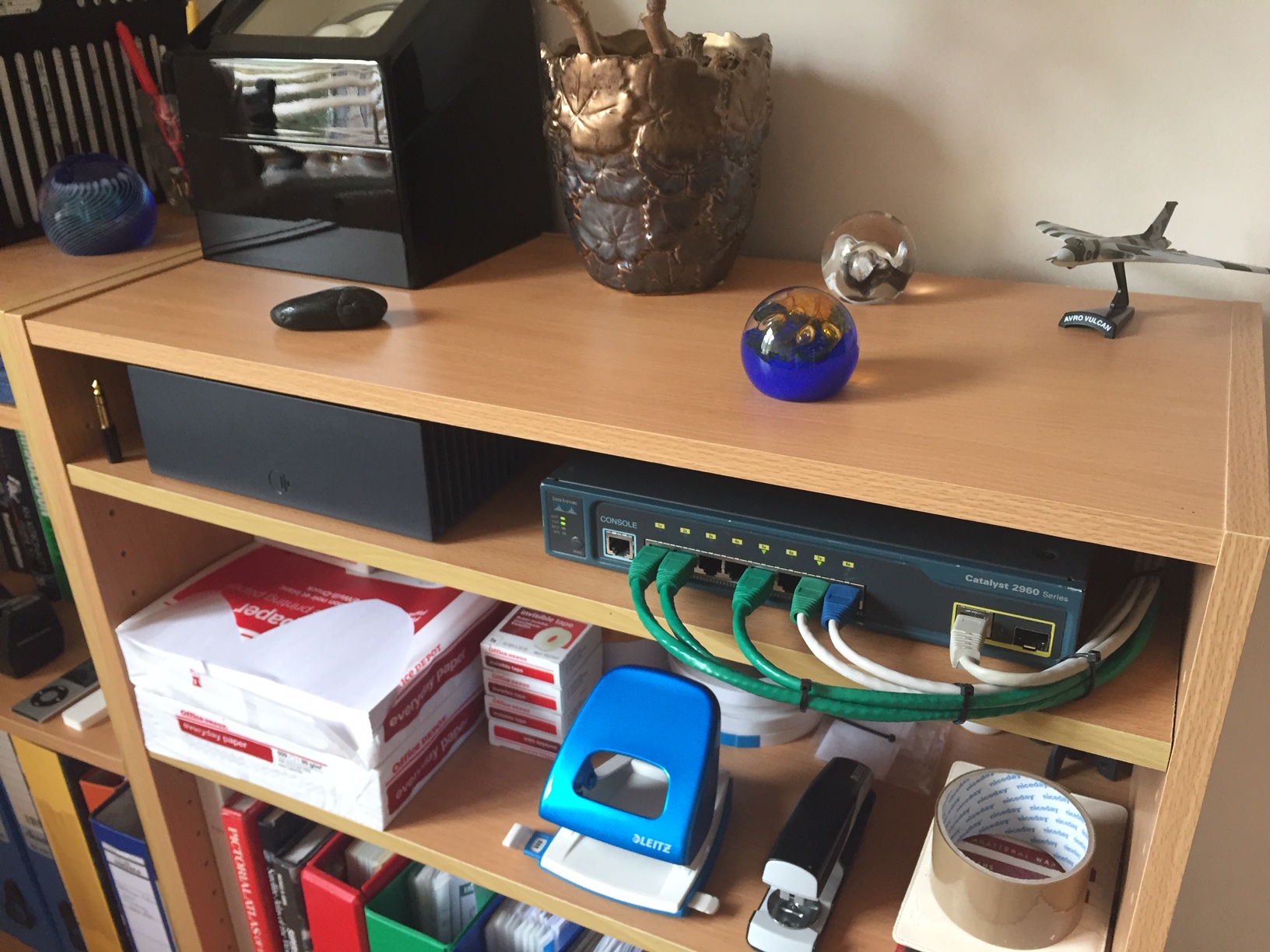
It wont be good for soundquality,..to pull together cables that you have made in the picture with your Cisco-switch.
Try to “unleash” them,.and see if you hear any musical difference. -
It looks like you’re missing “feet” under your Cisco.
Put there any kind of “feet”,.it is needed to improve the cooling of your Cisco.
…

 And..It can also improve Soundquality.
Try these small rubber feet above,.they are cheap and actually improve soundquality.
I don’t know,.if you can find just these where you live,..but try different,they are so cheap.
/Peder🙂
The bottom line … with some cheap consumer switches there can be advantage in having a separate switch for SQ, perhaps with a third party linear powersupply designed for the job in hand. With a device like the Catalysts there isn’t (by default)… which is one of its benefits I introduced to the forum. It also better manages interference (EMI) compared to some other devices… which is how I stumbled across the 2960 in the first place.
However if you find there are SQ issues/differences to do with placing and positioning of Ethernet cables etc, then the issues are most likely due to other reasons and not to do with the switch, no matter what type it is. I do wonder if some people are mixing these two things up…
1 Like
Thanks Peder - it does sit on feet very much like that. Just for airflow (as you say) and it stops it scratching the surface it’s sat on. The cables are bunched for neatness - not too tight, a good bend radius and minimal tension on the sockets. The cables take a varied route through the house both externally and internally, avoiding mains cables so I’m pretty sure bunching at the switch isn’t going to make a difference - a bit of a tweak too far for me. It all sounds good
1 Like
Same here, one of my 2960s usually has only my NDX connected to it, but I occasionally connect a MacBook Pro and various other bits and pieces to it. No difference at all to my ears.
1 Like