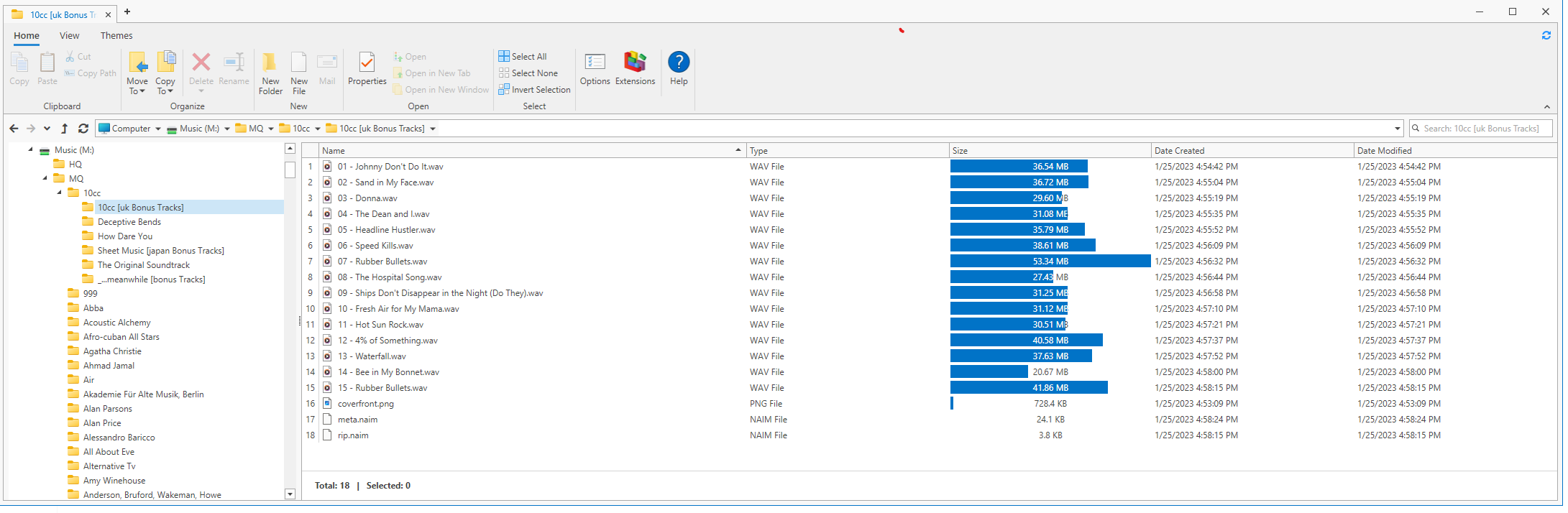
I’ve got an Astell & Kern SP3000M player which has a SD cad slot that will handle an SD card of up to 1.5TB.
So, I thought I’d copy my Uniti Core’s MQ directory onto a 1.5TB SD card and use that in the player.
All tracks play well and sound superb (I’m using Focal Clear MG headphones) BUT
The tracks are displaying their titles and album names and the album art is all spot on but the artist is for everything, which means I have to search everything by track title or album name - a bit of a chore.
Does anyone have any thoughts as to why the artist is not being picked up and shown ?
Sorry- I assumed you’ve used a laptop for managing your downloads and such. I’ve had issues before when moving music with title duplication and/or artist names being repeated and it always came down to the way the folders were named in the directory. I had thought that maybe in your case, when looking at it from a computer, you would be able to see the hierarchy of the file folders to see where the artist name is. If it’s at the top of the file volume it’s likely to repeat on all of the following.
If this happened on Naim ripped files I’m not sure of what is happening there as I’ve not seen this before. Still, accessing the Core over a network via laptop should give you the ability to see the file structure. You could take a screen shot from that point.
Hopefully someone with more knowledge than I can contribute here as well.
Are the files ripped by the Core in WAV? If so that’s the problem, as the metadata is not embedded, so when played on other hard drives you’ll get the problem you are finding. There is software that will embed the metadata, which you may be able to find details of by doing a Forum search. Flac rips do not have this issue.
These files all have “meta.naim” which I think is only accessible via the core software. It would be interesting to see what the file structure looks like in the Astell & Kern for comparison. May take a lot of editing- may not be worth the effort either.