My music files are held on a hard drive plugged into my NDX2. This works perfectly until I add new music to my collection at which time I have to unplug the drive, connect it to my Mac, update with the new content and plug back into my streamer.
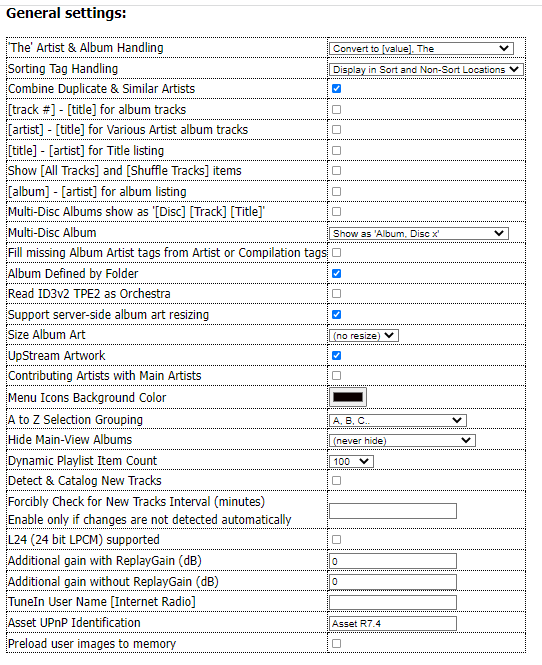
To get round this faff I decided to use the duplicate library on the headless Mac Mini I use for streaming to all the HomePods we have around the house. I installed Asset UPnP and it works well, but the way it asks you to browse is not to my taste. I’ve tried to tinker with the browse tree, but I’m an old, impatient technophobe.
The Naim app does a good job of displaying the library I have on its local hard drive. Albums are sorted alphabetically first by artist (so you get all of ABBA’s albums first, then all of AC/DC’s). Apple Music refines this by displaying each artist’s albums in chronological order.
How can I replicate this with Asset? I don’t want to go through submenus of artist, then album, then year - I just want them displayed in the neat and logical way I’ve described.
Yes you can all this and more than you have even imagined with Asset
I have mine ‘simplified’ which suits my way after some time experimenting.
Album Artist/Albums are in A-Z
Artists are in A-Z
This is how I have mine set up
If you know how to edit Browse Tree (Asset>Advanced>Edit Browse Tree) and (Edit Browse Tree Plain Text)
If you are OK with this I can send you my plain test files to copy/paste
Its your risk, if you do screw up you might need to reinstall Asset
Go into your Asset>Advanced>Edit Browse Tree as Plain Text
… Delete the text on that page and copy/paste this in place
Album Artist / Album{no_track_list}
Album Artist / Album\Album
Album
Folders & Filename Browsing
Composer{no_track_list}
Composer\root
Genre{no_track_list}
Genre\root
Dynamic Browsing
Dynamic Browsing\Artist{a_to_z}
Dynamic Browsing\Composer{a_to_z}
Dynamic Browsing\Conductor{a_to_z}
Dynamic Browsing\Genre
Dynamic Browsing\Style
Dynamic Browsing\Year
Dynamic Browsing\Rating
New Albums
Even before worrying about the browse tree, if you want to sort your albums chronologically, you’ll need to make sure the metadata has something in there that you can use for this sorting - year, release year or something else. Some albums will have this completed but you’ll need to add it (or correct it) for lots of others.
I use the SortAlbum field to put the release year in. I’m not sure it’s the best route but the one I started down many years ago and keep with now.
You can add the year in the metadata to get albums chronologically. However, if you have 2 albums by the same artist from the same year, it will then put those albums in alphabetical order rather than chronological. For example, Yellow Submarine was released before Abbey Road in 1969 but appears the other way around in Asset even with the correct metadata. I mentioned this on the Asset forum years ago but the organiser didn’t seem interested in fixing it so I’ve just learned to live with it. Minimserver does put the albums in the correct order provided the metadata is accurate.
I still wish there was a way to display the year of release for each album in my library when browsing with the Naim app… the year IS included in the metadata for each of my albums.
I’ve mentioned this here before and the solution was to add the release year to each album title in the metadata, which is not something I want to do.
I believe that will sort the albums by year… (correct?)… but what I have been looking for is a way to display the release year for each album in the Naim app, which unfortunately remains impossible, given that the app does not have a field to show that info. Just a personal quirk… sometimes I need to see the release year for a specific album I want to listen to. I’d like to be able to do that from the app, rather than having to go look it up in my files.
I think that when you put this type of sorting into the browse tree, the album title gets displayed as Year+Title. (It’s a good while since I last used Asset.) I suspect the sorting options mentioned by mb above need to be after ALBUM ARTIST (or ARTIST) otherwise you’d be picking year and see all your albums from that year.
Album
Album Artist{no_track_list}
Album Artist\Album
Album Artist{no_track_list}
Album Artist\Album by Release
Artist{no_track_list}
Artist\Album
Artist{no_track_list}
Artist\Album by Release
Composer{no_track_list}
Composer\Album
Genre{no_track_list}
Genre\Album
Playlists
Additional
Additional\New Albums
Additional\New Tracks
Additional\Recent Albums
Additional\Recent Tracks
Additional\Top Artists
Additional\Top Artists\Album
Additional\Top Albums
Additional\Top Tracks
Additional\Least Played Albums
Additional\Least Played Tracks
Additional\Jukebox Track Selection
Additional\Jukebox Album Selection
Additional\Album Artist / Album{a_to_z}{no_track_list}
Additional\Album Artist / Album\Album
Additional\Album by Release
Additional\Album by Artist
Additional\Compilation{no_track_list}
Additional\Compilation\root
Additional\Bits{no_track_list}
Additional\Bits\root
Additional\Channels{no_track_list}
Additional\Channels\root
Additional\Contributing Artist
Additional\Conductor{no_track_list}
Additional\Conductor\root
Additional\Composer / Work{a_to_z}{no_track_list}
Additional\Composer / Work\Work
Additional\Frequency{no_track_list}
Additional\Frequency\root
Additional\Rating{no_track_list}
Additional\Rating\root
Additional\Type{no_track_list}
Additional\Type\root
Additional\Year{no_track_list}
Additional\Year\root
Additional\Folders & Filename Browsing
Additional\Stream As
Additional\Stream As\root
Additional[Details]
New Albums
Top Artists
Top Artists\Album
Top Albums
Encodingtime{no_track_list}
Encodingtime\Album
You/we need to explain/understand what you mean by Naim app and what the Naim app is capable of.
The Naim app doesn’t have a UPnP/DNLA function, so cannot access your albums.
This is done by Asset UPnP.
If your albums have the date year field populated in their metadata, then Asset can show year date if your browse tree is edited to show it.