I guess my software for the. NAIM Uniti Core was updated because now it doesn’t work properly and looks different. I just ripped a newly purchased CD that Naim processed without finding any metadata. I tried to add a new photo cover, selecting from my iPad Photo Library, and the app refused/cannot add it. The option to “Choose Photo” does nothing. The option “Move and Scale” is similarly unresponsive. What do I have to do to get this cover selected?
the new cover and there it is pictured but there is no actionable means of adding it as the new cover,
After you select the photo you need to be able to ‘copy’ it; then when you return to the Core in the app it should ask your permission to ‘Paste’ it; it should then appear and you can ‘Save’ it.
.
After I select the image from my photo library I get the screen pictured:
I don’t see any option to copy it.
This is the screen I get just before the image in the initial message: I don’t know if it is significant or not.
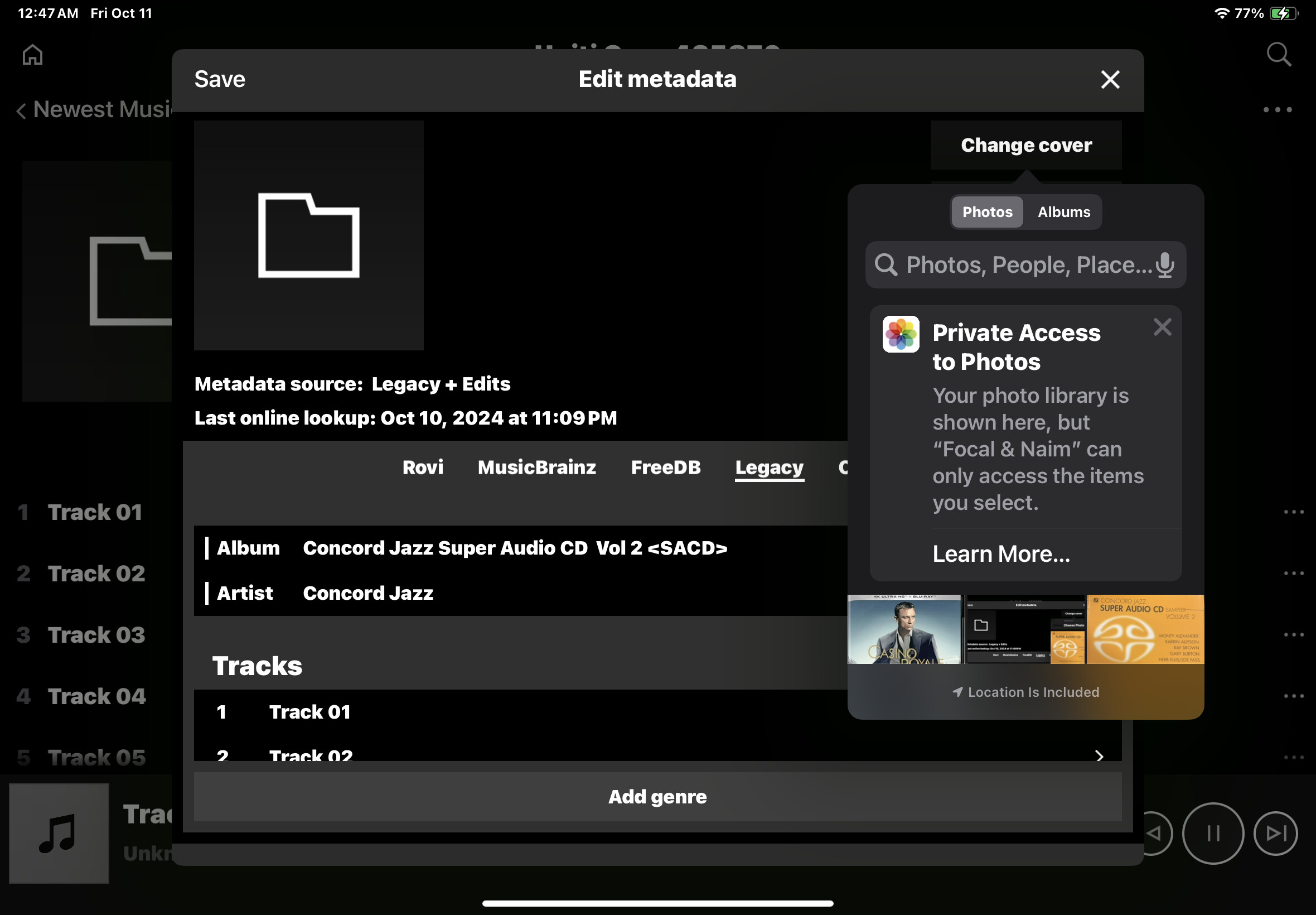
The Core’s firmware hasn’t had any recent updates – v 2.5.7 is the latest, back from around June time if I remember…
Have you used your Naim App/iPad to edit recently…? It’s more likely they have had updates in recent time and could be the cause of an issue…
SC
I looked on my Core and at the bottom of the photo I get the option of ‘Use’ which then selects the image. That’s with the app on an iPad.
I think what you need to do is a power off restart of your Core Janet. So turn it off as usual, then pull the power cord out of the back or from the wall socket, whichever is easier and then wait 30 seconds and plug it back in again. The Core should start up normally and behave in the same way as you expect.
Good idea, but unfortunately, that didn’t work. I still have exactly the same mysterious problem.
I am using my iPad but the app does not look entirely familiar and it does not behave in an entirely familiar way either. In particular, I’ve never seen the screen display verbiage about my photo library “Private Access to Photos”. It makes me suspect an iOS update might be the culprit?
It does say my firmware is uptodate. 2.5.7 (4059].
I’m sorry - this must be frustrating.

Here’s a screen shot from my Core. The last Waltz is the existing cover for the album and when I try to change cover in metadata using my photo Iibrary this is what I get when I have selected a photo. As you can see I get the additional option of Use on the top menu that doesn’t appear on your screen shot and it’s not clear why there is the difference. I simply clicked on that photo in the photo library.
As an alternative you could try using Discogs as your source instead of your photo library. With the other metadata Discogs should find a selection of covers from various issues of the album including yours. You should then be able to select the album and copy the artwork - then when you return to the Naim app you should get the paste option.
CliveB:
Your screen shot looks entirely familiar to me. It is what I usually get and for some reason do not get now.
I’m not optimistic that turning to Discogs will be the needed solution but it’s a creative idea soII’ll give it a try.
I think you need to go to home on the Naim app, select the tools icon and change from dark to light - if my screen shot looks more familiar.
I’m on iPad IOS 17.7.
I get virtually all my artwork for the Core from Discogs when the metadata doesn’t produce it, but then I am familiar with Discogs for buying CDs and LPs.
Except when it’s the Cross in Chichester!!
1 Like
You win the prize for a great idea. Going to Discogs solved the problem. Thank you!!
I buy most of my music CDs used from Amazon or eBay depending on who has the cheapest “very good” quality CD. If I don’t like those prices I will check Discogs. It begs the question - why don’t I go to Discogs first- and I really have no answer for that.
My iOS iPad version is 17.7.
1 Like
Seems as though there may possibly be a Permissions issue re the Naim App accessing/using your iPad’s Photos library……There’s no other reason why you shouldn’t be able to use pics from your Photos library (providing they compatible file formats etc)……Or failing that, then possibly a bug between the latest iOS and Naim App, but then nobody else has flagged this issue……
SC
I was there last weekend. My son and daughter both live in Chichester and we have a long family connections with West Sussex. My parents ran a business in Chichester that you may well have known if you were living on the south coast when your son was a boy.
It worked for me so there is no apparent iPad or Naim software issue in play.
Fair point. 
Though then, there’s Qb2 owners after recent updates who have Alarm functionality and those that don’t….! Nothing is what it seems, it seems….!
SC
Which shop was that?
It’s very odd! This has worked perfectly for me for years. Why not now. And why, as you say, is it working for you but not me when we are using an iPad with the same up to date version.
I’m going to bed. It’s almost 4 am here in California and I’m tired. Thanks again!
this is a bug in the app that naim support are aware of. i was told it would be fixed in a future app revision. note that although the “use” button is greyed out when you have selected the image it does still seem to work if you press on the “use” - well it did for me anyway.
The other issue i have also told naim about is that when i am editing metadata for a track name, the app is saving the track name as both the track name and is also overwriting the album name with the track name!
Example screenshot, just this minute tried changing track 2 name and it has overwitten the album name again…

ipad pro v4 ios 18.01, and note the problems were occuring on ios 17 also.
Also just tried it on an older ipad pro v2 running ios 17, and an iphone 14 running ios18.01, all give same problem.
2 Likes