If you’re using android, it might be worth trying different device if available.
It could be your device isn’t working well with the new Innous software or qobuz at the moment.
If you’re using android, it might be worth trying different device if available.
It could be your device isn’t working well with the new Innous software or qobuz at the moment.
I have experimented with putting a USB DAC (Shin Kin DAC 24/196, £40 from Maplins many years ago) on my Zen Mk3. The Joe Jackson album first three tracks played fine from Qobuz to my Zen through the USB DAC without problem. Switching back to the ethernet player output from the Zen to my Naim NSS333, I played Joe Jackson on Qobuz from track 4. At track 5, half of the piece is played and then the playback skips to track 6. Track 6 plays OK, track 7 skips half way through. I think I am experiencing a problem with the Innuos SenseUPNP feature.
I have opened a support ticket with Innuos. Let’s see what comes of it.
Innuos got back to me today. It has given me some things to try, but there is no definitive answer yet.
Thanks for update. What did they suggest you try?
Yup keen to hear as well, as it’s happening more frequently than before for me.
The suggestion is to use the primary USB audio output (to a USB DAC or DDC device), or to delete the audio setup of the network streamer for your Naim streamer and then reinstate it. They are acknowledging that this is most likely a SenseUPNP issue. SenseUPNP is an experimental feature.
I have tried disabling and reinstating the Naim streamer as a UPNP network streamer on the Innuos SenseUPNP setup and it hasn’t made an improvement for me.
I switched off Sense UPNP and the problems stopped, waiting until they resolve the issue before going back.
I love these FW updates. My zenith is on a very old and outdated fw. I also miss the opportunity to have Qobuz engaged with nds as you did in the past. But I have not done the update.
If anyone has installed 3.12 on their Naim streamer, could they retest the Innuos SenseUPNP to Naim streamer to see if anything has changed?
I have a 333, so waiting on a 5.3.1 release in June. I am guessing there won’t be a change but you never know. If there is we could push this information to Innuos. I understand they are trying to get hold of a Naim streamer to test for themselves.
I updated to 3.12 yesterday, and it does sound great - very clear and sharp, engaging the listener. I used Innuos Sense today via UPnP to ND5XS2 and it plays as before with 3.11. No issues with locally stored music (on the Zen Mini internal storage), but the same issues with Qobuz via Sense as noted in the Innuos forum - skipping half way through each second track played - are still evident, Innuos need to fix this.
I have that issue too with quobuz and like you my hard stored files are perfect.
Does this issue sit with Innuos or Quobuz does anybody know?
I understand Innuos are investigating it, but it will take time to track down why this happens with Naim streamers.
I think the problem is the issue sits with both Innuos and Qobuz
I haven’t raised a ticket but ifit’s both parties that need to resolve an issue that can be tricky…
Bloody annoying though…
I guess I’ll just have to wait or jump to today!
Hi all interested folk,
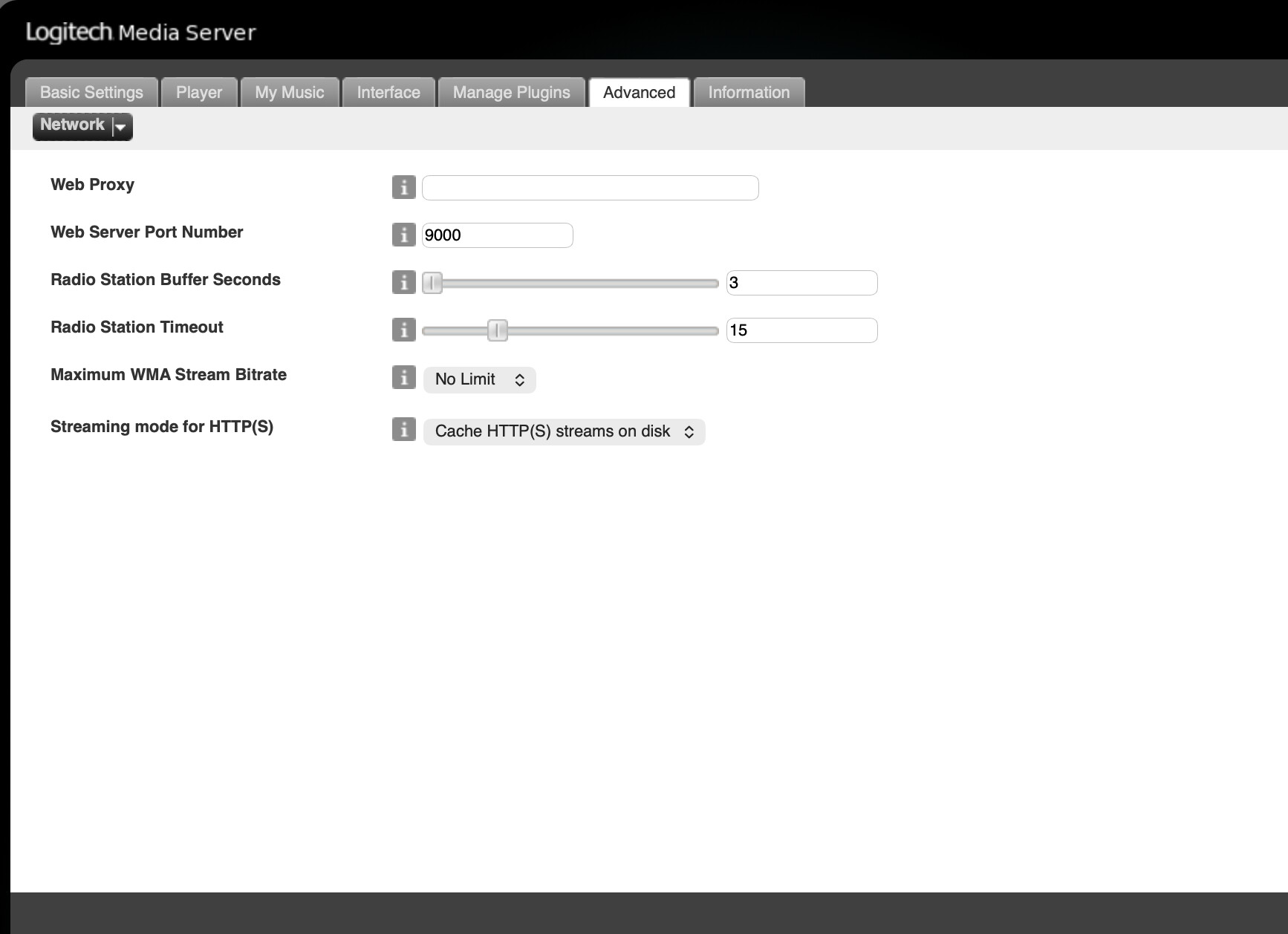
News from Innuos. Can you please check if a setting in the Lyrion Music Server on your Innuos box is set to Persistent or HTTPS Cache mode.
If it’s set to Persistent, change to HTTPS Cache mode, Save, reboot the system and try out the connection from Qobuz through Innous Sense to a Naim streamer.
To access LMS, you need to use a web browser so this is more easily done on your PC.
On your browser, edit the address bar and add “:9000/default/settings/index.html” to the IP address for your Innuos system so it looks like “192.168.1.100:9000/default/settings/index.html” for example.
Navigate to the “Advanced” options page, and select the “Network” tab from the drop down menu, and adjust the setting as described above.
Fingers crossed (there is probably an emoji for that).
Thanks for sharing this, managed to do it via my iPad although the UI was a bit tricky!
I’ll report back on if this has resolved my issue - running through a playlist as we speak!
Fingers crossed.
Hi @Farthings-cat I hope it works out successfully for you. I have played a couple of albums without problem this evening. There is some information about this LMS setting:-
“When a HTTP(S) connection to a server fails, Logitech Media Server terminates playback. It can also try to re-open it (Persistent mode) or it can buffer streams (Cache mode) of defined length (podcasts, single tracks) on disk files. These will be removed once the stream has been played. This can improve the reliability with some servers that expect tracks to be downloaded, not streamed and thus close long connections. But it also does cause more writing to the file system, which could potentially wear out e.g. SD cards. If you have enough space for buffering files, then “Cache” mode is the way to go”.
On an Innuos system the cache will be written to hard drive which is either an SSD or HDD. SSD reads and writes will be quicker than HDD, and the wear levelling algorithms will spread out the recurring writes to preserve the life of the SSD for as long as possible.
So far so good on two playlists! Hopefully this is the resolution we have ben waiting for.
Thanks again for sharing
Gary
I’ve also played a couple of Qobuz albums after tweaking LMS and had no problems - looking like a resolution at last!