Naim uniti ci 102 buying story plus advice needed

Hiya guys.

A bit late to the party re joining this forum.

I’ve been a Naim owner for 35 years, starting off with olive, then upgrades. Moving on to black Naim then finalising with freshly serviced cdi/72/Tpr4 hicap/250/SBL’s and Briks.

Loved most of the naim kit i owned and had great service from both the dealers i used and also Naim themselves if issues arose on new kit.:+1:

The one fly in the ointment was the wife. She loves music but never grasped why so many boxes and largish speakers were needed….dust collectors as she says​:sweat_smile:

Anyway last year after faffing about with many dacs and i mean many i bought a little cheapo Wiim pro plus.

Boom, after a week of playing with settings it was streaming and playing audio at a quality i’d not have thought possible. All this coupled with a silky interface. Brilliant.

It got me thinking i was stuck in the past, and although my olive was a keeper i thought i’d look at a one box solution to maybe give me 80% of what the olive gave and pleasing mrs too.

Sadly my go to dealer for new kit was no longer a stockist.

Anyway i sold my whole kit plus other bits for 3.5k and budgeted 3k for an all in one unit and a pair of bookshelf speakers.

A Uniti atom paired with the much vaunted ae300 mk2 speakers seemed a no brainer. So i went to demo that package.

Beautiful sound and clarity as always from naim but sadly not my cuppa. Reminded me very much of my Nait 5i amp i bought and had to p/x back a few months later for something with more punch. Shame as it seemed ideal.

Came home for a rethink and decided to visit another dealer.

Looked at the wiim amp streamer and the more expensive arcam. Neither a match for the old kit….to my ears.

Then he pointed me towards the ci 102. First time i’d heard of one let alone seen one. Knew nothing about the product, zilch.

He fired it up in store, not in a demo room. It was linked to some big floorstanders. It belted out just like my old kit did, it had the Naim olive sound and blew me away. Truly thought he was going to say £7500 when i asked price. I was floored when he said 1300 quid.

Where’s the catch was my thoughts. It did not seem possible…..compared to the 10’s of thousands i’d spent over the years.

We decided on a demo with some speakers, starting with my choice of ae300 mk2.

I felt the amp just overfaced them so moved up a notch to the next set.

We then played the ae anniversary model.

A thousand pounds more but i was saving that buying the ci102 over the atom. This pairing was everything i needed.

His '“Mystery speaker” he said he’d save until last was the new M series from Scansonic at same money as the anniversary’s. We played it through these and deal was done. So remeniscent of my Isobarik and SBL days yet a fraction of the price i paid years ago…unbelievable.

It is here now and singing. Fellow Naim owners have visited and thought exactly what i did….How?

I mentioned “where’s the catch” above so just wanted to run through some of those “catches” and maybe get advice from fellow owners or even Naim personell.:ok_hand:

First off as you know it is class D. People will shudder at that. I would have and would not have touched it with a barge pole.

Thankfully i heard it before i sussed it was class D.

Another maybe downside is its simplicity. No screen no nothing. Just a black box with a lit up Naim logo. Not for everyone one but i thought it looked sleek and hewn out of billet.

No remote at all will be a no go for many too.

Biggest catch is info on how it works. I know it is built as an install product but also know it is being sold and delivered to guys like me who are downsizing to more wife friendly and more modest systems.

I knew this when i bought it so no axe to grind at all. However there is nothing at all that i can find that just gives you the basic grasp of its DSP in the manager app.

Forunately it sounds fine on its “out of the box” flat settings.

I have it set on a Focal speaker preset and have managed a few tweeks and it basically now matches my old system. Still Naimy and not in any way harsh. Incredible roomy soundstage too.

Sad thing is there is more to come. I know this. I just need a simple explanation of what its 4 filters relate to and how best to use them.

As i say it is being sold widely by dealers as a none install amp and should really have a guide for those of us who are not sound engineers​:sweat_smile:

It is certainly not as user friendly as the wiim in this department but jeez it’s a keeper…even though i have a week left to swap it​:+1: Cheers.

16 Likes

Hi,

Welcome to the forum. I quite understand your situation. I too have some concerns as to why enhancements to the Focal/Naim have not been included so that setting up the Naim CI 102 becomes super easy.

I think it has been a business decision. It may also be because the product has the possibility of producing output that can blow up loudspeakers - and Focal cannot know the characteristics of the loudspeakers that customers may choose. Unless of course one chooses Focal loudspeakers!

I am not sure what specific help you need just right now but it is possible to bypass the loudspeaker selection dropdown in the Focal Manger software so that ‘no’ loudspeaker is selected.

Many thanks for your reply. Really appreciated.

To answer your valid question. Yes you can indeed remove Focal setting and bypass dsp.

This gives what i beleve to be the stock setting. However when you pick a Focal speaker from the list and install that preset the amp just comes alive. Minor tweeks (more by luck than skill) will bring even more in the way of great sound.

I knew this was the case but it was hinted that it was like the wiim i used before to use.

I also wonder why the wiim dsp does not come with “speaker damage” warnings.

Punters will be dragging its parametric eq all over the shop as i did​:sweat_smile:

I also cannot find how to save a setting to do back to back tests. Again there is no literature i can find for it to explain.

Yet i bought it from a dealer in full knowledge it was for use as a 2.1 living room amp and not a custom intall. Superb thing. Just wish how to use it was not a secret, especially when sold as a none install.

Thanks again for reply​:+1:

2 Likes

@Stevesky Can you offer any advice?

2 Likes

Hi,

It seems you have also got the same issue I had when testing the CI-102. How to have the settings saved! If I recall correctly, one needs to create an account in the Focal Naim manager software. This is where it may ask for a dealer ID number? Once that is achieved, settings can be saved?

I can give you lots more guidance if you wish, but maybe just search the forum, and you might find a few of my posts where I was specifically testing the CI-102 vs the LINN Klimax DSM. However I was doing that using the pre-amp outputs and separate power amplifiers.

My first question is: have you left the ‘compression’ function enabled?

Totally fabulous advice and many,many thanks for taking the time and effort to reply.

I will first thing tomorrow do exactly what you say re registering in Naim manager app, calling dealer if needed for registration details if i can’t do it myself.

Saving settings is a critical feature. I’ve been really struggling without it. At least i now know it can be done.

With regards to compression. I have disabled that function. Purely because i felt it sounded cleaner without…..would you agree?

I also disabled “loudness” which again to my ears made a difference for the better.

I will search out your previous threads now and once again thank you for your invaluable input​:+1:

2 Likes

Hi all,

the CI102 was initially intended for custom installers. They like to manage the configurations of the install at the property, then lock it down so fiddling fingers don’t mess it up and cause support issues. That’s why the power features are not exposed in the ios/android apps used by the end user and dealers can also reduce app functionality with the security features.

However, many have discovered the ci102 is a perfectly good one box hifi. Out of the box it’s configured to work like any other hifi, but use the dealer app and there are a life time of fiddling that can be done. The app works on projects that are saved off. but just have a project of one device.

Limiter or no limiter - I run mine with limiter as more a speaker protector. Hence dial it to where either the 102 is just entering clipping (see front panel lights if using internal amp), or your speakers are almost at their limits.

Loudness - typically to make it sound ok it needs to be matched to the speaker otherwise the compensation curve vs speaker vs ear are not aligned and it goes bass heavy/muffled at lower volumes.

Best

Steve

9 Likes

Many thanks for taking the time to reply. Much appreciated.

A few interesting points you bring up i would love clarification on please.

  1. You mention the “dealer app” Is this something that needs to be activated from the Focal Naim manager app to get more features. Do i need to contact dealer to activate?

  2. I finally worked out i only need one project open with one amp. I had created other projects purely to save settings whilst experimenting. It obviously never worked.So how do i save settings please? Through this “dealer app”?

  3. You mention a limiter? I can see no limiter settings. Is this too in this dealer app?

  4. When you say look at lights on front of amp for clipping etc. There is no mention of this in the little booklet i got with it. What am i looking for? I do know when i manually drag a curve in the graph a redline appears that i can’t drag curve through….is that the limiter?

  5. I would also love a clue as to what the 4 filters are asigned to. They are colour coded. Which one does what please? Are they asigned 2 to each speaker for highs and lows? Nobody i ask knows. I know now it is classed as an install amp but as i say it is being sold by dealers as a 2.1 conventional amp. The booklet that comes with it tells you very little apart from how to switch it on. I love the amp but would just be over the moon to get the basics right without hours of guesswork. Many thanks once more Stevie in your efforts to help. Truly appreciated​:+1:

1 Like

Hi TheOlivehasgone,

In @Stevesky you have the ‘chief design authority’ at Naim providing you help.

I guess he may be busy during UK working hours and probably it is best that you direct your questions to the dealer from whom you purchased the CI-102.

FYI I can provide answers to many of your questions, particularly in respect of how one might choose to apply the DSP filters. However it will get quite technical, but maybe it can be informative if you are interested?

The first question I have is do you consider that you have your loudspeakers in the best position in the room for the sound you desire and with the toe-in that you like?

Many thanks one more for the assistance. I appreciate it​:+1:

Thanks also for the info re. Stevie who has been very helpful so far. His imput is also much appreciated.

It would be great if i could possibly accept your offer of a bit more advice you could share….maybe offline?

I feel bad having to ask for assistance on here but the dealer is struggling to advise and is not really clued up on the product. Great guys but have no more info than i do.

Just being able to save settings would be a great start…then a modicum of advice re the filters etc.

Hifi was moved today to where it will be used. I have successfully linked it to tv via earc and all was good. Just wish i knew how to save settings. It is a massive drawback.

Many thanks as always​:+1:

1 Like

Hi @TheOlivehasgone ,

My apologies for not providing an immediate reply - I was elsewhere and needed to get back to my house to be able to begin to answer any questions you might have. Some context:-

  1. I borrowed the NAIM CI-102 from a dealer in the UK during August 2025 - I no longer have it.
  2. Focal&Naim Manager software is installed on HP Desktop computer running Windows 10.
  3. I can run the Manager software without NAIM CI-102 being present on computer network.
  4. I am able to recover settings in the Manager software that I previously saved in August 2025.

Questions for you…
Have you tried to get the (NAIM/FOCAL) dealer from whom you purchased the NAIM CI-102 to answer any basic questions - such as how to save settings?

You mention a ‘2.1’ system. Can you please describe exactly what equipment you have:- specific loudspeaker and sub bass brand/make and model types, connected using which cable types etc and which specific outputs on the NAIM CI-102 are being used.

It would also be great to have room dimension information and a photo of the room (if you are willing) showing how close to the wall the loudspeakers are etc.

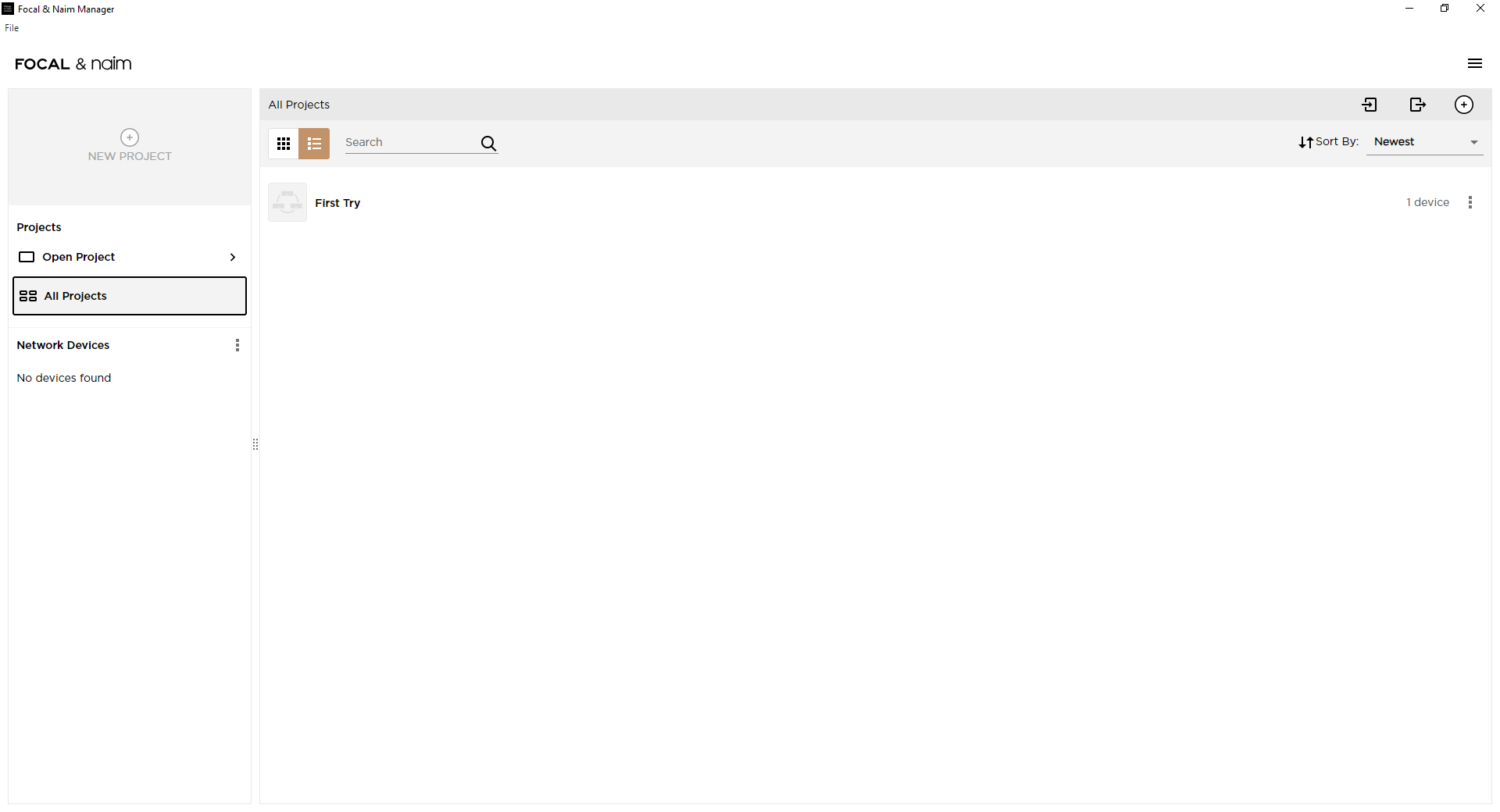
To get this help started, below is the ‘screen capture’ of the Focal/Naim Manager software when no CI devices are present. Note that ‘no devices found’ is declared under the ‘Network Devices’ column on the left - this is correct for my network, but yours should show the NAIM CI-102 device you have purchased.


Image Credit and Copyright: Focal/Naim

Wouldn’t be nice if Naim, or someone in Naim, could just provide the documentation that would be supplied to an installer, straight to this customer?

Perhaps Naim made a mistake selling a product aimed at professional installers to Joe Public and then are reluctant to provide support when they realise this excellent product is more popular than they anticipated?

It’s scary; if you misconfigure it you’ll damage your speakers.

How do I avoid that scenario?

We’re not at liberty to tell you. Thanks for buying our product.

Come on Naim!!

I would imagine anyone on this forum would be able to cope with the details required to set up this piece of hardware considering the amount of tinkering that goes on here. It’s not like it’s being sold in Curry’s or PC World.

DBS.

3 Likes

Would be really nice to have a kind of user manual.

Perhaps a few current users could write some headlines where other could fill-in, in order to further make the CI 102 understandable in setting up and use.

Bet it could be a hot selling item if this issue would be handled.

I’m not sure I understand the “dealer install” idea if dealers are selling this item as “hand over and find out yourself” method. Maybe I should call my dealer tomorrow, making an order and ask when he could do the “install” ?

In Naim land the CI 102 is “cheap” and it looks exemplary.

3 Likes

I think the CI-102 is a great product, so if customers were to easily understand it, it would be great. Its potential is high and could sell more, it deserves it in my opinion.

2 Likes

Have you read through the Focal & Naim Manager User Manual? It’s probably best used alongside the software as the program appears to offer additional assistance.

4 Likes

Good timely posting Richard. Even these manuals may appear intimidating to some potential users. Steve’s comment that the product works straight out of the box is encouraging.

Obviously, my previous descriptions of my activities with the CI 102 were very highly technical because I was interested to see how I could make the NAIM CI 102 do what Linn Space Optimisation enabled products do in my listening spaces.

Nevertheless, I am happy to chip in to give my perspective if people want to post here.

1 Like

Many thanks once more for the kind offer of assistance. Appreciated​:+1:

First off i will attempt to answer the questions you brought up to help clarify my position as it stands.

First off yes. I have now contacted dealer a few times.

To be clear they are very nice guys but as it stands know less about the ci102 than i do after owning it for a fortnight.

They keep saying they will get a Naim rep or Naim hq to call me but so far nothing.

The amp was bought fully knowing by the dealer it was to downsize from the multi box olive system i had for something more wife friendly. In other words as a trad amp.

I was told it was an install but it ran along the same lines as the wiim. They were even giving me a mic to use with it for rc until they realised it was not possible.

Doubt i’d have bought it now with the lack of any documentation or assistance…..although on my basic settings/ running on a focal preset it does sound great. Just know there is more to come….if i can find out how.

Second question was what kit i have and room size.

I demo’d the amp with the view to pair it with dynaudio emit 20 or ae1 anniversary.

I plumped for the quite newly released Scansonic M15.2 speakers which won me over at 1500 pounds.

Cables are brand new factory terminated Chord rumour x with Chord ohmic bananas.

Not sure as of yet which room it will finally reside but both rooms are circa 13’6” square​:+1:

The things i’d like to know range from the basic of basics to more in depth things. The literature provided with the amp goes barely beyond plugging it in.

Basic first which amazingly the documentation does not give.

The lights on front panel. I have the larger off/on button that glows white. I then have a small light that is red when amp is switched on….then turns pinkish when connected, is this correct?

We then have the two digits 1 +2 which turn a solid green when in use. I learnt on here and google they may be to indicate clipping.

Not a murmer about them in the booklet. Zilch. Down to guesswork again.

Secondly i still have no idea how you save a sound setting. If i like a setting i have no clue how to save it for back to back purposes as on the Wiim.

Someone on here said i needed some “dealer” code to activate this but dealer has no idea​:roll_eyes:

Finally i just need to know the basics of the dsp/ eq settings and graph plus filters.

Filters are colour coded….what do they apply to?

The graph has a parallel line which represents htz i think. No idea what the vetical line represents.

When in parametric mode on a filter and you drag a curve manually sometimes you are stopped by a red line that appears above it after a small movement. Why? Is this some kind of limiter?

Simply floundering without any basic instuctions or naim info of any kind.

Worrying thing is now dealer is hinting i’m locked out of features “for a reason”…..mentioning damage and bricking the amp. Maybe rep has told him to say this​:thinking:

To be brutally honest i’d not have bought it if up front i was told all of this,or that i need to be a sound engineer to use it.

The thing was sold as a 2.1 living room conventional amp in a home hifi shop. With dsp as many streamer amps have.

I am not daft and do pick things up quickly. However without a shred of documentation or naim back up it is hopeless.

Maybe should have stuck with my uniti atom/ ae 300mk2 idea at similar money.

Many thanks again though for trying to assist.:+1:

1 Like

100% Nail on head.

Really sorry to hear.

I’d forget everything about this item unfortunately.

Hi TheOlivehasgone

Thanks for all your responses. I have been trying to interpret where exactly you are in your understanding of the Naim CI-102 and the Focal/Naim manager product.

First, a point of clarification:
The Naim CI-102 has capabilities included in it that are way beyond a Wiim Pro Plus.
Furthermore, if you want to undertake tweaks to get ‘more’ out of the CI-102 by using the digital signal processing features, I am afraid that taking a few steps to being a ‘sound engineer’ will be necessary.

FYI: I am going to proceed in this post on the basis that you are willing to undertake this journey.

Your first question…

perhaps will be answered by reading the manuals that Richard Dane has helpfully provided at post number 15.

Your second question…

The answer is obtained by reading about how to create a ‘project’ which is covered from pages three (3) to seven (7) within the first manual linked in the Richard Dane at post number 15 here.

Your next questions, which relate to the digital signal processing features…

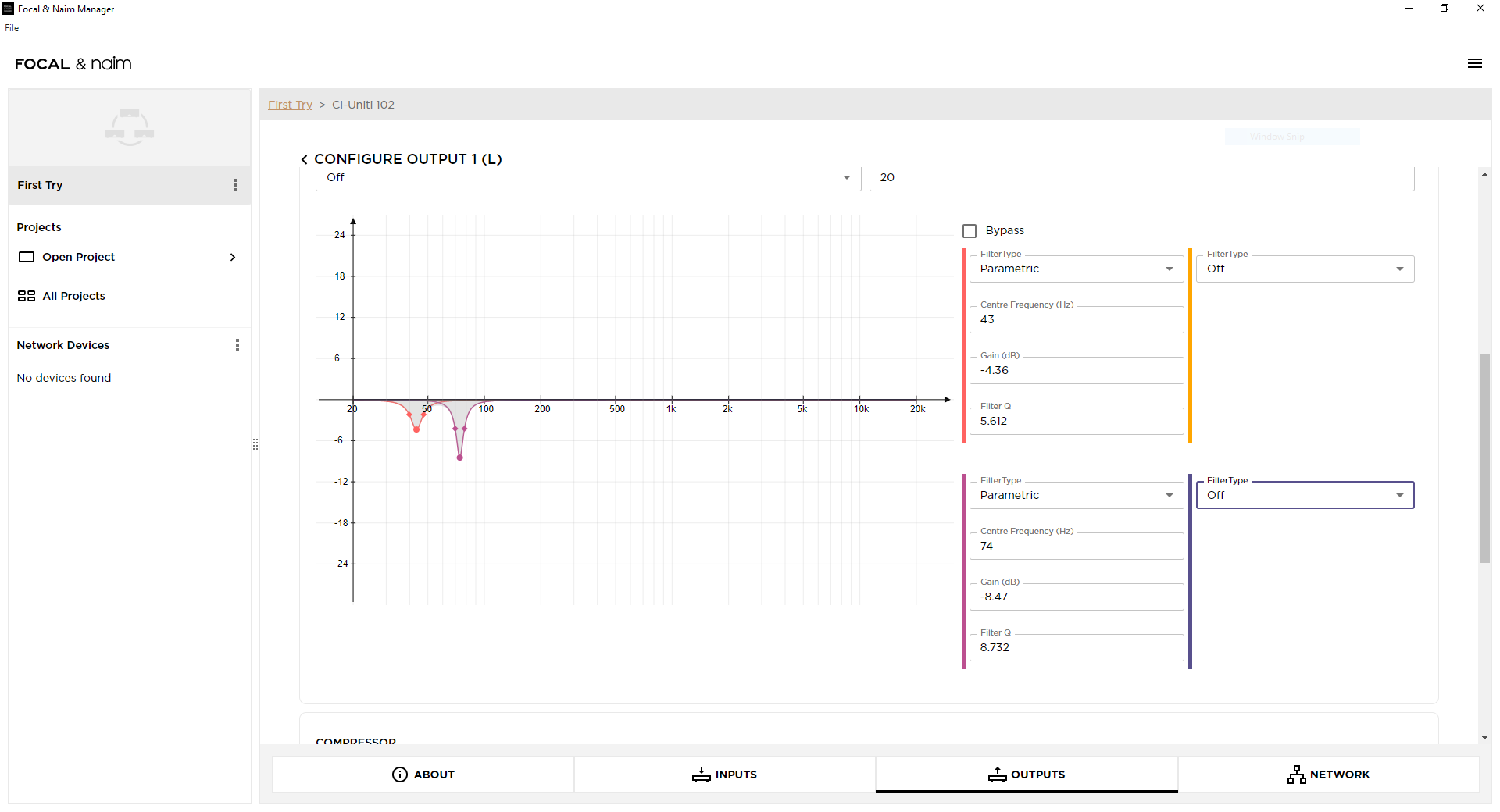
I do not know for certain why the filters have been ‘colour coded’ - but I suspect that it is to help visualise/relate what is occurring on the right hand side of the data entry area with the impact in the frequency domain displayed on the left. I have included an example (see image below) from my display to help others if they are reading this thread.


Image Credit and Copyright: Focal/Naim

The horizontal axis in the graph represents frequency in Hertz.
The vertical axis in the graph represents filter gain (at the given frequency) in dB (relative to input).

I have a suggestion @TheOlivehasgone: perhaps you could start to post screenshots of your work in the Focal/Naim manager software too?

You asked a question here (repeated below), which indicates you are working quite deep into the DSP capabilities of the CI-102.

The simple answer to your question is YES! I think to fully explain why this is I should take time to post more general information about what is NOT a good idea when using features such as the DSP EQ. But I think I have covered enough for now.

ATB

E of E