I have an issue where I want to simplify matters in all aspect (s) and the CI102 fits what may be a system requirement
My other requirement is a headphone system and I have all the components for an all Naim /Focal system - with zero additional cost to myself
Again thank you for your input
I will address your 3 questions first.
- My ci 102 is indeed set up with both aeriels fixed in place.
I do not have it connected via ethernet. I disposed of ethernet and “home plugs” when we went high speed broadband a while back.
2 and 3) Sadly i have no screen shots of the settings i used on the Wiim pro plus.
I let it go with the olive system stupidly.
I say stupidly as i’d have loved to have tried the idea you suggested earlier in the thread..i.e running the Wiim through the 102.
You asked how i came about my settings on the Wiim. Good question.
The answer is simple really. With being able to easily name and store settings it was far simpler than this 102.
For example. I would do a room sweep with the wiim. If pleased with the overall sound i would name the setting and save it.
Then on that same setting i would then adjust the eq. Maybe to raise treble, back off or raise bass etc. When happy i would name and save that and “back to back” it with first saved setting.
I had about 8 saved settings i liked and could switch between.
A simple feature that the 102 seems unable to do. At least i can’t fathom it and have had no definitive answer on how to do this.
Saving settings is crucial to be able to go any further.
With those 3 questions hopefully answered can i go back to a point you raised earlier in your post please
You correctly said we had been informed by Steve etc. that the 102 plays fine out of the box. I agree with that 100%. So does any all in one amp
The part i did not grasp/agree with is where you said it needs NO tweaking.
If this were the case why would Naim put presets for many Focal speakers in the app? That does not line up with the comment.
It needs adjusting for the speakers it is being used with. It needs optimizing.
That is where i hit the problem. I have no basic grasp of how to do it with none Focal speakers.
If i was told up front, and pardon the cliche once more. If i was told you need to be a “sound engineer” to set it up i’d have swerved it.
Either it should be sold only to pro install engineers or serious user info should be given if it is being sold as a traditional amp to an end user. Or just don’t sell it as a traditional amp at all. I don’t know my high shelf from my notch and not ashamed to admit it as i know i’m not on my own
As i say….a video or a description of the basics of setting it up with none focul speakers is all i am after now in truth…plus how to save settings
Many thanks once more.
1 Like
Hi @TheOlivehasgone ,
Sorry for the slight delay for this reply. I keep re-reading what you have written throughout the thread, just to make sure that I understand the situation.
However I if might just correct something…
I don’t believe I ever suggested running the WiiM through the 102 - and nor would I.
Nevertheless one could choose that approach if one wished to try that.
In my experience of using room correction systems is that some brands appear to be super easy to set up and with other brands not so much.
However, I would also observe that it is often better not to use the ‘broad brush’ or ‘quick fix’ corrections (such as the WiiM) and my approach is generally to delve a bit deeper to understand the capabilities in the systems. I think you are already very close to having your system set up correctly.
I would very much like to help and as I mentioned previously I think you have made a great purchasing decision in buying the NAIM CI-102.
I believe the difficulties you are experiencing in not being able to save settings will be solved simply by attaching an ethernet cable to the NAIM CI-102. Once you have the setting saved you can disconnect the cable. If you do not currently have an ethernet cable then get the dealer who sold you the CI-102 to send you one Free of Charge.
I will continue to provide input on this thread and answer any further questions you might have. I may even post some of my general observations on room correction systems such as DIRACLive, WiiM RoomFit, Lyngdorf RoomPerfect and Linn Space Optimisation (maybe others too?).
ATB
E of E
Intersting though and thank you.
Maybe i am misunderstanding this advice and apologies if i am.
But how would an ethenet cable help in saving settings?
There is no physical “save button” to do so.
Where does it save it to?
I cannot find this feature anywhere.
I can’t fathom how an ethernet cable could solve this.
Again apologies if i am way off in my thinking
Thank you once more.
1 Like
Hi TheOlivehasgone,
Let me reiterate that I am using my memory from last year when I had the device. Now I only have the manager software on my PC with the filter and other settings such as Compression (set to OFF) and loudness (set to OFF) as part of the meta data associated with the ‘Project’ I created.
I may be giving you incorrect advice re the ethernet cable - but I doubt it.
REASON: Section 2.3 of the User Manual states the following:
- Network port
The CI-Uniti 102 uses the network when being configured. If possible use a wired
network connection during use. This socket is also used for Dante.
In other words some step needs to happen to pair the Focal/Naim manager software with the CI-102 device you have. If this is done and you have also created a ‘Project’, the Project will automatically save the settings within the manager software AND put them on some FLASH memory (memory that keeps data) actually on the CI-102 (if you have the CI-102 device correctly paired with the manager software).
All of this is covered in the Focal/Naim manager software manual that Richard Dane posted and I referenced previously here…
Here is the image again of the Focal/Naim manager software on my screen just right now.
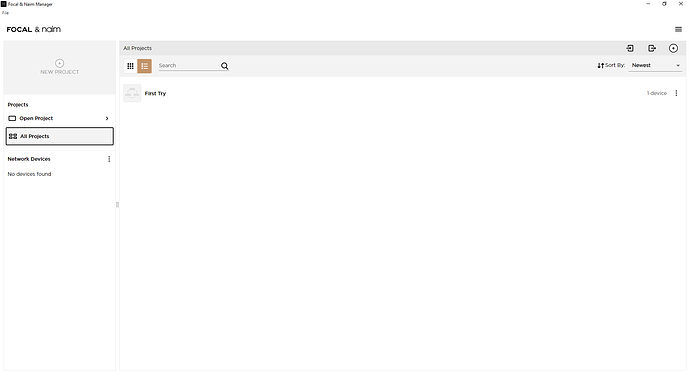
Image Credit and Copyright: Focal/Naim
If you can see, I created a project called ‘First Try’, which is visible because I have the view window set to ‘All Projects’.
When I click on that text ‘First Try’ (in the ‘All Projects’ view window), the following appears…
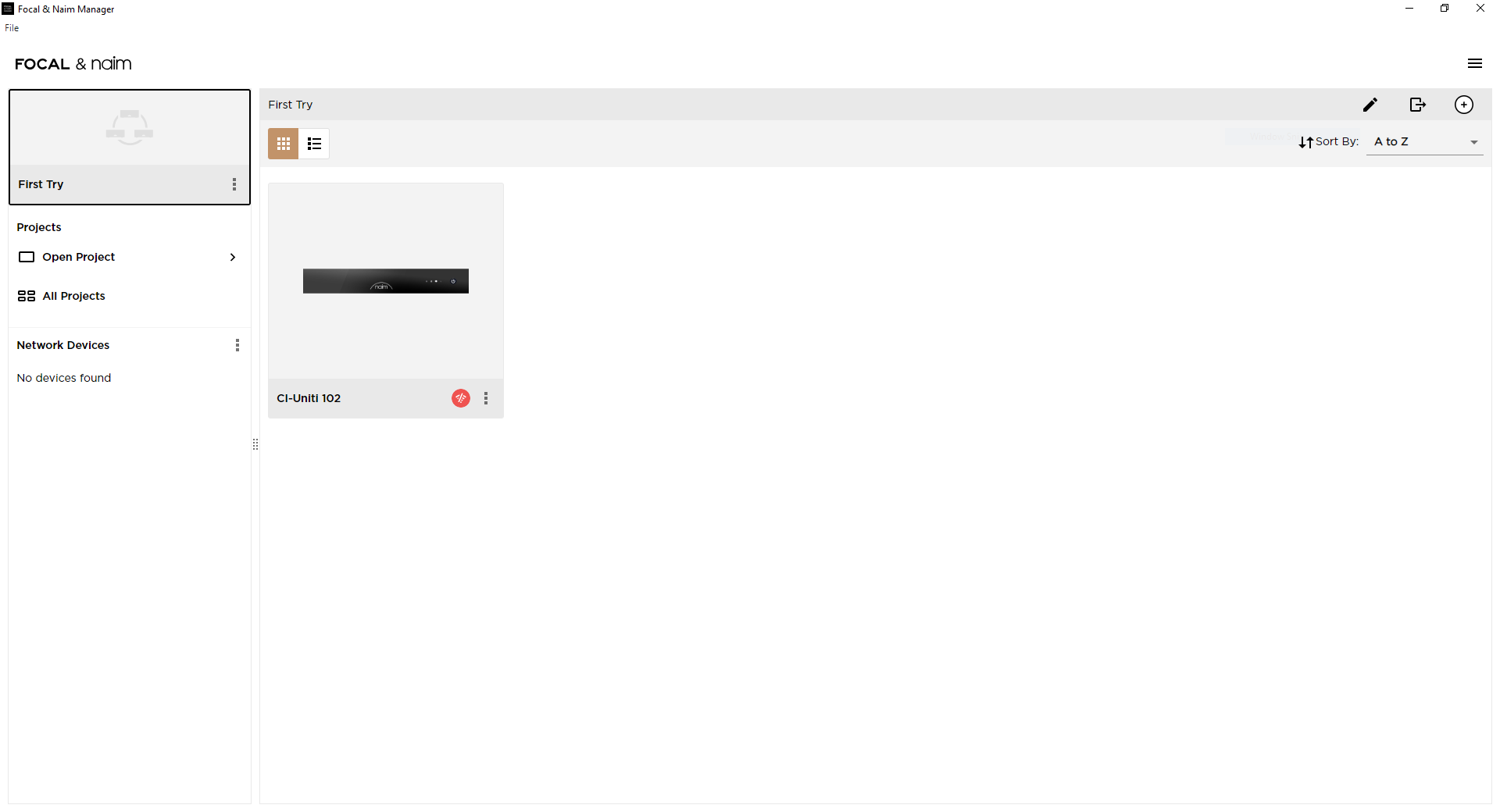
Image Credit and Copyright: Focal/Naim
If I click the three little dots in the bottom right hand corner of the CI-102 device thumbnail picture, the following options sub-window comes up.
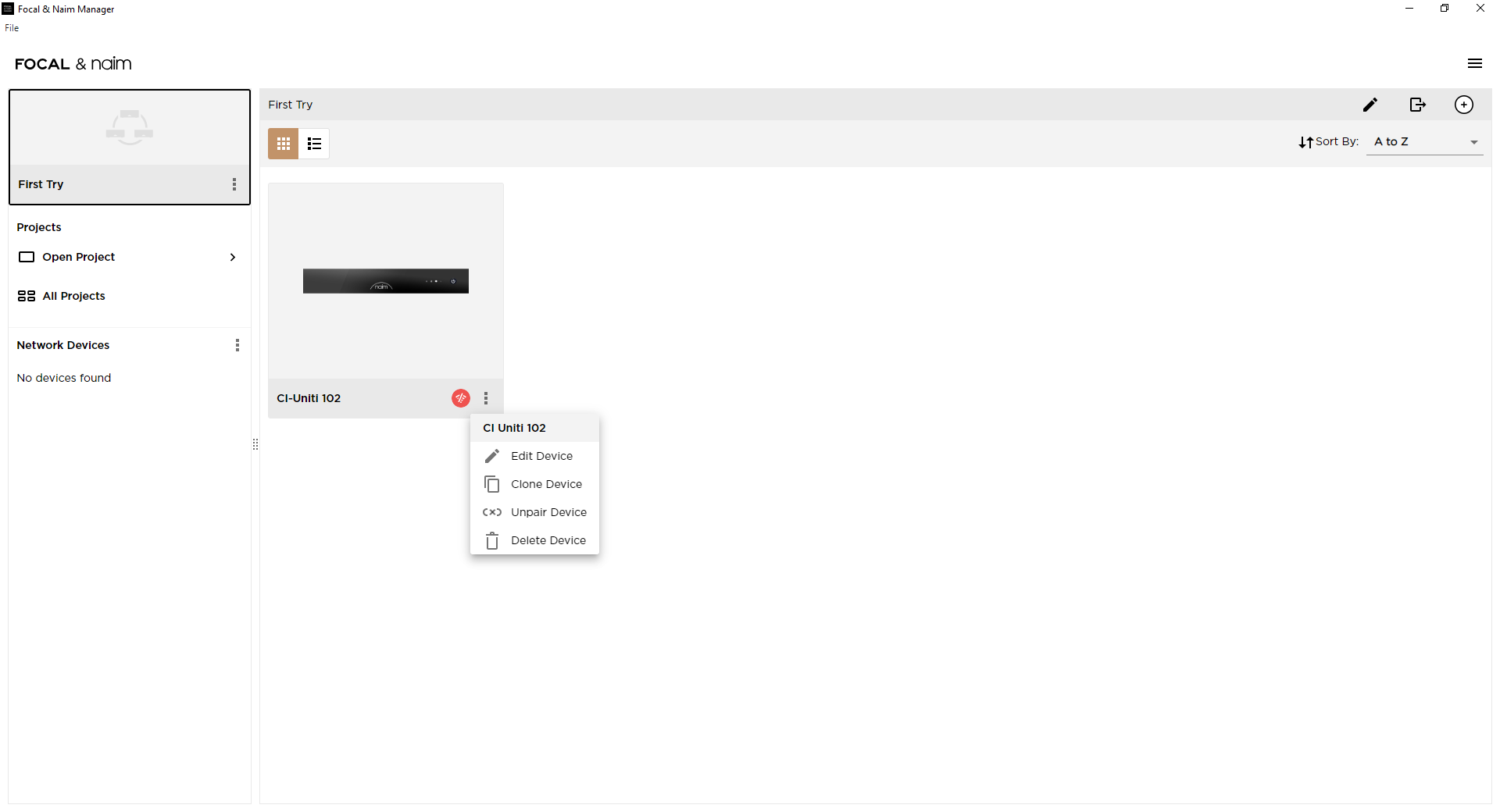
Image Credit and Copyright: Focal/Naim
Hopefully you can see that there is the third option to ‘Unpair Device’. What this suggests is that even though I do not have the CI-102 device anymore, there is some data on my computer that holds the meta data/information regarding that device. It is possible that such data is (also) held elsewhere on Focal/Naim servers.
If I simply click the ‘Edit Device’ selection (or simply clicking on the thumbnail picture of the CI-102) a full edit window comes up showing the serial number of the CI-102 that I had. But I assume you already know this as you have already been changing the Compression and Loudness settings on your device?
The other thing that you might note is that the little wireless symbol next to the three dots on the thumbnail image shows in orange with a line through it (there is also a dynamic message pop up stating “Device is disconnected”).
In summary, you WILL need the ethernet cable that I have suggested previously, and you WILL NEED to have the CI-102 correctly paired (with F/N manager software) and also have CREATED A PROJECT.
My working assumption (as you have stated) is there is no need to explicitly action a SAVE button - data transfer simply happens through the live ‘pairing’ from the FN Manger control software to the CI-102 device.
I am reluctant to copy Stevesky or Richard Dane to check my guidance on these topics, but please do have a bit of a play with the FN Manager software. Perhaps try ‘Pairing’ and ‘Unpairing’ your Naim CI-102 from your created ‘Project’ to see what happens?
Perhaps try creating two Projects (with the same serial number of your CI-102) to see what that might enable you to achieve?
ATB
E of E
1 Like
I’m not sure the Ethernet cable is really mandatory.
All the previous Naim streamers work in principle on both the same. Obviously Dante will only work on the cable, but anybody planning to use that feature will know. (And why would there be a WiFi, if the cable is mandatory?)
Of course, when considering installations for a CI context, I would also highly recommend cabled Ethernet. Guaranteed stability and bandwidth (including all multiroom or whatever setups), no configuration hassle, minimal support needs towards the user. And if you put the 102 into a rack, you’ll likely have structured cabling and everything already in place.
Well working WiFi should be perfectly fine; unless it’s not working. (See all the threads on this forum - router changes, unstable connections, interference, funny configurations in mesh networks, …)
I think it is worth taking a look at the instructions for the CI-102.
The instructions for the Network port are that it is used for the configuration of the device. Afterwards it may not be needed.
Do please try a CI-102 for yourself. I am happy to be corrected in my guidance discussions above in this thread.
@Edmund-of-Essex- regardless of whether your suggested fix works for the OP, and I have confidence that it will, the time and thoughtfulness you have invested here are exemplary community service. Thank you.
6 Likes
Hi @Middle
Very many thanks to you for the compliment 
Actually, your post has reminded me to say that if anyone is thinking of putting in filters for room resonance corrections, the general guidance is the one only should attempt to reduce peaks, not try to increase gain to fill in nulls!
So my 6dB peaking filter example I showed in my previous post number 26 is definitely NOT a filter correction I would introduce.
1 Like
Hi @TheOlivehasgone ,
I hope all is well with you.
How are you getting on with your NAIM CI-102?
Did you manage to save your settings or create a ‘Project’ yet?
While you have been a bit quiet on your thread I have undertaken some more work to understand the capabilities of the WiiM Pro Plus and in particular the RoomFit software.
In summary, I am not sure I would wish to buy such a product. I can see that the development roadmap for RoomFit in the WimM Pro Plus includes the capability to undertake spatial (multipoint) microphone measurement - this being in beta release at present.
I have watched several online videos of people promoting this product and demonstrating the RoomFit measurement method and the corresponding graphical and AUDIO results. Nevertheless (IMO) the product is not very good.
Fun? - yes maybe.
However simply not very good for achieving consistent improvement in the ‘in-room’ audio experience. This applies even when the WiiM is added as a front end source to ‘old HiFi gear’.
YMMV.
Thank you for posting once more. Much appreciated.
Hope all is well with you too.
I have not used the ci 102 recently as the weather has been nice and we’ve been busy with the garden.
It breaks weatherwise next week so i will spend some time with the amp and see if i can understand it further.
I did actually attempt a project to answer your question
I am not fully convinced the feature is aimed at when it’s used as a stand alone conventional 2.1 hifi amp.
I feel it’s for creating a project with another amp in another room.
In no way is it a save feature for a stand alone amp…..i stand to be corrected.
The Wiim to my ears was on par with many more expensive dacs i used with the old olive.
It was flawless as a streamer with a brilliant interface too.
As i say easily on par with the early Benchmark, Modified MDac and N dac.
All to my ears of course.
Best sound i have had in my Dac journey was some Allo kit i splashed out on. Raspberry pi based. Incredible but so flaky running it with LMS. If it crashed it was a nightmare to set up again.
Having said that there was more info about on youtube for setting them up than there is with this thing
To be serious. I think the 102 sounds great.
It would just be nice to get more out of it.
Any other piece of hifi equipment i’ve ever needed advice about the dealer has always given advice.
With this amp it’s tumbleweed if you call them….hence i gave up long ago.
If it becomes mainstream maybe more user videos will appear on youtube
Again thank you for your thoughts and have a glorious summer
1 Like
Hi TheOlivehasgone,
Great to hear that you still have the NAIM CI-102!
My casual observation is that you seem very capable of setting up digital HiFi gear (ref the history you declare re ‘Benchmark’, ‘Modified MDac’, ‘N dac’ and ‘Allo kit’ with ‘Rasberry Pi’ and mentioning ‘LMS’).
Furthermore, your thread has enabled me to get more educated about some really compelling audio products - if one considers ‘cheap’ and ‘feature rich’ as the main objective.
NAIM have never (to my knowledge) had a market position of ‘cheap and feature rich’.
Personally, I find it amusing that some of the highly positive reviews of the WiiM Pro Plus are from people with 40k plus followers who don’t even know what High ‘Q’ and a Low ‘Q’ means for a Room Correction or EQ filter - and actually give the exact counter explanation!
(It may of course be the case that I am the one that is confused?).
Nevertheless, what I am NOT confused about is that DIRACLive has had multipoint microphone measurement figured out for over 15 years (commercially available since 2011) and has clearly shown the measured and corrected impulse responses since 2018 - both of which WiiM RoomFit has yet to provide.
I note that DIRAC have simple YouTube videos to help with setup and configuration, but I found the step by step process defined within the DIRACLive software itself to be quite sufficient.
Back to your issues with the NAIM CI-102: I suppose NAIM could create some YouTube videos and it does seem like a modern way of explaining equipment setup is via YouTube videos.
Perhaps I am too ‘old school’ - I just prefer to RTM.
If you did want to set your NAIM CI-102 to top performance (where it corrects for any dominant room resonances) I could still help. But I have become a little wary since you seem to have had quite sufficient digital HiFi software and setup experience.
This topic was automatically closed 60 days after the last reply. New replies are no longer allowed.