Maybe check the speed of your broadband with one of these web tools? In the past, I used Which?'s broadband speed test.
There has been no rationing, in fact the opposite has happened, most ISP have temporarily removed bandwidth restrictions in the UK.
For 192/24 FLAC you want to ideally have around at least 15 Mbps sync speed, which will equal about 12Mbps throughput.
1 Like
Ahhh…this probably explains it…while we normally get around 25, the speed has been dipping significantly over the past week to as little as 10Mbps. Up to 16 today and the Stones live is pretty impressive in 192/24 
I can stream 192/24 at 11 mbps without any issue but that’s with nothing else contending
Yes - if you have nothing else using your access you can get away with under 10Mbps depending on the FLAC compression for 192/24 - but most people don’t have a dedicated internet access just for their streamer.
No contention is probably a key issue…still getting occasional drop outs, probably due to other family members on the net. Shame, as it is hampering my decision about Quobuz (is it better overall than Tidal?).
[I am acutely aware that these are but trivial issues in such desperate times]
I would get in touch with my internet service provider to establish as to why you have been experiencing recent drops in internet speed so that it doesn’t spoil your Qobuz HiRes experience – or just ban you family from using the internet when you listen to music. Though I fear this might translate into full-on riots in Casa Docv, especially in these Covid-19 days… 
Well its shouldn’t be too much of an issue - there is not much 192/24 and where there is I have always seen the same media at lower definition.
Cheers Simon, I’m on the government’s particularly vulnerable list (though I’m doing fine at present) and music is a real balm…it’s great to get advice from fellow hifi enthusiasts, particularly as my technical knowledge is almost nonexistent!
1 Like
I’ll be banished to self isolate on the roof after the inevitable riot 
1 Like
I have a paltry 4.5mb line speed, and having just jumped from Tidal to Qobuz, was expecting to have to set it to 16/44 to get it to work reliably. In practice, it struggles with 24/192, but is fine with 24/96 as long as the network is otherwise quiet. Yet we still see posts here from people with pretty decent line speeds getting dropouts. Perhaps more to do with latency than line speed, although the new Naim streamers shouldn’t have too much trouble with this compared to the old models with their very small buffers.
@ChrisSU Just an idea…It is not uncommon for both Tidal, Qobuz and the like to cause problems with your local ISP concerning bandwidth consumption. I had this with both while I have a screamingly obscene amount of data speed by fiber. The solution I found was to change my DNS addressing to recommendations easily found on the internet by searching a bit (Google DNS, OpenDNS, etc) to replace the specific DNS assignment by your ISP.
Certainly worked for me in France with ISP Orange. There were lots of us here with the same problem and we resolved it thusly.
Brgds.
Have you cancelled Tidal in favour of Roon?
*Quobuz sorry
I will give this a try.
I don’t think that my BT homehub will allow me to alter the DNS 
Yes I have now
Yes you shouldn’t need to change your DNS. the DNS will be optimum usually for your ISP. From a security/safety perspective I would be wary of changing the DNS as well.
Certainly with a quality ISP like BT, that after all provides a considerable proportion of the UK internet backbone infrastructure, small consumer oriented services like Tidal and Qobuz are trivial.
Bandwidths in the regions of Tbps are the ones that get more interesting.
As an experiment you can over ride the DNS for a client by replacing its DHCP settings… but I don’t recommend this unless you just want to be curious.
Great thanks, l will avoid messing around with it. My Wi-fi speed is definitely lower now than it was when I first obtained the “superfast” service, with no obvious reason other than some form of choke being applied locally. I’ll go directly to BT to try to sort it out 
There won’t be any choke.. it doesn’t really work like that.. but your sync speed is key.
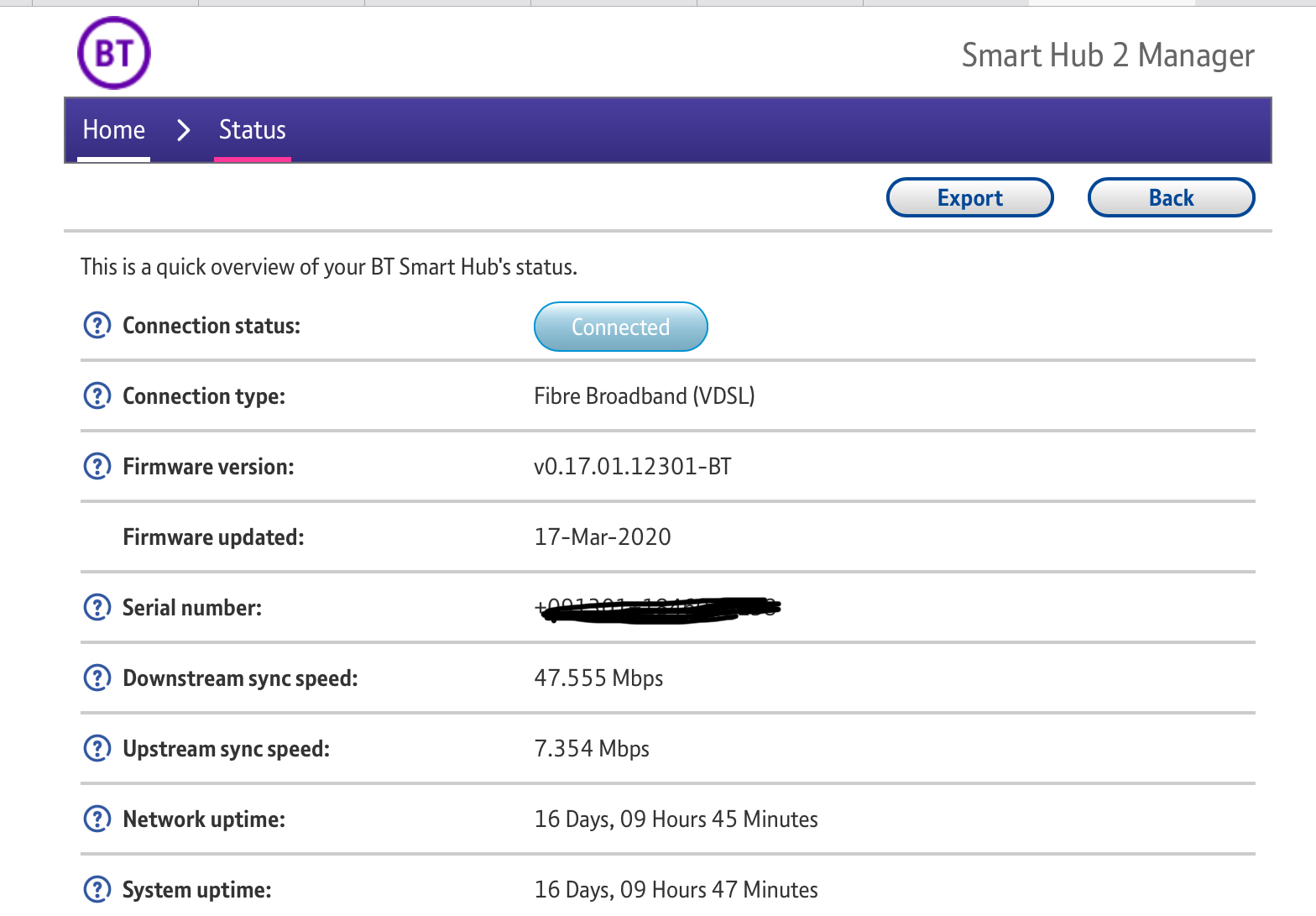
You can see that on BT router… if there is noise on the line, electrical interference in your house near the broadband cable, then you might suffer lower interference.
If you have had severeal disconnects, or power interruptions, the system will try and improve your sync stability by using a higher noise margin. If that is the case your sync speed should improve back over the coming weeks if the fault or source of interference is removed.
Look at this screen or similar, and note the sync speeds… it is these that will determine your speed, rather than choke.