It cannot be powered by a separate power supply, but a PowerLine can be used.
I didn’t know … But where do you connect it?
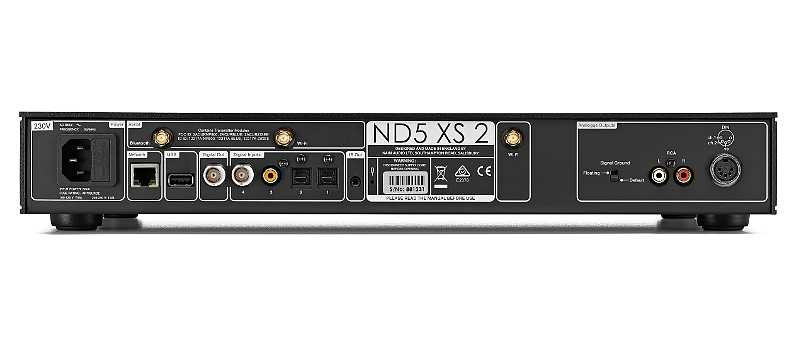
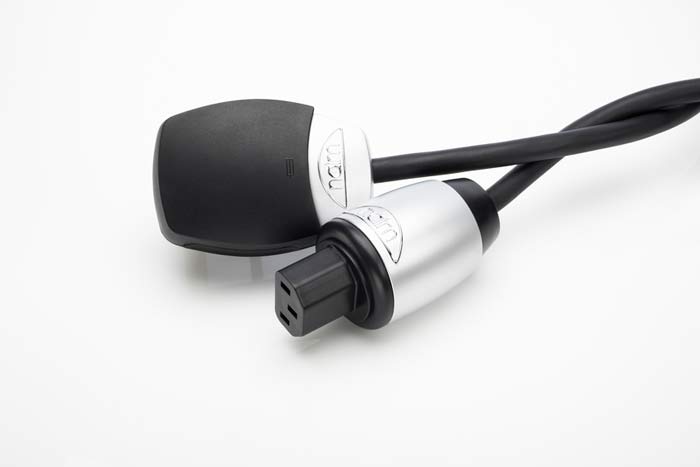
It plugs into the AC IEC socket. It replaces the stock power cord.
How it’s done?
1 Like
€? I have a power nordost blu heaven now
Naim Powerlines have a unique feature compared to any other power cables - microphonic isolation.
I have been listening all night through Tidal and the one thing that really does strike me (although there a lots) whilst streaming from a subscription service via the ND5 XS 2 than compared with my old laptop arrangement, is the amount of more mid-range coming through. I no longer have to squint my ears as it trying to listen, with the ND5 XS 2 it’s just there and in abundance. The bass is miles deeper and tighter as well as a lovely delicate, sweet & detailed treble but it’s mid that has blown me away. Effortless listening at any volume can be had with this new streamer, quite remarkable and a revelation to what I have been used too!
3 Likes
You’ve got a sweet system there Stephen. A fine combination of components that seems to be hitting the musical spot.
Nice one 
1 Like
one question Stephen: how is your nd5xs2 connected in ethernet? to the router? dedicated switch?
A very good questions FR. My ND5 XS 2 is connected via a Ethernet cable straight to my Plusnet integrated ‘switched’ router. Thanks
Thanks James. Yes, i’m liking it more and more each day. I’m so glad I decided to go the Naim route.
1 Like
so perhaps, but not sure, a dedicated switch, for very little money, would give you a significant upgrade. Router to switch and nas and streamer to switch. For me, even a little dedicated switch like the netgear gs105 gave me a big uplift. More often, a direct connection to the router is not the best for sound. It’s noisy.
There were a lot of posts on that… You can try.
4 Likes
Ok FR. That’s great information and thank you very much for the heads up. I had a feeling that this could be upgraded and, like you say, for not much of an outlay. It’s certainly got to be worth a punt and something I shall be now considering.
2 Likes
In Italy everyone says to connect directly to the router if the latter has gigabit ports. Is better…
Let me know how you get on…and what the difference is
I currently have my SKY router connected to my ND5 and the other output from my router goes to my Ethernet wall plug…
I could place my NAS/ND5 all on the same switch
Barry
My dealer told me not to bother with dedicated switches as my router with 4 gigabit switches is up to the job, but I am keeping an open mind nevertheless…
In general, for modern routers, they have good switch capabilities. But I don’t agree a routers switch is “better” , a full duplex 10/100/1000 Mp/s switch will be either the same or better, not worse.
However a few other things to consider:
A commercial grade router will be made to a price & minimising specification in areas such as the chip-set might be included. So the question is how does the router switch perform? Do you have any published switch specs?
A switch sold as such will be a full duplex switch & capable of correctly managing the data stream distribtion, & it will have published spec’s on that.
The other advantage (that I have) with a switch is it will only have one cable coming from the router (wireless hub) to the switch, & as the wireless hub is best located in full view & with space around, the visual impact is so much better with one cable over (in my case 3) with everything going to the router.
1 Like
Well, not everyone.
Not me ,for sure.
Get that netgear switch and an ifi ipower 12v DC low noise is my advice.
That’s odd, because Naim streamers do not have gigabit ports.