Yep, however the gpon is working in the separate subnet, different network mask. All client are dealing with my central ASUS
Hopefully someone with more knowledge will chip in, but I think that is an issue. I understand that the subnets are different in terms of configuration, but they share the same physical network, and so both DHCP broadcasts will be across the full physical network (both sides), and you therefore cannot guarantee what a device may pickup. (I dont think this would effect WiFi devices though)
That is pretty much what I had when I added a separate mesh network to my existing ISP router and I had all sorts of issues. When I set the Mesh device to run in AP mode, everything sprung into life.
It may be worth looking at this current thread, where network operators ssiea are also being discussed:
https://community.naimaudio.com/t/tidal-buffering-stuttering-only-in-the-evening/42400
So the GPON router is connected to the WAN port on the AX86U and then a cable goes from one of the LAN ports on the AX85U to a LAN port on the AX57?
Have you checked that the phone/tablet you are using to connect to the Naim is using the same IP address range as the Naim device?
Yep, I’ve checked, they re using the same address range. The only guy that is outside this is the gpon - I made this intentionaly, to avoid possible issues
And they are connected the way I mentioned?
I assume you’ve set a fixed IP address on the Naim, is this outside the range given out by DHCP?
Also is the AX57 set up as a Wireless Access Point or a Router?
The Ip addres for the streamer is fixed, explicitly set in both streamer and the central router.
Another router works in the media bridge mode - it exposes the wired clients(streamer, nas, tv) to the wifi. So, it does not create its own wifi - it connects to the one provided by the central router. Technically it servers as a switch.
I’ve chosen this way as there is no good way to wire the streamer, nas and tv directly to the central router. The bridge mode avoids any additional subnet, nat, dhcp, etc - it literaly exposes its wired clients to the upstream wifi.
So, from the streamer there is a wire to the bridge, then the wifi connection to the central router, then the wire to the isp gpon which is in its own the separate network.
In the settings on both Asus devices do you have multicast routing enabled, it seems to be set on a per port basis on the Asus. Also what about IGMP snooping?
Igmp snooping and the multicast routing are enabled on the central router. Another asus is in the bridge mode and these settings are managed by the central router
You seem to have 2 routers. Could you try only one, then connected to a switch with several ports you need. Read somewhere that having 2 routers give problems in streaming.
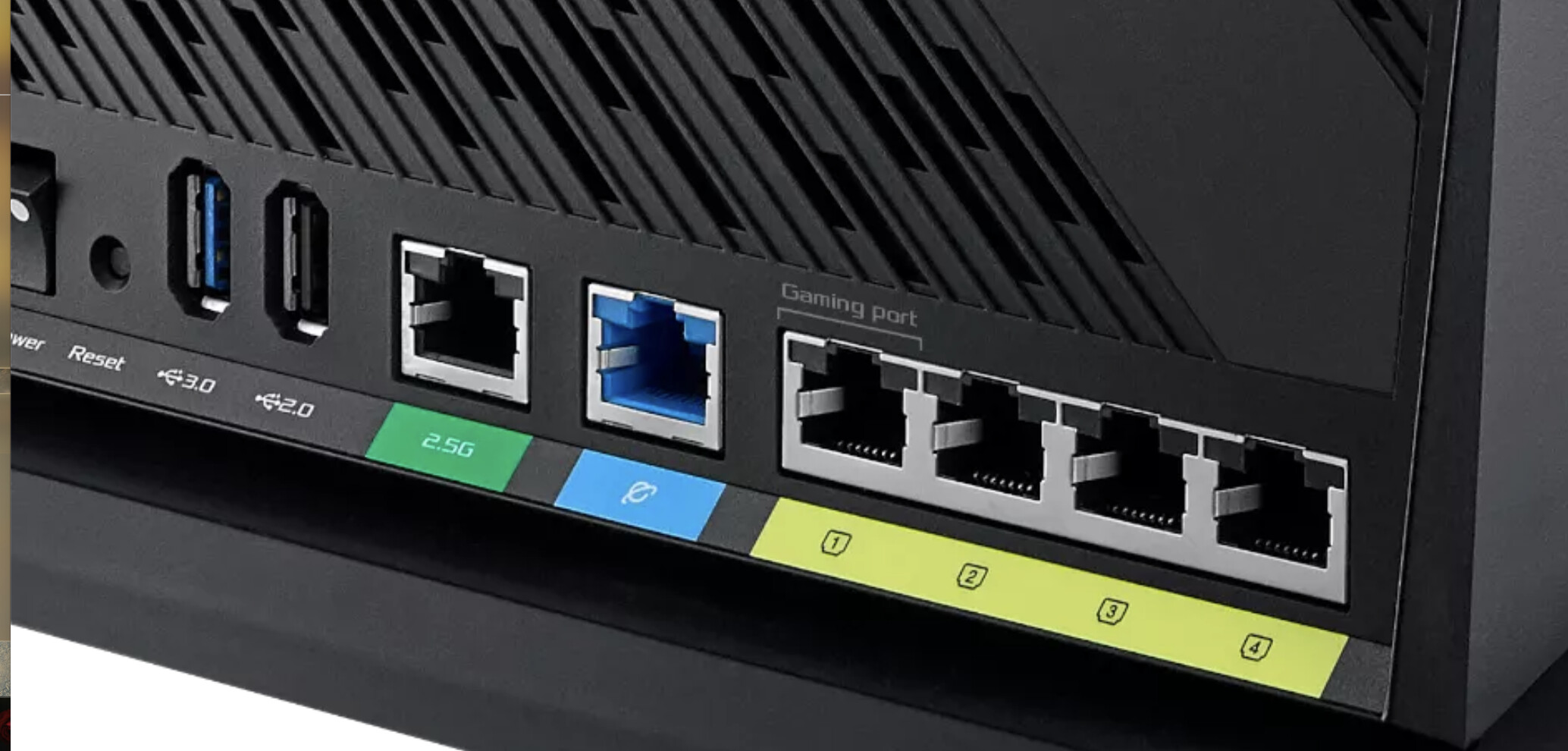
Which port above is your GPON connected to?
Also when you have issues, have you tried to logon to the GPON to see what devices it has registered?
Blue one
Upd - gpon registered just my central router, nothing else.
The secondary is a bridge, it does not do any routing, nat, dhcp, dns, etc features
Actually, If I had a way to connect directly with the wire, I would not exercise with the secondary router.
It helped me to solve some constant issues, such long connection time, awakening, etc.
The rest of issues i havent solved yet and not sure if I can:
1 sometimes streamer becomes unresponsive to any of the application
2 it plays, but the sound stops rendering, i.e. stops rendering in the middle of the track. The application shows it plays, and the playlist is progressing
3 it hiccups, as if a weak internet connection
All these issues are somehow related to each other. Usually it starts from 3, then 2, then, finally, 1
If at the same time I switch to another player, no issues at all, and never have ever been.
The usual fix is send the device to the deep sleep.
Sometimes I need to turn it off. Sometimes - to reset.
Pals, thanks for the help - I finally managed to file a support request. I put the answers from this topic to the support form, and attached a diagnostic snapshot.
If anyone interested, I’ll keep you informed.
1 Like
Is there some reason you don’t just Hardwire it to the router? I had an issue with my Auralic Aries Streamer it just did not want to connect over wifi tried all kinds of things. Finally just hardwired it. The only thing that Auralic tech support and I could come up with was that the router ( Asus RT AX88U) might have been too close to the streamer .
It is hardwired, the wifi is between two routers. There is no way to connect the streamer directly.
Why? Are you saying that there is no way an Electrican can’t pull a Cat cable??
1 Like
It is a bit pricey option.
For ages I decided that I couldn’t put in a dedicated main, until someone gave me the idea of going up the outside of the house, through the loft, and down the other side. Now all done.
And then last week, I finally got around to putting in a Cat6 cable from my living room, through te wall, up the side of the house, into the loft, then through a ceiling into a cupboard where I have a NAS and a WiFi unit smack in the middle of the house. The result is that I have since removed 3 mesh devices that are no longer needed, and WiFi much more stable.
So always worth thinking out the box
4 Likes
Try running cat cable from router to your streamer directly and see what it does. Just see if it works.
I have all my Naim and hifi and AV equipment hardwired.