If would be very surprised there was any problem as I am pretty sure it will go via Naims audio-system. But this is based on my trust in Naim and not any actual tests - and “GoldenSound” did not test Spotify Connect.
1 Like
I am using Spotify Android to connect to my ND5XS2. It shows lossless in the Spotify app and also the FLAC coded and bitrate on the diagnostics page.
The second screenshot in your post looks weird. That is the screenshot I get when playing lossless tracks on the phone itself. If I connect to my ND5XS2 using Spotify Connect, it displays as the screenshot below (e.g. It show the name of my streamer - lossless) and the icon is different.
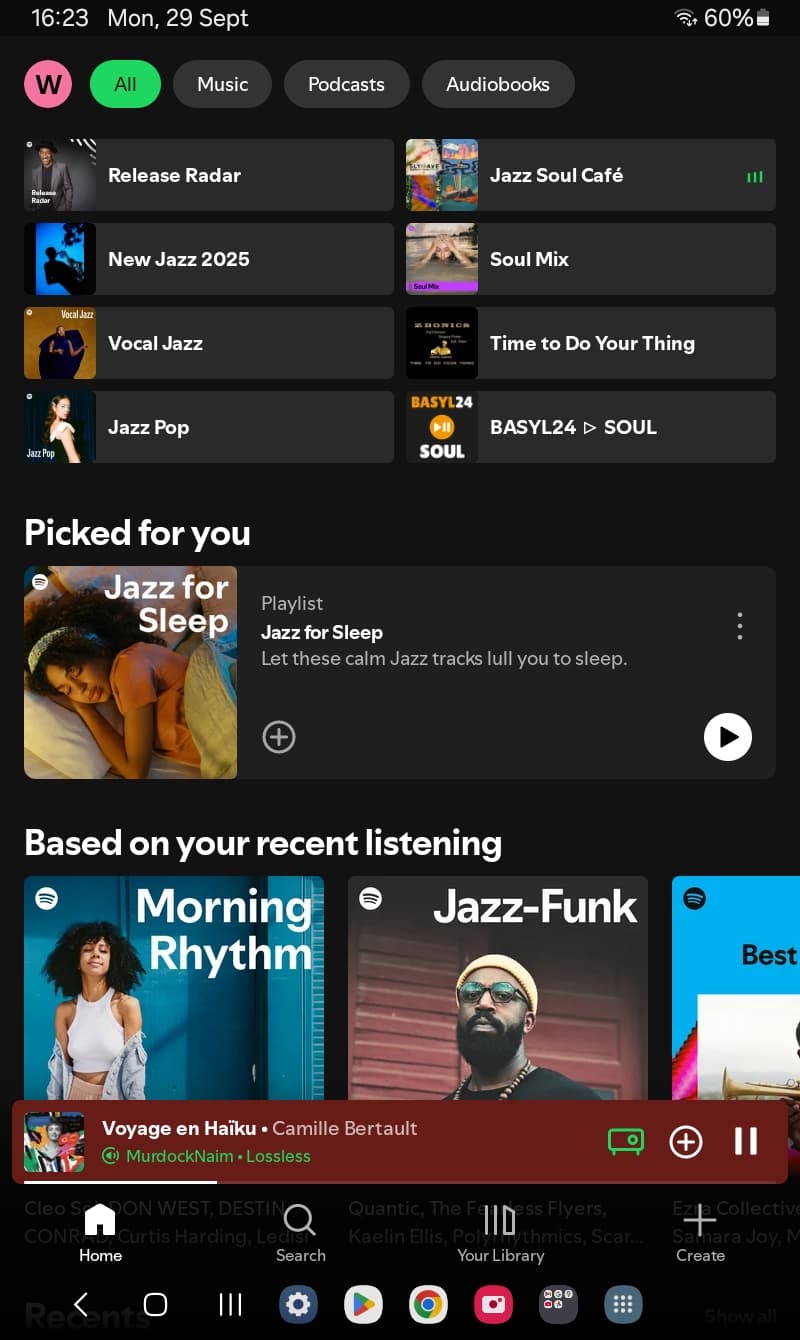
Hi @Norma_Snows
For each spotify connect device you need to force lossless in settings, so while connected to the device goto settings->media quality:
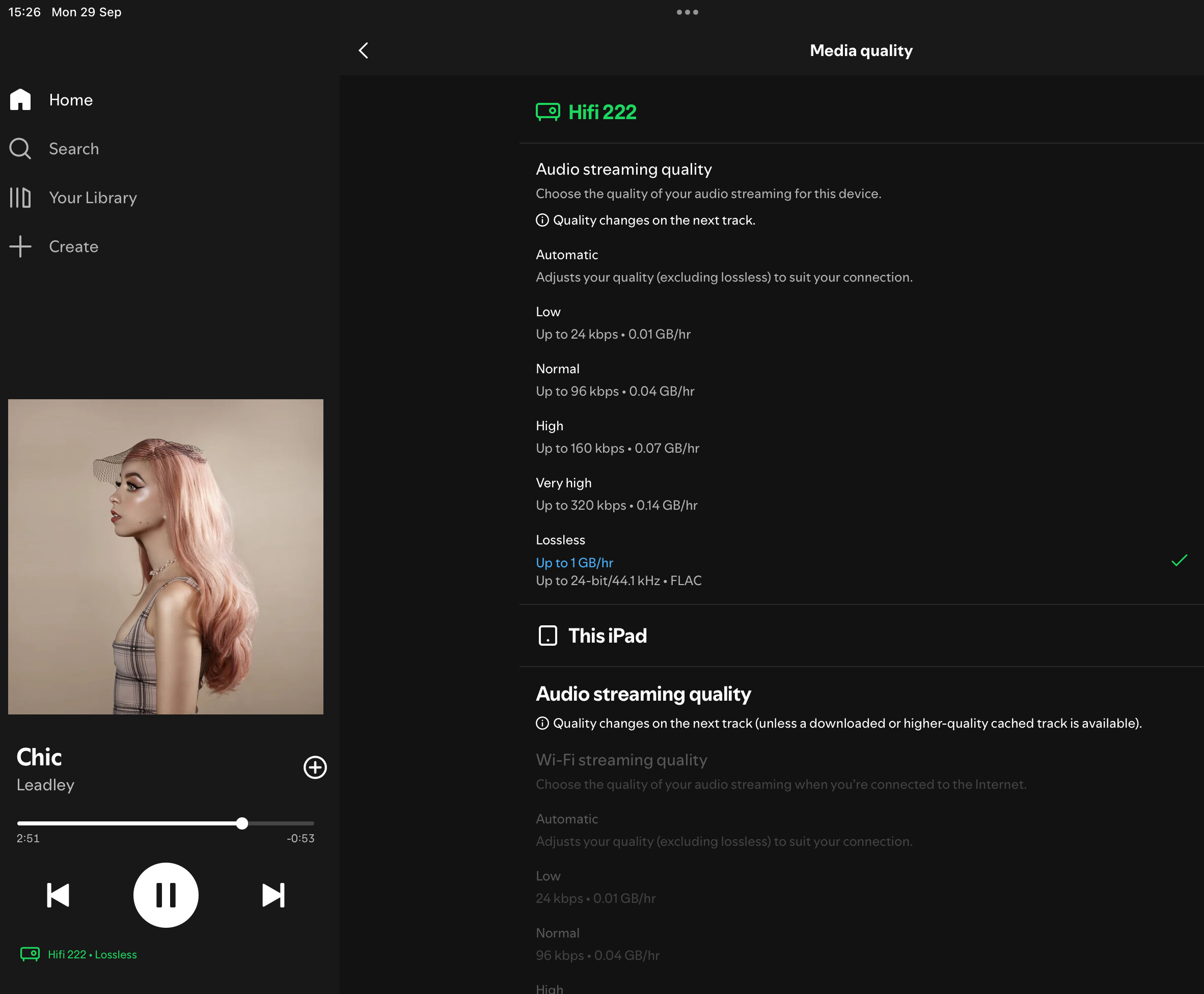
I’d suggest once done log out of spotify on the device, as Spotify have some account upgrade issues at the moment. In Naim app:
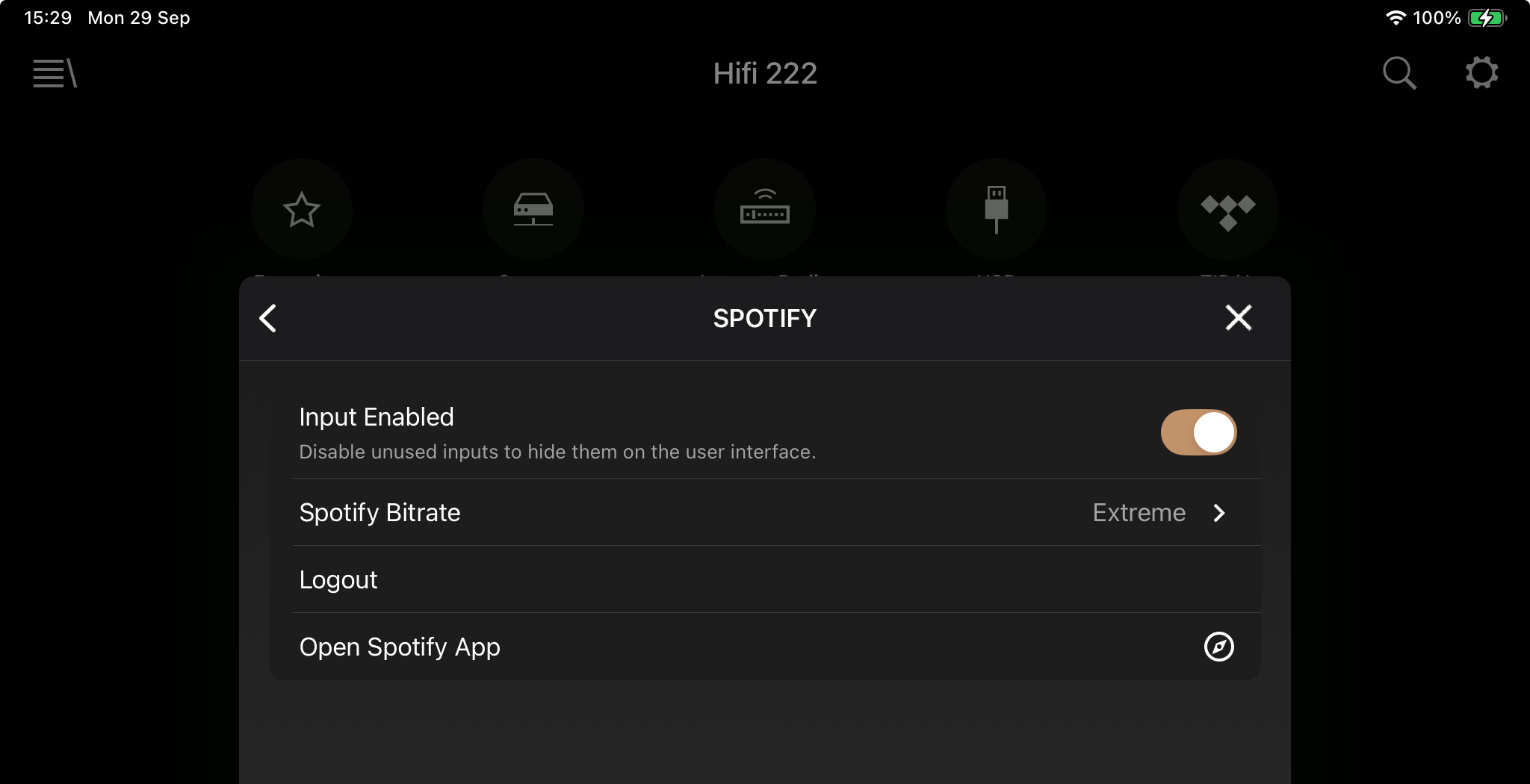
Once done and reconnect you should be in lossless flac mode:
In Diagnostics page:

On the Naim platform it’s genuine lossless. No sneaky ASRC of the like going on from our side.
Best
Steve
2 Likes
The second screen shot is just demonstrating that lossless is fully working outside of Spotify connect. Ie the problem is focused on the naim side of things. It’s what happens on the phone PRIOR to selecting the Atom, and Spotify connect, as the device.
Sorry for the confusion!
See @Stevesky reply. You have to connect to your device first and than select Lossless in the app for the connected device.
2 Likes
Just got lossless this morning as well. So even though I had set the iPhone as lossless, when I first connected to Spotify Connect, it was set to automatic. Had to change that to lossless as well. Logged out on the Naim app and now iPhone says lossless thru the app and can tell sound quality matches roon with Qobuz for same track.
What is goldensound saying about lossless? First I’ve heard it’s not true lossless?
ha! Of course! I didn’t realise the interface was clickable - it used to be display only.
Obvious once you know. Thank you!

1 Like
Where do I find the diagnostics page? I have never seen it.
Neither had I, until your question made me look!
It’s a web page off the device.
Find the ip address (settings>system>network), put that into your browser and there it is; who knew!? 
Anyway on there diagnostics is a tab across the top, and scroll to bottom and it shows spotify bitrate.
And Lord Be Praised I have lossless.
For me, the Nova held out for a bit, and the spotify app kept telling me my device (the nova) didn’t support lossless. But then something changed, it woke up, caught up, and the option offered. And that diagnostics confirms I can toggle my rates now.
Fwiw it’s not night and day.
Still can’t detect difference 320kbps to quobuz hi-def.
Lossless set now to cure fomo.
New 660s2 headphones arrive tomorrow, and I’ll try again.
Do my PMC GB1s limit?
Got lossless today and tried it out in my headphone system briefly via a Node 2i before moving it up to my main system and plugging into my NDS DAC. Need to do some critical listening later tonight. Will decide later this week whether to buy the NP5 I have my eye on but not till Primare confirm they can support Spotify lossless.
I’ve got to say that 320kbps is very good and the difference lossless brings is most definitely there but it does makes you think about how much to invest in taking advantage of it.
I just canceled Qobuz. Funny is I thought I was hearing more air and sparkle with Qobuz and thought maybe Spotify was a little duller when compared 24/48 to CD quality. But then I noticed I was still playing the Qobuz track and when switch to Spotify it sounded the same. I was also able to confirm lossless in diagnostic screen.
3 Likes
Thanks for that. A couple of years ago I trialled and cancelled both Tidal and Qobuz and stayed with Spotify because I could hear no discernible difference. Now Spotify lossles sounds really good.
1 Like
The lossless option was available on my iPad and iPhone beginning today. I needed to update the version of Spotify to get the lossless option working on iPad mini. Version should be 9.0.82.1033.
I use a Lejonklou Kalla and the lossless option is a significant upgrade. Did not know what to expect but it is more musical and quite nice. It’s like the noise floor was lowered to allow more music to come through.
3 Likes
I am in Southern California - Spotify Lossless showed up overnight and is a definite improvement
1 Like
this worked for me too. thank you!!
2 Likes
Spotify Lossles now shows as an option on my app and PC desktop app, but I am unable to get my UnitiLite to stream in lossless. Settings are showing that the maximum bitrate is 320 kb/s. Firmware version is up-to-date 4.9.40. What should I try next to enable?
I watched goldensound’s video and like he’s trying to make another MQA type viral video. I find his current video misleading. Spotify doesn’t have exclusive mode yet on windows desktop. So it’s known not to be bit perfect. Same goes for most music apps on Android. And lastly not sure why the streamers he currently had on hand don’t have latest firmware when Naim’s had for over 18 months. He didn’t need to run all those tests to make it almost like Spotify was deceiving use like MQA did. That’s not what’s happening here.
Spotify is sending a true lossless file, no upsampling or anything like that. It’s just he was using non bit perfect ways for playback but waits until more than halfway thru to explain.
Thought I heard a rumor the Spotify lossless would be fully rolled out to all 50 countries by end of Sept and then within Oct Spotify would shore up any vendors that don’t have latest firmware. And perhaps add exclusive mode on windows.
Blockquote
1 Like
Still waiting here  . Got a bit of FOMO.
The Lossless option is set per device in the Spotify app. First logout Spotify in the Naim app and close the Spotify app. Start the Spotify app and connect to your streamer using Spotify Connect. Now go to the setting in the Spotify app and change the quality to Lossless. Make sure you do that for the connected Naim streamer.